

Configure a load balancer
Place a load balancer in front of your clustered Itential Platform deployment to distribute client and API traffic across nodes and route around unhealthy ones. Use these practices in any high availability deployment where multiple Platform nodes share the same MongoDB and Redis backends. You’ll configure HTTPS between the load balancer and nodes, set up health checks, and use example configurations for HAProxy, Nginx, and F5.
Topology
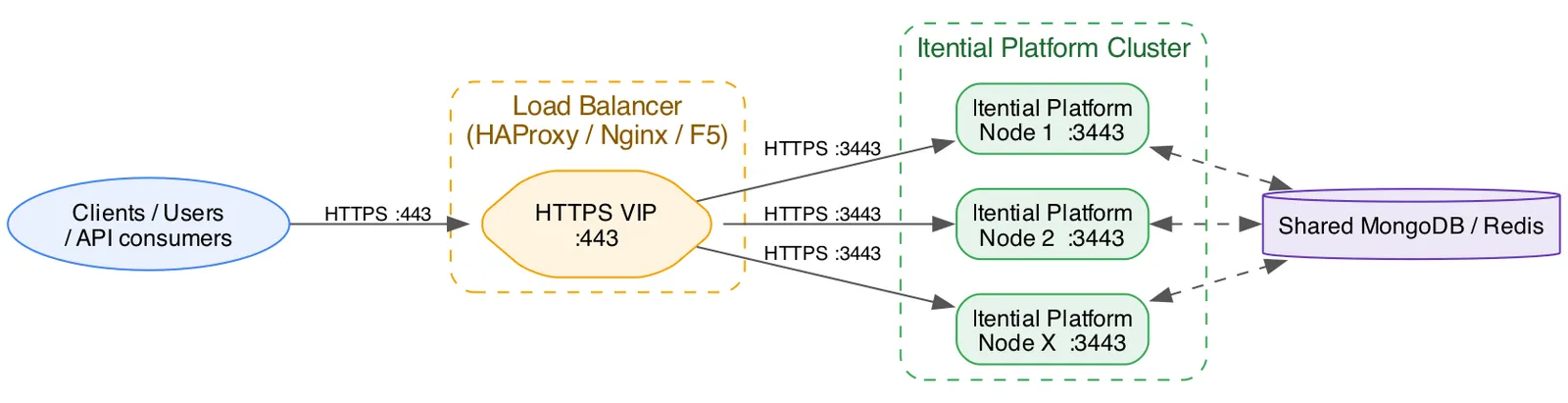
Connect client and API traffic through the load balancer’s virtual IP address, or VIP, on port 443, not directly to a node. The load balancer terminates TLS on the VIP and re-encrypts traffic to each node over HTTPS on port 3443. For details, see HTTPS between the load balancer and nodes.
You can add nodes to the load balancer pool as your capacity needs grow. These nodes are IP1 through IPX in the diagram. Connect all nodes to the same MongoDB and Redis instances. The load balancer can send any request to any node, so every node must see the same session and cluster state.
Restart apps and adapters
Connect directly to each node when you restart an app or adapter. Platform can’t restart an app or adapter across all nodes in a cluster at once. If you restart through the VIP, the restart applies only to the node that handles the request. To restart an app or adapter cluster-wide, restart it on each node individually.
For information on how to restart apps and adapters, see Status.
HTTPS between the load balancer and nodes
Enable TLS with valid certificates on each Platform node. The connection between the load balancer and each node must use HTTPS on port 3443, regardless of authentication method. This includes OAuth through Okta, Azure, or PingID, and LDAP.
Don’t use plain HTTP between the load balancer and nodes. Plain HTTP causes issues with OAuth and Gateway Manager. These issues occur for the following reasons:
- Secure session cookies: Platform sets the
Secureattribute on theconnect.sidsession cookie, so browsers send the cookie only over HTTPS. If the load balancer downgrades the connection to HTTP, session handling and the OAuth redirect and callback flow can fail, sometimes without an error message. - Protocol-sensitive OAuth flows: OAuth token exchanges and redirect URIs depend on using HTTPS. Plain HTTP between the load balancer and nodes can expose tokens and cookies and cause callback URL mismatches.
Itential recommends the following load balancer settings:
- Re-encrypt traffic, also called TLS bridging, instead of terminating TLS and forwarding plain HTTP.
- Use certificates from a trusted certificate authority, or from a private certificate authority that the load balancer trusts.
- Enable certificate verification.
Work with your network team to apply your organization’s certificate and security standards.
Your OAuth provider or integration might have additional callback URL or cookie domain requirements. Confirm these requirements with Itential for your environment.
Health checks
Endpoint
Send a GET request to /health/status over HTTPS on port 3443 of each node. The endpoint doesn’t require authentication. It returns a 200 response with a JSON body like the following:
The endpoint returns a 200 response even when apps or adapters report degraded. A check for 200 confirms only that the node process is running and responding. It doesn’t confirm that the node is fully healthy.
You can run one of two levels of health check:
- Basic check: Send
GET /health/statusand pass on any2xxresponse. This simple check confirms that the node responds successfully. It evaluates only the HTTP response status, so it works on every load balancer, including open source Nginx. - Deep check: Send the same request, then inspect the response body. Fail the check if the body contains
degradedor a service status other thanrunning. Only load balancers that can match response content support this check, including HAProxy, F5, and Nginx Plus.
Skip dependency checks
Add the query string ?exclude-services=true to the health check URL, for example /health/status?exclude-services=true. This parameter skips the dependency checks for Redis, MongoDB, and Vault and returns only node-level status. Load balancers send health checks frequently, every few seconds per node, so skipping the dependency checks avoids unnecessary load on those services.
The response omits the services array:
Tune health check settings
Start with the following values, then adjust them to meet your service-level agreements.
Load balancer configuration examples
The following HAProxy, Nginx, and F5 examples are for reference only. Directive names, syntax, and available options vary by product version. Before you use an example in production, verify it against the vendor documentation for your version of each product.
HAProxy
The following example targets HAProxy 2.x. Directive availability and flags can differ between versions. Validate the example against the output of haproxy -vv and the HAProxy documentation for your installed version.
The example uses mode http because HAProxy needs Layer 7 features for option httpchk with a specific path and http-check expect string for the deep check. The ssl and ssl verify options on the server lines re-encrypt traffic to each node independently of mode http.
Nginx
The following examples target Nginx 1.2x and Nginx Plus R2x. Directive names and availability, especially health_check match, have changed across releases. Validate the examples against the output of nginx -v and the Nginx documentation for your installed version.
Open source Nginx doesn’t support active health check probing. It supports only passive checks based on failed live requests, using max_fails and fail_timeout. Active health checks that match content, using health_check match, require Nginx Plus.
Open source Nginx with passive checks
Nginx Plus with active deep checks
F5 BIG-IP Local Traffic Manager
The following example targets BIG-IP Local Traffic Manager 16.x and 17.x, configured with tmsh. Monitor and profile object syntax can differ between versions. Validate the example against the F5 BIG-IP documentation and the output of tmsh help for your installed version.
Use an HTTPS extended application verification monitor so that the monitor can inspect the response body, not only the status line:
For a basic F5 monitor, change the recv value to 200 OK. Alternatively, use the built-in https monitor type against /health/status without a body match.
Session affinity
Platform sets a connect.sid session cookie, but all nodes in the cluster store session and cluster state in the shared Redis and MongoDB instances. Any node can serve any request, so you don’t need sticky sessions on the load balancer. Use round-robin or least-connections balancing.