

Events

Itential Platform publishes events using an internal event system.

To subscribe to an event topic, provide a source and event handler in the format source, topic, handler:

1eventSystem.subscribe("@itential/app-workflow_engine", "jobStart", jobStartHandler);

Job events

The table below lists event topics published to the Itential Platform environment.

Event sourceEvent topicDescriptionPayload
@itential/app-workflow_enginejobStartPublishes when a job starts.Started job
@itential/app-workflow_enginejobCompletePublishes when a job completes.Completed job
@itential/app-workflow_enginejobErrorPublishes when a job encounters an error.Error job
@itential/app-workflow_enginejobFixPublishes when a job reverts.Reverted job
@itential/app-workflow_enginejobPausePublishes when a job pauses.Paused job
@itential/app-workflow_enginejobResumePublishes when a job resumes.Resumed job
@itential/app-workflow_enginejobCancelPublishes when a job is canceled.Canceled job
@itential/app-workflow_enginejobSlaBreachPublishes when a job breaches its SLA.Job SLA
@itential/adapter-nsoncs-alarmsPublishes when NSO encounters an alarm.NSO alarm object
@itential/adapter-nsoncs-eventsPublishes when NSO events occur.NSO events object
@itential/adapter-nsodevice-notificationsPublishes when NSO device notifications occur.NSO notifications object
@itential/adapter-nsoservice-state-changesPublishes when NSO service state changes occur.NSO service state changes object

Event payload structure

All job event payloads contain a job property with the complete job document from the database at the time the system publishes the event. The job document’s structure and content vary based on the workflow definition and the job’s current state.

Standard job events

Standard job events (jobStart, jobComplete, jobError, jobFix, jobPause, jobResume, jobCancel) follow this structure:

1{
2 type: <number>,
3 source: '@itential/app-workflow_engine',
4 topic: '<event_topic>',
5 instance: 'WorkFlowEngine',
6 timestamp: <timestamp_in_milliseconds>,
7 payload: {
8 job: {
9 // Complete job document from MongoDB
10 _id: '<job_id>',
11 name: '<job_name>',
12 tasks: { /* task definitions */ },
13 status: '<job_status>',
14 // Additional job properties...
15 }
16 }
17}

Subscribe to job events

You can subscribe to job events using the global eventSystem object available in applications and adapters. This example subscribes to multiple job events:

1const util = require('util');
2
3const inspect = msg => {
4 console.log(util.inspect(msg, false, null, true));
5}
6
7// Subscribe to job lifecycle events
8eventSystem.subscribe('@itential/app-workflow_engine', 'jobStart', inspect);
9eventSystem.subscribe('@itential/app-workflow_engine', 'jobComplete', inspect);
10eventSystem.subscribe('@itential/app-workflow_engine', 'jobError', inspect);
11eventSystem.subscribe('@itential/app-workflow_engine', 'jobFix', inspect);
12eventSystem.subscribe('@itential/app-workflow_engine', 'jobPause', inspect);
13eventSystem.subscribe('@itential/app-workflow_engine', 'jobResume', inspect);
14eventSystem.subscribe('@itential/app-workflow_engine', 'jobCancel', inspect);
15eventSystem.subscribe('@itential/app-workflow_engine', 'jobSlaBreach', inspect);

Job SLA events

Job SLA events are supported in Itential Platform 6, 2023.2, and 2023.1.

You can use the events defined above within the platform through Operations Manager triggers and the EventListenerJob task within a workflow. You can build automations in Operations Manager that trigger when a job breaches its service level agreement (SLA). For more information, see Event triggers.

jobSlaBreach payload structure

The jobSlaBreach event includes additional properties beyond the standard job document:

  • job: The complete job document from the database at the time of the SLA breach.
  • runTime: The job’s runtime in milliseconds.
  • slaDelta: The amount in milliseconds that the job overran its SLA threshold. For example, if you set the SLA threshold to 2000 ms and the job runs for 3086 ms, the slaDelta is 1086 ms.

Example jobSlaBreach event

1{
2 type: 16,
3 source: '@itential/app-workflow_engine',
4 topic: 'jobSlaBreach',
5 instance: 'WorkFlowEngine',
6 timestamp: 1758819821241,
7 payload: {
8 job: {
9 _id: '50329d1bc0594165b5b1825a',
10 name: 'slaBreach',
11 tasks: {
12 '1132': {
13 name: 'delay',
14 canvasName: 'delay',
15 summary: 'Delay a Job',
16 description: 'Delay a Job for a duration by Job ID and number of seconds.',
17 location: 'Application',
18 locationType: null,
19 app: 'WorkFlowEngine',
20 type: 'operation',
21 displayName: 'WorkFlowEngine',
22 variables: {
23 incoming: { time: null },
24 outgoing: { time_in_milliseconds: '' },
25 decorators: []
26 },
27 actor: 'Pronghorn',
28 groups: [],
29 nodeLocation: { x: 24, y: -84 },
30 status: 'complete',
31 previous: { incomplete: [], complete: [], error: [] },
32 incomingRefs: [
33 {
34 type: 'static',
35 pointer: '/variables/incoming/time',
36 reference: { location: 'document', value: 2 }
37 }
38 ],
39 outgoingRefs: [
40 {
41 type: 'taskOutgoing',
42 status: 'success',
43 pointer: '/variables/outgoing/time_in_milliseconds',
44 taskVariableName: 'time_in_milliseconds'
45 },
46 {
47 type: 'taskOutgoing',
48 status: 'error',
49 pointer: '/variables/error',
50 taskVariableName: null
51 }
52 ],
53 taskId: '1132',
54 owner: 'Pronghorn',
55 iterations: [ '440c69a5-e38b-495d-a0a2-00363f924fc1' ],
56 transitions: { success: [ { task: 'workflow_end', type: 'standard' } ] },
57 serverId: 'local_node1',
58 start_time: '2025-09-25T17:03:38.957Z',
59 end_time: 1758819820979,
60 finish_state: 'success'
61 },
62 workflow_start: {
63 name: 'workflow_start',
64 groups: [],
65 nodeLocation: { x: 0, y: -500 },
66 x: 0,
67 y: 0.5,
68 status: 'complete',
69 metrics: {
70 start_time: 1758819818925,
71 user: '667afeda7cd7b76286c0bfb5',
72 finish_state: 'success'
73 },
74 taskId: 'workflow_start',
75 owner: 'Pronghorn',
76 iterations: [],
77 transitions: { success: [ { task: '1132', type: 'standard' } ] }
78 },
79 workflow_end: {
80 name: 'workflow_end',
81 groups: [],
82 nodeLocation: { x: 0, y: 500 },
83 x: 1,
84 y: 0.5,
85 status: 'complete',
86 previous: { incomplete: [], complete: [ '1132' ], error: [] },
87 taskId: 'workflow_end',
88 owner: 'Pronghorn',
89 iterations: [],
90 transitions: {},
91 endTasks: { incomplete: [], complete: [], error: [] },
92 metrics: { end_time: 1758819821011, run_time: 2086 }
93 }
94 },
95 transitions: {
96 '1132': { workflow_end: { state: 'success', type: 'standard' } },
97 workflow_start: { '1132': { state: 'success', type: 'standard' } },
98 workflow_end: {}
99 },
100 canvasVersion: 3,
101 type: 'automation',
102 font_size: 12,
103 errorHandler: null,
104 preAutomationTime: 0,
105 sla: 1000,
106 groups: [ 'default' ],
107 last_updated: '2025-09-25T17:03:41.008Z',
108 lastUpdatedVersion: '5.55.5',
109 uuid: '82cbd255-86aa-4fc1-b403-6cc3a20e0986',
110 created: '2025-09-25T17:03:10.090Z',
111 created_by: '667afeda7cd7b76286c0bfb5',
112 createdVersion: '5.55.5',
113 encodingVersion: 1,
114 last_updated_by: '667afeda7cd7b76286c0bfb5',
115 description: '',
116 status: 'complete',
117 variables: {
118 _id: { location: 'job_data', _id: '68d575ea51431df6af6c7e4e' },
119 initiator: { location: 'job_data', _id: '68d575ea51431df6af6c7e4f' }
120 },
121 watchers: [ '667afeda7cd7b76286c0bfb5' ],
122 ancestors: [ '50329d1bc0594165b5b1825a' ],
123 mocked: false,
124 decorators: [],
125 metrics: {
126 start_time: 1758819818925,
127 user: '667afeda7cd7b76286c0bfb5',
128 progress: 1,
129 end_time: 1758819821011
130 }
131 },
132 runTime: 2086,
133 slaDelta: 1086
134 }
135}

In this example, the job had an SLA threshold of 1000 ms but took 2086 ms to complete, resulting in an SLA breach with a slaDelta of 1086 ms.

Configure the EventListenerJob task

The following figure shows how to configure the EventListenerJob task to receive the jobSlaBreach event.
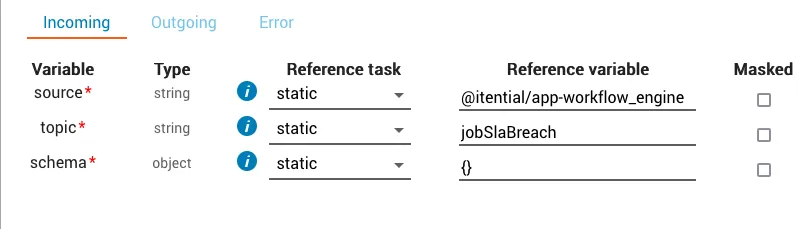
EventListenerJob task configuration for jobSlaBreach

For additional SLA information, see Setting job metrics.