

Configure usernames in Azure AD
Administrators who use the Itential Azure AD AAA adapter can use the usernameKey property field to configure a specific claim in the AAA response for Itential Platform to use as the username. If the usernameKey field is not specified, the adapter uses the default claim name to set new users.
To configure the usernameKey field, navigate to Admin Essentials. Use the search bar in the left sidebar to locate “Azure” in the Adapters menu list. Under the Configuration tab on the Properties page, enter a specific claim in the usernameKey field.
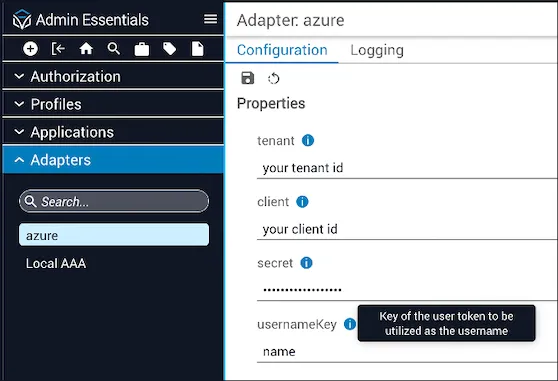
Why this matters
The usernameKey provides administrators with a configurable option to specify a custom or optional claim in the AAA response for Itential Platform to authenticate a user. As long as the configured attribute is confirmed to be unique in the Azure/EntityID database, specifying the usernameKey as an attribute of a custom or optional claim also prevents multiple users from having the same Azure/EntityID display name in one Itential Platform account.
The custom attribute that is chosen must contain a value. It cannot be blank or not found; otherwise, the user is unable to log in to Itential Platform.