For AI agents: a documentation index is available at the root level at /llms.txt and /llms-full.txt. Append /llms.txt to any URL for a page-level index, or .md for the markdown version of any page.
Open sourceSupportFAQsDocs Home
DocumentationAPI referenceRelease notes
  • Platform On-Prem
    • Overview
    • Navigate
    • Search resources
  • Apps
      • Overview
      • Navigate
        • Configure and manage tasks
        • Null vs. undefined values
        • Parallel branches
          • Overview
          • addDuration
          • arrayIncludes
          • arrayLastIndexOf
          • arrayPop
          • arrayToString
          • assign
          • calculateTimeDiff
          • charAt
          • charCodeAt
          • childjob
          • codePointAt
          • concat
          • concatArray
          • convertEpochToObject
          • convertTimeFormat
          • convertTimeToEpoch
          • convertTimezone
          • copyWithin
          • csvStringToJSON
          • deepmerge
          • delay
          • endsWith
          • ErrorHandling
          • evaluation
          • eventListenerJob
          • excelToJson
          • extractField
          • fill
          • FlattenJSONFormInput
          • getTime
          • includes
          • arrayIndexOf
          • indexOf
          • isArray
          • join
          • keys
          • lastIndexOf
          • length
          • length (string)
          • localeCompare
          • makeData
          • map
          • match
          • merge
          • modify
          • newVariable
          • normalize
          • objectHasOwnProperty
          • objectToString
          • padEnd
          • padStart
          • parse
          • parseInt
          • pop
          • push
          • pushToArray
          • query
          • repeat
          • restCall
          • reverse
          • runCode
          • search
          • setObjectKey
          • shift
          • slice (array)
          • slice (string)
          • sort
          • split
          • startsWith
          • stringValueOf
          • stub
          • substring
          • toLocaleLowerCase
          • toLocaleString
          • toLocaleUpperCase
          • toLowerCase
          • numberToString
          • toString (array)
          • toString (number)
          • toString (object)
          • toUpperCase
          • transformation
          • trim
          • trimEnd
          • trimStart
          • unshift
          • updateJobDescription
          • values
          • viewData
    • FlowAI
    • Itential Automation Gateway
  • Resources
    • Itential Academy
    • Version lifecycle
    • Itential MCP
    • Accessibility conformance
    • Get support
    • FAQs
LogoLogo
Open sourceSupportFAQsDocs Home
On this page
  • Potential use case
  • Properties
  • Example
AppsStudioTasksTask reference

eventListenerJob

Was this page helpful?
Previous

excelToJson

Next
Built with
On-prem only

The eventListenerJob task pauses a workflow and waits for an event that matches a specified topic and schema. Job variables can also be used with this task.

Potential use case

Suppose you have an email queue that requires all relevant information in a form to be filled out. The eventListenerJob task could be used to pause the request if the correct information is not present when the request is passed through.

Properties

IncomingTypeRequiredDescription
job_idStringYesThe job ID.
sourceStringYesThe source that provides the topic.
topicStringYesThe event topic.
schemaObjectYesA valid JSON schema that uniquely identifies an event.
OutgoingTypeDescription
resultObjectThe payload of the captured event.

Example

In this example:

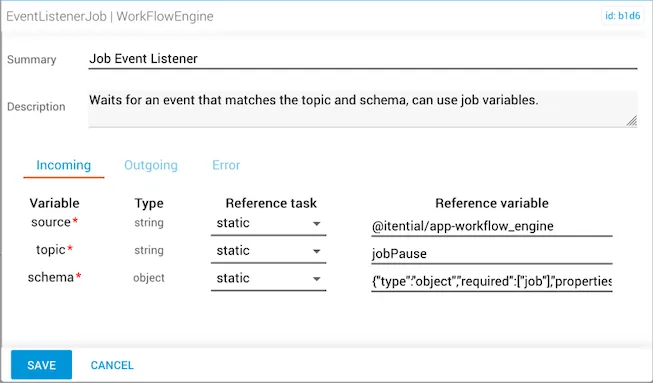
  • The source string refers to @itential/app-workflow_engine to pull job information.
  • The event topic is jobPause. The job completes once it is paused on the Jobs page, where the result is shown.
  • The schema from the source being listened for is {"type":"object","required":["job"],"properties":{"job":{}}}.
eventListenerJob task configuration

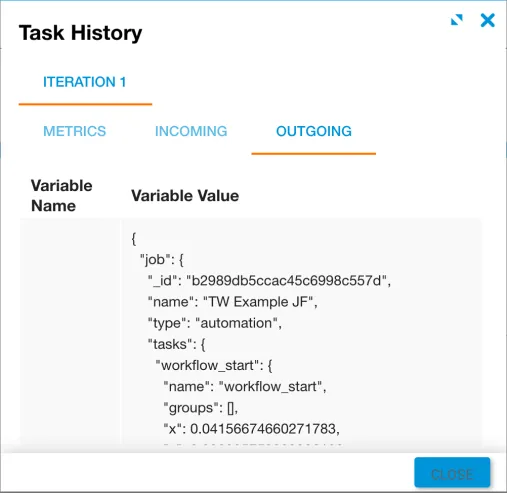
The result returns information relevant to the workflow — specifically the job _id, name, type, and tasks.


eventListenerJob result