fill
The fill task fills the elements of an array with a static value. You can specify where to start and stop filling. If not specified, all elements are filled. This task overwrites (modifies) the original array.
Potential use case
Use this task when you have a dataset and want to populate it with some unique values. For example, if you have a counter whose values need to be incremented over time, you could use the fill task to populate the counter with the new values.
Properties
Examples
Example 1
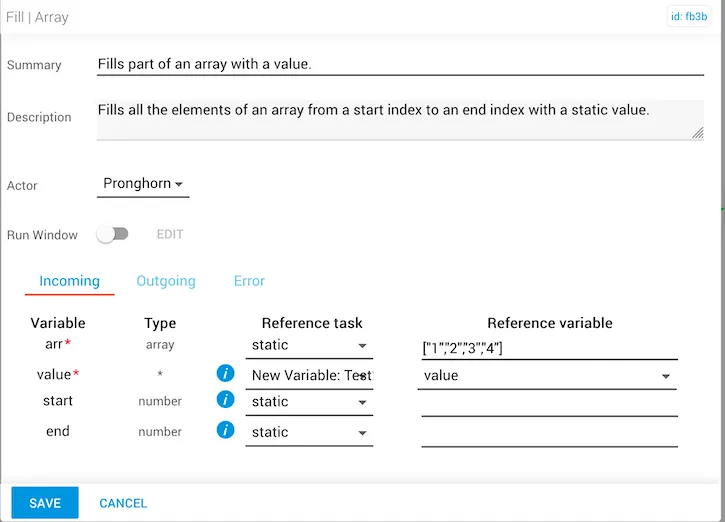
In this example:
- The incoming
arrvariable is set to["1","2","3","4"]. - The
valuevariable is contained in theNew Variable:Testreference task, located in another workflow. The value provided is[a,b,c]. startandendwere not provided, so defaults are used.- The
filledArrayoutput is[a,b,c],[a,b,c],[a,b,c],[a,b,c]— each element of the incoming array is replaced with the value from the reference task.
Example 2
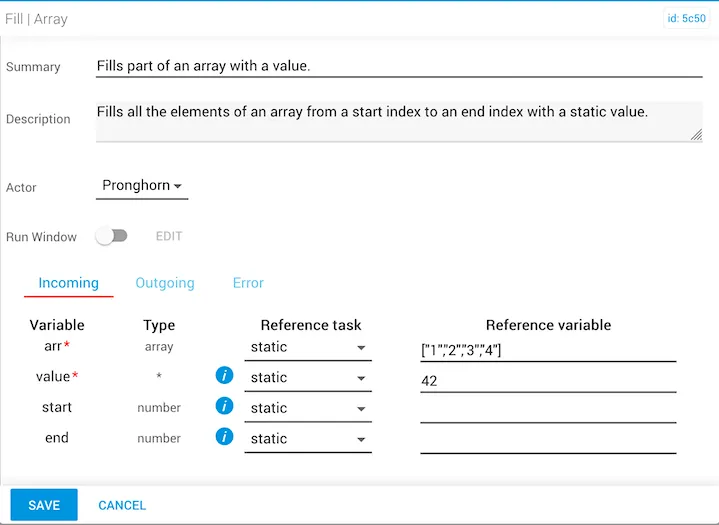
In this example:
- The incoming
arrvariable is set to["1","2","3","4"]. - The
valuevariable is static with a value of42. startandendwere not provided, so defaults are used.- The
filledArrayoutput is[42,42,42,42]— the entire array is filled with42, replacing all initial values.
Example 3
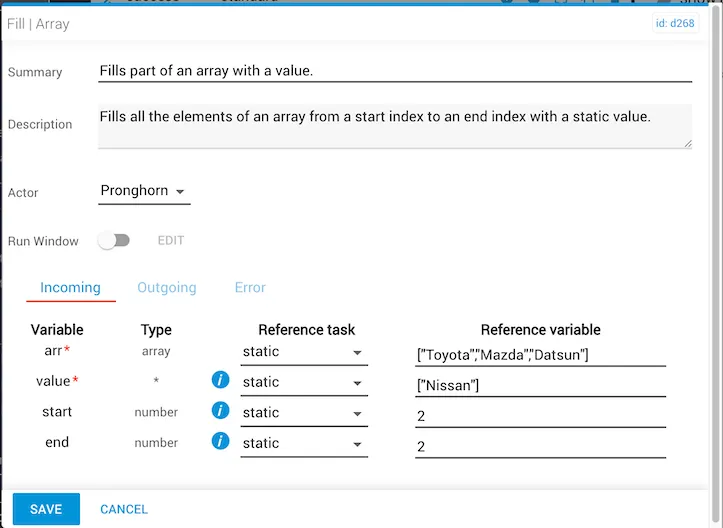
In this example:
- The
arrvariable is statically set to["Toyota","Mazda","Datsun"]. - The
valueused to fill the array is statically set to["Nissan"]. - Both
startandendare statically set to2, so filling begins at position 2 of the array. - The
filledArrayoutput is["Toyota","Mazda","Nissan"]—Datsunat position 2 is replaced byNissan.