restCall

The restCall task is a powerful and flexible task for obtaining and posting data to and from external API data sources. If a specialized adapter is not available, restCall is typically the first task to consider for interacting with an external data source.

Potential use case

You are developing an employee on-boarding automation that creates user accounts in external systems via API. One restCall task retrieves the list of users from an API-accessible data store. Another restCall task creates user accounts via API calls to the external systems.

Properties

IncomingTypeDescription
uriStringRequired. The URI for the REST call.
verbEnumRequired. The HTTP verb: DELETE, GET, PATCH, PUT, or POST.
userStringUsername for authentication, if required.
passwordStringPassword for authentication, if required.
headersObjectAny custom headers.
bodyObjectThe request body.
responseHeadersBooleanRequired. Set to true to include response headers in the output.
OutgoingTypeDescription
responseObjectThe response from the REST call.

Example 1 — GET request

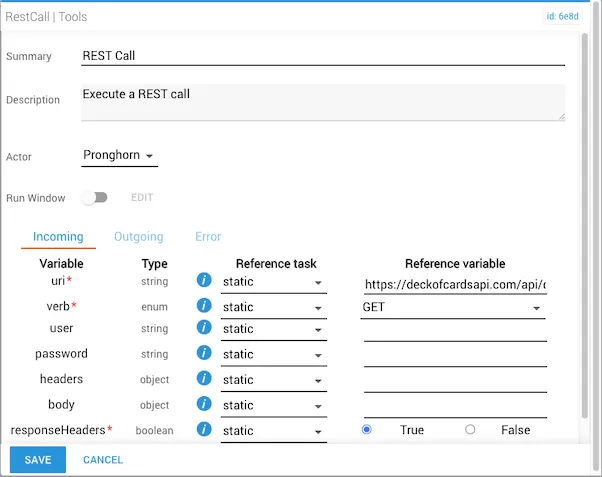
  • uri is statically set to https://deckofcardsapi.com/api/deck/new/shuffle/?
  • verb is GET
  • user, password, headers, and body are not required by this API
  • responseHeaders is true
restCall task configured for a GET request to the deck of cards API

The outgoing response contains deck information. Because responseHeaders is true, the response also includes header data such as content-type.

1{
2 "success": true,
3 "deck_id": "tay82vn7nlsu",
4 "remaining": 52,
5 "shuffled": true
6}

Example 2 — POST request

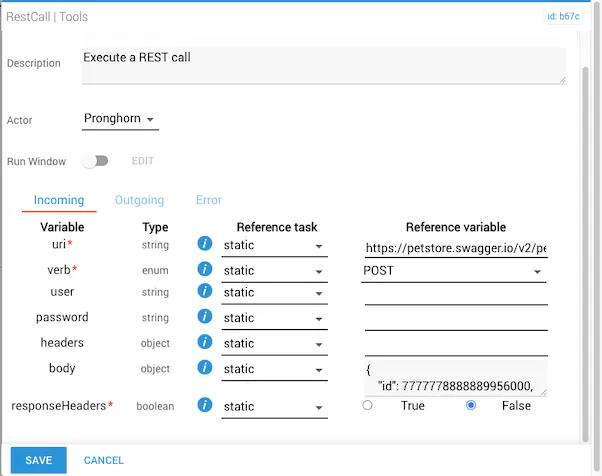
  • uri is https://petstore.swagger.io/v2/pet
  • verb is POST
  • user, password, and headers are not required
  • body is required by this API:
1{
2 "id": 7777778888889956565,
3 "category": { "id": 0, "name": "Pronghorn" },
4 "name": "Delores",
5 "photoUrls": ["http://example.com/images/Pronghorn01.png"],
6 "tags": [{ "id": 0, "name": "string" }],
7 "status": "available"
8}
  • responseHeaders is false
restCall task configured for a POST request to the pet store API with body values

The response confirms the pet record was created. The exact content varies by API.

Example 3 — GET request with headers

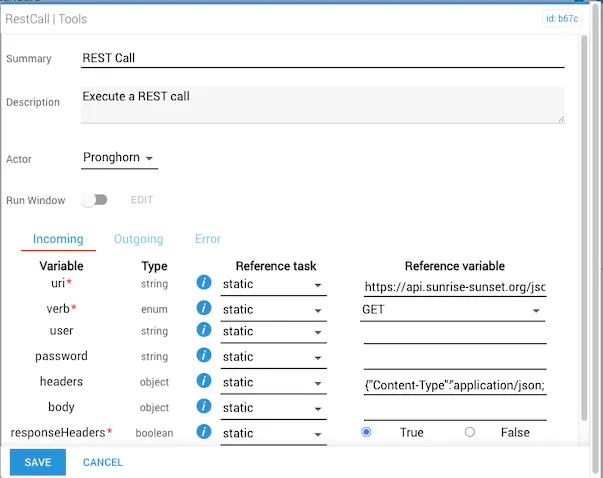
  • uri is https://api.sunrise-sunset.org/json?lat=33.791570&lng=-84.389510&date=today
  • verb is GET
  • user, password, and body are not required
  • headers is {"Content-Type": "application/json; charset=utf-8"}
  • responseHeaders is true
restCall task configured for a GET request with a custom Content-Type header

The response contains sunrise and sunset time information for the Itential home office in Atlanta, GA:

1{
2 "results": {
3 "sunrise": "10:46:46 AM",
4 "sunset": "12:41:22 AM",
5 "solar_noon": "5:44:04 PM",
6 "day_length": "13:54:36",
7 "civil_twilight_begin": "10:19:17 AM",
8 "civil_twilight_end": "1:08:51 AM",
9 "nautical_twilight_begin": "9:45:55 AM",
10 "nautical_twilight_end": "1:42:14 AM",
11 "astronomical_twilight_begin": "9:10:21 AM",
12 "astronomical_twilight_end": "2:17:48 AM"
13 },
14 "status": "OK"
15}