

convertTimeFormat
The convertTimeFormat task converts a time value into a new format.
Potential use case
Use this task if a workflow requires you to take a specific record timestamp and convert it to a different time or date format, such as the quarter of the year, or to provide only the day of the year from a given date.
Properties
Input variables
Output variables
Example 1
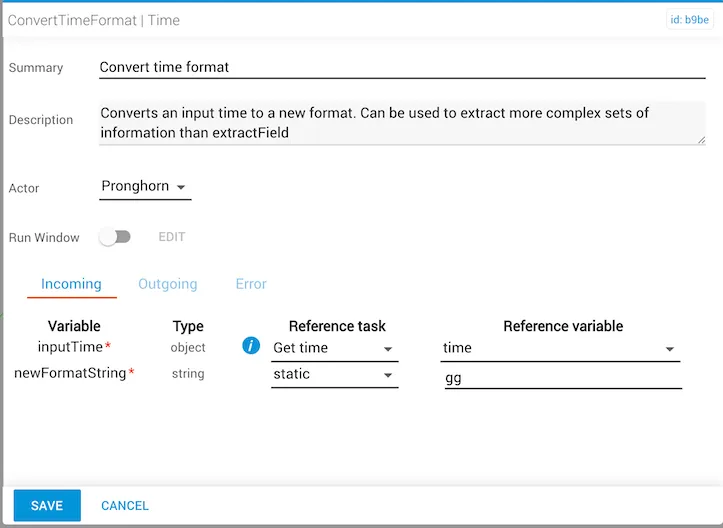
In this example:
- The
inputTimeproperty is provided by the output ofgetTime, a reference task located elsewhere in the workflow. The reference variable provided by thegetTimetask istime. - The
newFormatStringproperty is set togg, which is the moment.js locale two-digit format for Week Year (1–52). - The
convertedTimewill be the week number of the year in which theinputTimevalue exists.
Example 2
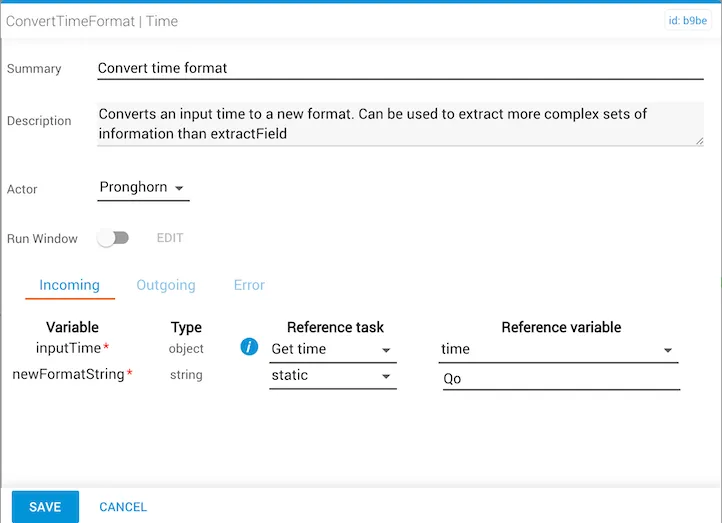
In this example:
- The
inputTimeproperty is provided by the output ofgetTime, a reference task located elsewhere in the workflow. The reference variable provided by thegetTimetask istime. - The
newFormatStringproperty is set toQo, which is the moment.js format for Quarter. This format includes a trailing numeral abbreviation such as “1st”, “2nd”, “3rd”, or “4th”. - The
convertedTimewill be the quarter number for the calendar year in which theinputTimevalue exists. If theinputTimevalue is February 12, the resultingconvertedTimevalue will be “2nd” Quarter.
Manual reference variable entry (inputTime)
To enter the inputTime object manually, use the format below for Year-Month-Date-Time (yyyy-MM-dd 'T' HH:mm:ss.SSSZ):
This format displays as: