

convertTimezone
The convertTimezone task converts a timestamp by offsetting the input value in whole hour increments. This task does not take true UTC time into account — the input time is always treated as the 0:00 marker (no offset), and the output is the chosen offset applied to the input value. The output format matches the format specified in the input time.
Potential use case
Use this task when your workflow imports a timestamp from a device in a different time zone and you need to offset it to blend chronologically with log file history from devices in your time zone.
Properties
Example 1
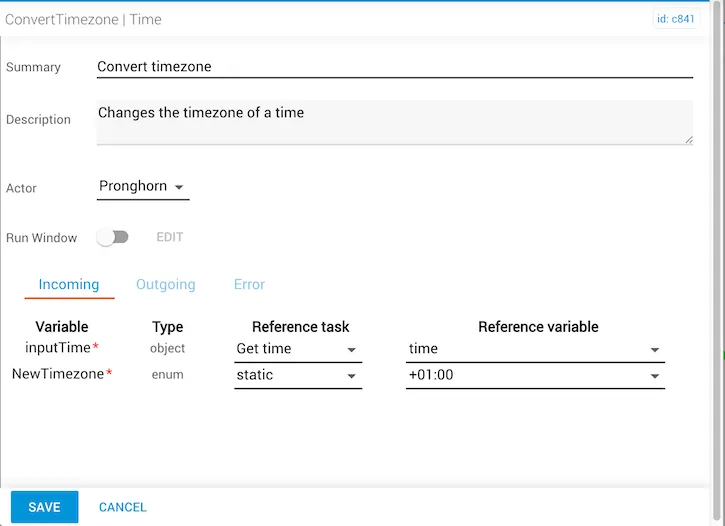
In this example:
- The
inputTimecomes from thegetTimereference task. The reference variable istime. - The
NewTimezoneis set to+01:00(a one-hour increment). - If the
inputTimewas03:00, theconvertedTimewould be04:00.
Example 2
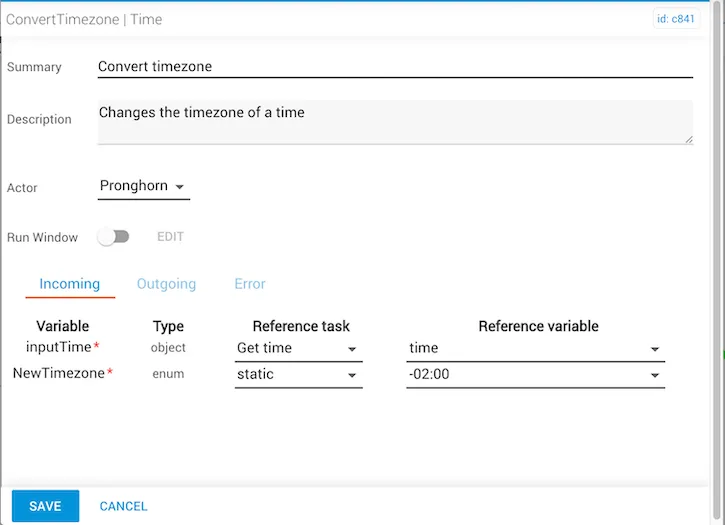
In this example:
- The
inputTimecomes from thegetTimereference task. The reference variable istime. - The
NewTimezoneis set to-02:00(a two-hour difference). - If the
inputTimewas03:00, theconvertedTimewould be01:00.
Example 3
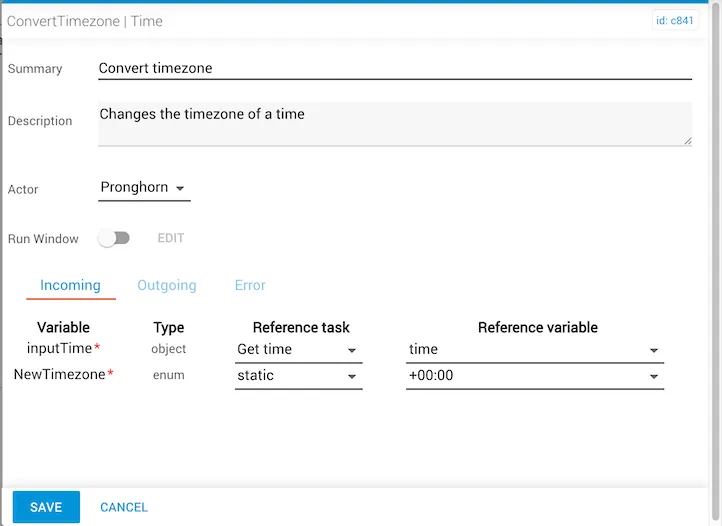
In this example:
- The
inputTimecomes from thegetTimereference task. The reference variable istime. - The
NewTimezoneis set to+00:00(no offset). - If the
inputTimewas03:00, theconvertedTimewould remain03:00.
Manual reference variable entry
To enter the inputTime object manually, use the Year-Month-Date-Time format (yyyy-MM-dd 'T' HH:mm:ss.SSSZ):
This displays as: