

LDAP authentication overview
Authentication
The following diagram shows the authentication flow in Itential Platform using LDAP.
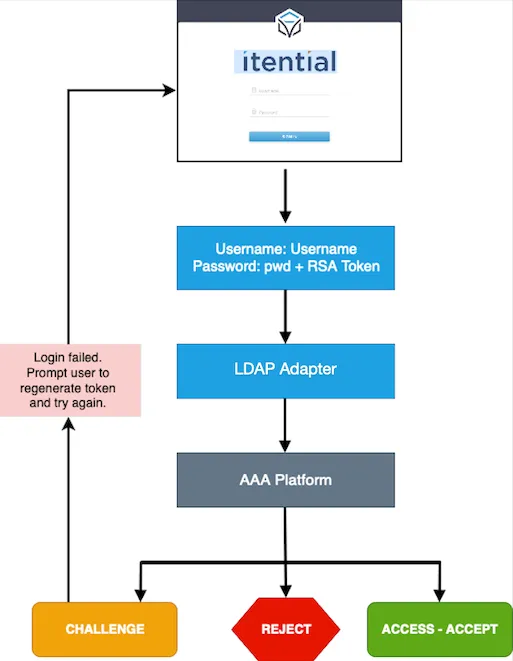
- User provides username and password.
- The LDAP server in the AAA platform authenticates users and returns one of the following:
Reject— Itential Platform displays “Invalid credentials.”Access-Accept— Itential Platform allows user to log in.Challenge— Itential Platform displays “Generate token and retry.”
- The AAA platform also returns a vendor-specific attribute (Type 2 per RFC 2865, 5.6). For example:
- Vendor ID:
47688(Itential) - Name:
Itential-user-Group - Number:
1 - Value: User group of the user obtained from LDAP.
- Vendor ID:
Authorization
The following diagram illustrates both authorization and authentication between Itential Platform and NSO using LDAP.
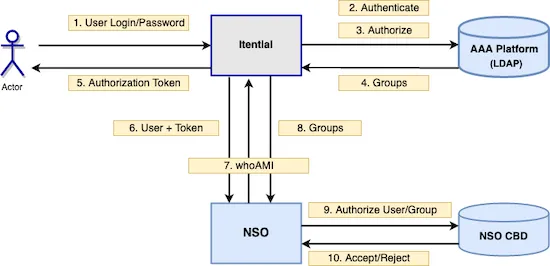
- User groups are defined manually in Itential Platform. Matching user groups are added in the LDAP server in the AAA platform. You must have user groups configured on the LDAP server.
- The LDAP server authenticates the user.
- The LDAP server authorizes the user.
- Groups associated with the user are returned.
- User receives the authentication token.
- Itential Platform sends a request to NSO with user and token.
Multi-tenancy
The following applies when using multi-tenancy:
- NSO sends a
whoamiAPI request to Itential Platform. - Itential Platform returns the group to NSO.
- NSO checks the NACM rules for the user or group to determine what the user can access.
- NSO accepts or rejects access.
Multi-tenancy is not required for most implementations.