

For AI agents: a documentation index is available at the root level at /llms.txt and /llms-full.txt. Append /llms.txt to any URL for a page-level index, or .md for the markdown version of any page.
Open sourceSupportFAQsDocs Home
DocumentationAPI referenceRelease notes
  • Platform On-Prem
    • Overview
    • Navigate
    • Search resources
  • Apps
      • Overview
      • Navigate
        • Configure and manage tasks
        • Null vs. undefined values
        • Parallel branches
          • Overview
          • addDuration
          • arrayIncludes
          • arrayLastIndexOf
          • arrayPop
          • arrayToString
          • assign
          • calculateTimeDiff
          • charAt
          • charCodeAt
          • childjob
          • codePointAt
          • concat
          • concatArray
          • convertEpochToObject
          • convertTimeFormat
          • convertTimeToEpoch
          • convertTimezone
          • copyWithin
          • csvStringToJSON
          • deepmerge
          • delay
          • endsWith
          • ErrorHandling
          • evaluation
          • eventListenerJob
          • excelToJson
          • extractField
          • fill
          • FlattenJSONFormInput
          • getTime
          • includes
          • arrayIndexOf
          • indexOf
          • isArray
          • join
          • keys
          • lastIndexOf
          • length
          • length (string)
          • localeCompare
          • makeData
          • map
          • match
          • merge
          • modify
          • newVariable
          • normalize
          • objectHasOwnProperty
          • objectToString
          • padEnd
          • padStart
          • parse
          • parseInt
          • pop
          • push
          • pushToArray
          • query
          • repeat
          • restCall
          • reverse
          • runCode
          • search
          • setObjectKey
          • shift
          • slice (array)
          • slice (string)
          • sort
          • split
          • startsWith
          • stringValueOf
          • stub
          • substring
          • toLocaleLowerCase
          • toLocaleString
          • toLocaleUpperCase
          • toLowerCase
          • numberToString
          • toString (array)
          • toString (number)
          • toString (object)
          • toUpperCase
          • transformation
          • trim
          • trimEnd
          • trimStart
          • unshift
          • updateJobDescription
          • values
          • viewData
    • FlowAI
    • Itential Automation Gateway
  • Resources
    • Itential Academy
    • Version lifecycle
    • Itential MCP
    • Accessibility conformance
    • Get support
    • FAQs
LogoLogo
Open sourceSupportFAQsDocs Home
On this page
  • Potential use case
  • Properties
  • Example
AppsStudioTasksTask reference

split

Was this page helpful?
Previous

startsWith

Next
Built with

The split task splits a string into an array of substrings at each occurrence of a given separator. The original string is not changed.

Potential use case

A comma-separated list of ticket numbers is provided to the automation. Use the split task to create an array of ticket numbers for subsequent processing in the workflow.

Properties

InputTypeDescription
strStringRequired. The string to split.
separatorStringThe point where each split occurs. Can be a single or multiple characters. If omitted, the entire string becomes a single array element. If an empty string (""), every character is separated.
limitNumberThe number of splits to make. Items after the split limit are not included in the returned array. Can be zero or a non-negative integer.
OutputTypeDescription
splitArrayArrayAn array of strings formed by splitting the original string at each separator occurrence.

Example

The incoming str variable is required.
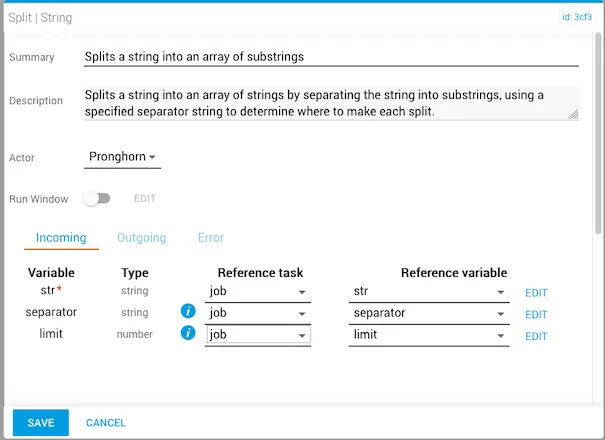
split task with str mapped to a reference variable

The variables are set before running the workflow. In this example, the string is "Hello World", the separator is the letter "o", and the limit is 3.
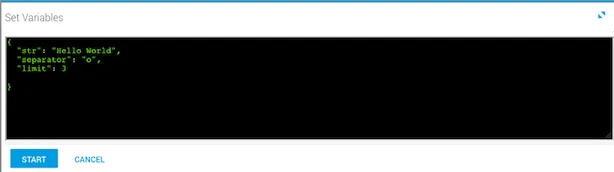
Job variable setup showing the string Hello World, separator o, and limit 3

After the workflow runs, the output is visible in Task History (accessed from Jobs in Operations Manager). Three splits were made at each occurrence of "o". Note that split also recognizes and includes whitespace.
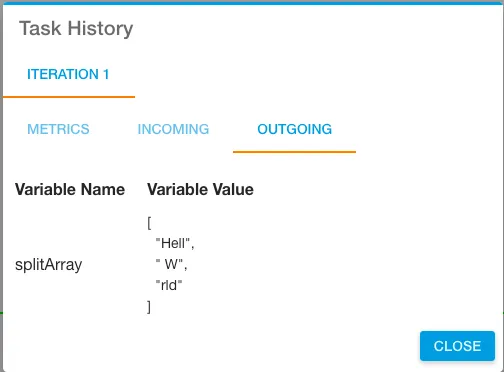
Outgoing tab showing three array elements split at each o in Hello World