

For AI agents: a documentation index is available at the root level at /llms.txt and /llms-full.txt. Append /llms.txt to any URL for a page-level index, or .md for the markdown version of any page.
Open sourceSupportFAQsDocs Home
DocumentationAPI referenceRelease notes
  • Platform On-Prem
    • Overview
    • Navigate
    • Search resources
  • Apps
      • Overview
      • Navigate
        • Configure and manage tasks
        • Null vs. undefined values
        • Parallel branches
          • Overview
          • addDuration
          • arrayIncludes
          • arrayLastIndexOf
          • arrayPop
          • arrayToString
          • assign
          • calculateTimeDiff
          • charAt
          • charCodeAt
          • childjob
          • codePointAt
          • concat
          • concatArray
          • convertEpochToObject
          • convertTimeFormat
          • convertTimeToEpoch
          • convertTimezone
          • copyWithin
          • csvStringToJSON
          • deepmerge
          • delay
          • endsWith
          • ErrorHandling
          • evaluation
          • eventListenerJob
          • excelToJson
          • extractField
          • fill
          • FlattenJSONFormInput
          • getTime
          • includes
          • arrayIndexOf
          • indexOf
          • isArray
          • join
          • keys
          • lastIndexOf
          • length
          • length (string)
          • localeCompare
          • makeData
          • map
          • match
          • merge
          • modify
          • newVariable
          • normalize
          • objectHasOwnProperty
          • objectToString
          • padEnd
          • padStart
          • parse
          • parseInt
          • pop
          • push
          • pushToArray
          • query
          • repeat
          • restCall
          • reverse
          • runCode
          • search
          • setObjectKey
          • shift
          • slice (array)
          • slice (string)
          • sort
          • split
          • startsWith
          • stringValueOf
          • stub
          • substring
          • toLocaleLowerCase
          • toLocaleString
          • toLocaleUpperCase
          • toLowerCase
          • numberToString
          • toString (array)
          • toString (number)
          • toString (object)
          • toUpperCase
          • transformation
          • trim
          • trimEnd
          • trimStart
          • unshift
          • updateJobDescription
          • values
          • viewData
    • FlowAI
    • Itential Automation Gateway
  • Resources
    • Itential Academy
    • Version lifecycle
    • Itential MCP
    • Accessibility conformance
    • Get support
    • FAQs
LogoLogo
Open sourceSupportFAQsDocs Home
On this page
  • Potential use case
  • Properties
  • Example
AppsStudioTasksTask reference

extractField

Was this page helpful?
Previous

fill

Next
Built with

The extractField task extracts a specific time field — such as day, month, year, or any other supported unit — from a given timestamp.

Potential use case

Use extractField when you need to pull a specific time component from a dataset, such as extracting just the year from a timestamp for sorting or reporting purposes.

Properties

IncomingTypeDescription
inputTimeObjectRequired. The time representation to extract a field from.
fieldEnumRequired. The field to extract. Allowed values are: Millisecond, Second, Minute, Hour, Day of Week, Day of Month, Day of Year, Week of Year, Month, Year.
outputFormatEnumThe format of the extracted value. Allowed values are: String, Number.
OutgoingTypeDescription
timeFieldValueStringThe extracted field value.

Example

In this example, the inputTime object pulls time fields from {"$ref": "timeProperties#/definitions/timeObject"}. The field selected is Year and outputFormat is String. Setting outputFormat to Number produces an identical result.
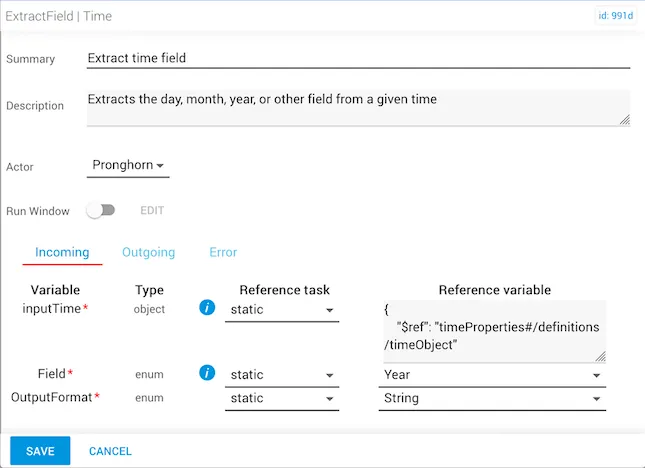
extractField task with field set to Year and outputFormat set to String

The outgoing timeFieldValue returns the year "2020".
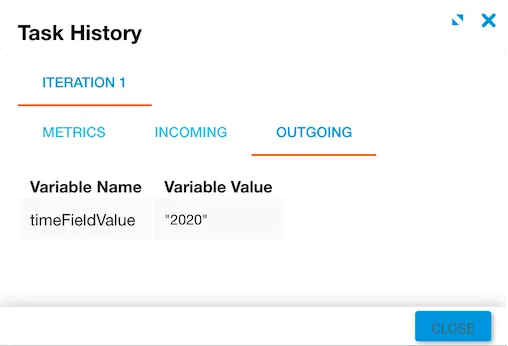
Output showing timeFieldValue as 2020