

For AI agents: a documentation index is available at the root level at /llms.txt and /llms-full.txt. Append /llms.txt to any URL for a page-level index, or .md for the markdown version of any page.
Open sourceSupportFAQsDocs Home
DocumentationAPI referenceRelease notes
  • Platform On-Prem
    • Overview
    • Navigate
    • Search resources
  • Apps
      • Overview
      • Navigate
        • Configure and manage tasks
        • Null vs. undefined values
        • Parallel branches
          • Overview
          • addDuration
          • arrayIncludes
          • arrayLastIndexOf
          • arrayPop
          • arrayToString
          • assign
          • calculateTimeDiff
          • charAt
          • charCodeAt
          • childjob
          • codePointAt
          • concat
          • concatArray
          • convertEpochToObject
          • convertTimeFormat
          • convertTimeToEpoch
          • convertTimezone
          • copyWithin
          • csvStringToJSON
          • deepmerge
          • delay
          • endsWith
          • ErrorHandling
          • evaluation
          • eventListenerJob
          • excelToJson
          • extractField
          • fill
          • FlattenJSONFormInput
          • getTime
          • includes
          • arrayIndexOf
          • indexOf
          • isArray
          • join
          • keys
          • lastIndexOf
          • length
          • length (string)
          • localeCompare
          • makeData
          • map
          • match
          • merge
          • modify
          • newVariable
          • normalize
          • objectHasOwnProperty
          • objectToString
          • padEnd
          • padStart
          • parse
          • parseInt
          • pop
          • push
          • pushToArray
          • query
          • repeat
          • restCall
          • reverse
          • runCode
          • search
          • setObjectKey
          • shift
          • slice (array)
          • slice (string)
          • sort
          • split
          • startsWith
          • stringValueOf
          • stub
          • substring
          • toLocaleLowerCase
          • toLocaleString
          • toLocaleUpperCase
          • toLowerCase
          • numberToString
          • toString (array)
          • toString (number)
          • toString (object)
          • toUpperCase
          • transformation
          • trim
          • trimEnd
          • trimStart
          • unshift
          • updateJobDescription
          • values
          • viewData
    • FlowAI
    • Itential Automation Gateway
  • Resources
    • Itential Academy
    • Version lifecycle
    • Itential MCP
    • Accessibility conformance
    • Get support
    • FAQs
LogoLogo
Open sourceSupportFAQsDocs Home
On this page
  • Potential use case
  • Properties
  • Examples
AppsStudioTasksTask reference

length

Was this page helpful?
Previous

length (string)

Next
Built with

The length task returns the number of elements in a given array. The return value is an unsigned, 32-bit integer that is always numerically greater than the highest index in the array. By unsigned, the value represents only non-negative integers.

Potential use case

Every failed login attempt on your device stores the username and timestamp in an array. Your company’s password attempt policy stipulates a maximum of three failed attempts within a specific timeframe. The length (array) task will provide the number of login attempts for subsequent workflow processing.

Properties

IncomingTypeDescription
arrArray (required)The array to get the length of.
OutgoingTypeDescription
lengthNumberExpressed as a numerical value, this is the number of items in the array.

Examples

In the example shown below:

  • The Reference task and Reference variable set for the length (array) task is job and arr, respectively. As an option, you can toggle the Run Window slider to set the task to run on a schedule.
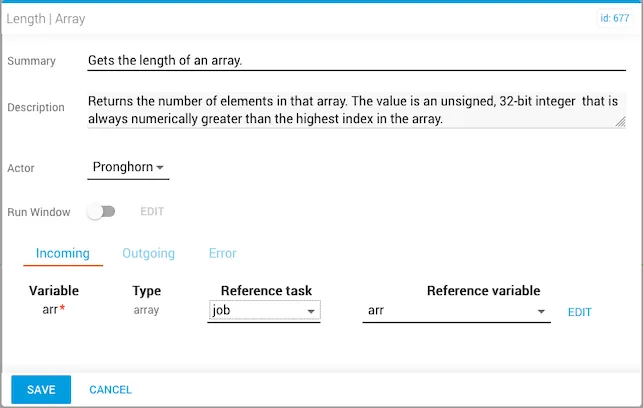
length (array) task reference task and variable configuration
  • The array variables are set prior to running the workflow.
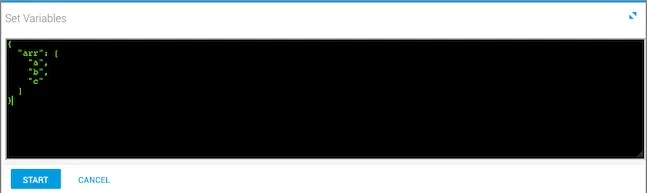
Array variables set before running the workflow
  • Once you run the workflow, the incoming variables that were set are displayed under the Incoming tab in Task History, which is accessed from Jobs (Operations Manager).
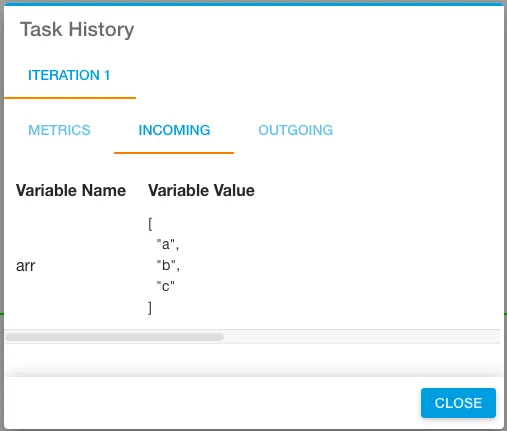
Incoming variables displayed in Task History
  • This output example returns the length of the array.
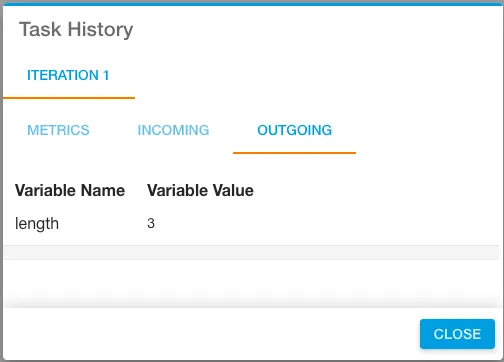
Output showing the array length