

For AI agents: a documentation index is available at the root level at /llms.txt and /llms-full.txt. Append /llms.txt to any URL for a page-level index, or .md for the markdown version of any page.
Open sourceSupportFAQsDocs Home
DocumentationAPI referenceRelease notes
  • Platform On-Prem
    • Overview
    • Navigate
    • Search resources
  • Apps
      • Overview
      • Navigate
        • Configure and manage tasks
        • Null vs. undefined values
        • Parallel branches
          • Overview
          • addDuration
          • arrayIncludes
          • arrayLastIndexOf
          • arrayPop
          • arrayToString
          • assign
          • calculateTimeDiff
          • charAt
          • charCodeAt
          • childjob
          • codePointAt
          • concat
          • concatArray
          • convertEpochToObject
          • convertTimeFormat
          • convertTimeToEpoch
          • convertTimezone
          • copyWithin
          • csvStringToJSON
          • deepmerge
          • delay
          • endsWith
          • ErrorHandling
          • evaluation
          • eventListenerJob
          • excelToJson
          • extractField
          • fill
          • FlattenJSONFormInput
          • getTime
          • includes
          • arrayIndexOf
          • indexOf
          • isArray
          • join
          • keys
          • lastIndexOf
          • length
          • length (string)
          • localeCompare
          • makeData
          • map
          • match
          • merge
          • modify
          • newVariable
          • normalize
          • objectHasOwnProperty
          • objectToString
          • padEnd
          • padStart
          • parse
          • parseInt
          • pop
          • push
          • pushToArray
          • query
          • repeat
          • restCall
          • reverse
          • runCode
          • search
          • setObjectKey
          • shift
          • slice (array)
          • slice (string)
          • sort
          • split
          • startsWith
          • stringValueOf
          • stub
          • substring
          • toLocaleLowerCase
          • toLocaleString
          • toLocaleUpperCase
          • toLowerCase
          • numberToString
          • toString (array)
          • toString (number)
          • toString (object)
          • toUpperCase
          • transformation
          • trim
          • trimEnd
          • trimStart
          • unshift
          • updateJobDescription
          • values
          • viewData
    • FlowAI
    • Itential Automation Gateway
  • Resources
    • Itential Academy
    • Version lifecycle
    • Itential MCP
    • Accessibility conformance
    • Get support
    • FAQs
LogoLogo
Open sourceSupportFAQsDocs Home
On this page
  • Potential use case
  • Properties
  • Example
  • Related reading
AppsStudioTasksTask reference

toLocaleUpperCase

Was this page helpful?
Previous

toLowerCase

Next
Built with

The toLocaleUpperCase task converts a string value to uppercase according to locale-specific case mappings. The locale is based on the language settings of the browser. For most languages this task functions identically to toUpperCase and produces the same output; however, certain languages may behave differently — for example, Turkish has case mappings that differ from the default Unicode case mappings.

Potential use case

Suppose you have a dataset in lowercase format and you want to display it in uppercase. Use the toLocaleUpperCase task to convert the entire dataset to uppercase characters.

Properties

IncomingTypeDescription
strStringRequired. The string to convert to uppercase.
localeStringThe locale to use for uppercase conversion, for languages with locale-specific case mappings.
OutgoingTypeDescription
uppercaseStringStringA new string representing the input string converted to uppercase according to the current locale.

Example

In this example, str is given the reference variable "hello world" in lowercase letters. The locale variable is only populated for languages such as Turkish, which require specific letter capitalizations for meaning.
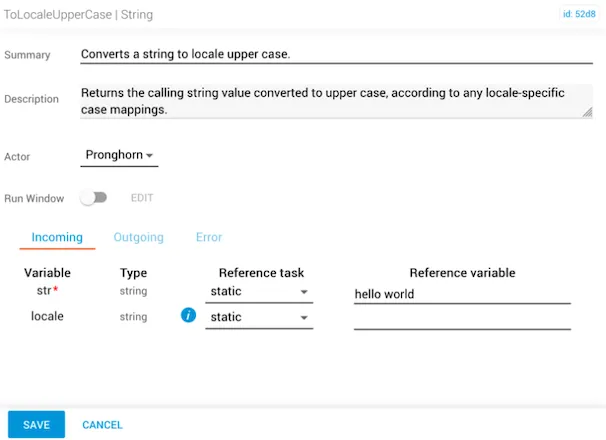
toLocaleUpperCase task with str set to hello world and no locale specified

The outgoing result shows all letters converted to uppercase: "HELLO WORLD".
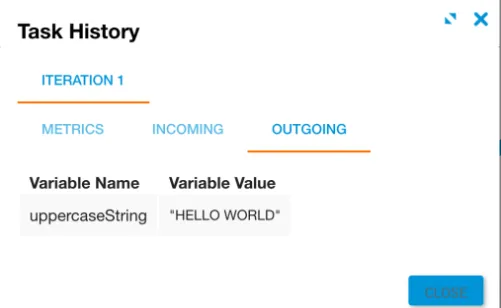
Outgoing result showing HELLO WORLD in uppercase

Related reading

For more information, see the Locale article on MDN.