

For AI agents: a documentation index is available at the root level at /llms.txt and /llms-full.txt. Append /llms.txt to any URL for a page-level index, or .md for the markdown version of any page.
Open sourceSupportFAQsDocs Home
DocumentationAPI referenceRelease notes
  • Platform On-Prem
    • Overview
    • Navigate
    • Search resources
  • Apps
      • Overview
      • Navigate
        • Configure and manage tasks
        • Null vs. undefined values
        • Parallel branches
          • Overview
          • addDuration
          • arrayIncludes
          • arrayLastIndexOf
          • arrayPop
          • arrayToString
          • assign
          • calculateTimeDiff
          • charAt
          • charCodeAt
          • childjob
          • codePointAt
          • concat
          • concatArray
          • convertEpochToObject
          • convertTimeFormat
          • convertTimeToEpoch
          • convertTimezone
          • copyWithin
          • csvStringToJSON
          • deepmerge
          • delay
          • endsWith
          • ErrorHandling
          • evaluation
          • eventListenerJob
          • excelToJson
          • extractField
          • fill
          • FlattenJSONFormInput
          • getTime
          • includes
          • arrayIndexOf
          • indexOf
          • isArray
          • join
          • keys
          • lastIndexOf
          • length
          • length (string)
          • localeCompare
          • makeData
          • map
          • match
          • merge
          • modify
          • newVariable
          • normalize
          • objectHasOwnProperty
          • objectToString
          • padEnd
          • padStart
          • parse
          • parseInt
          • pop
          • push
          • pushToArray
          • query
          • repeat
          • restCall
          • reverse
          • runCode
          • search
          • setObjectKey
          • shift
          • slice (array)
          • slice (string)
          • sort
          • split
          • startsWith
          • stringValueOf
          • stub
          • substring
          • toLocaleLowerCase
          • toLocaleString
          • toLocaleUpperCase
          • toLowerCase
          • numberToString
          • toString (array)
          • toString (number)
          • toString (object)
          • toUpperCase
          • transformation
          • trim
          • trimEnd
          • trimStart
          • unshift
          • updateJobDescription
          • values
          • viewData
    • FlowAI
    • Itential Automation Gateway
  • Resources
    • Itential Academy
    • Version lifecycle
    • Itential MCP
    • Accessibility conformance
    • Get support
    • FAQs
LogoLogo
Open sourceSupportFAQsDocs Home
On this page
  • Potential use case
  • Properties
  • Example
AppsStudioTasksTask reference

trim

Was this page helpful?
Previous

trimEnd

Next
Built with

The trim task removes whitespace from both ends of a string — the beginning and the end.

Potential use case

If you want to make sure no spaces have been added at the beginning and end of your dataset in a string entry, use the trim task to find and remove them.

Properties

IncomingTypeDescription
strStringRequired. The string to remove whitespace from.
OutgoingTypeDescription
noWhitespaceStringA new string representing the input str stripped of whitespace from both ends.

Example

In this example, a new job variable named “String” is used to input the data into the trim task. The value is Hello World, with spaces at the beginning and end of the string.
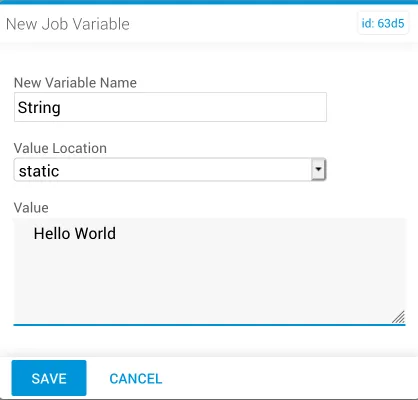
New job variable with leading and trailing whitespace

The trim task references the new variable within the reference task. The reference variable is automatically set to accept the incoming str value.
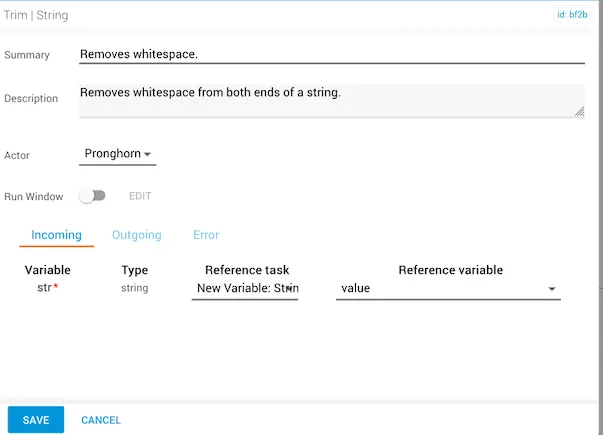
trim task referencing the new variable as input

After running the job, the incoming variable shows whitespace before and after Hello World, as indicated by the placement of the quotation marks.
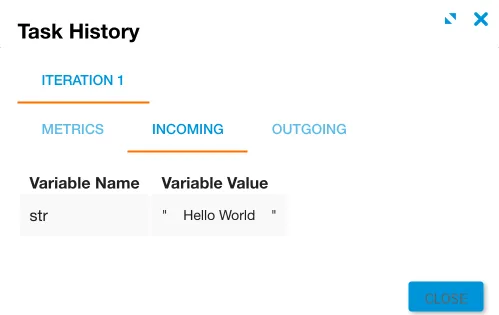
Incoming tab showing whitespace before and after the string

The noWhitespace result returns “Hello World” with the whitespace removed from both ends.
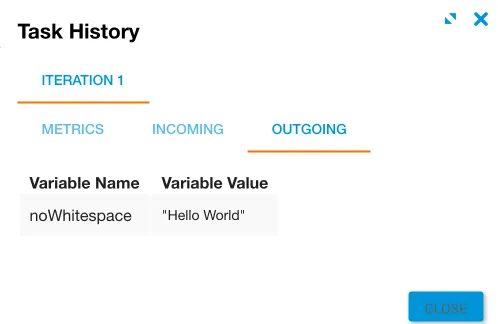
Outgoing tab showing the trimmed string with no leading or trailing whitespace