getTime
The getTime task obtains a current timestamp for use in other tasks in a workflow. An offset may be applied to the current timestamp if needed. The getTime task uses UTC for time representation.
Potential use case
Use this task to post the current time in a logfile or external database when an automation starts or completes. Using an offsetDuration, you can also use this task to provide a future timestamp calculated from the current time.
Properties
Input variables
When using object literal notation in offsetDuration, you must include the curly braces. See the moment.js documentation for more information.
Output variables
Example 1
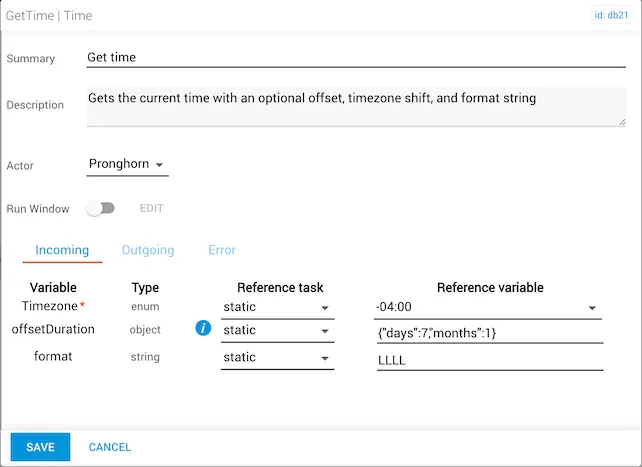
In this example:
Timezoneis UTC−04:00(North American Eastern Time).offsetDurationadds seven days and one month.formatisLLLL(month name, day of month, day of week, year, time).- The outgoing
timevalue is presented inLLLLformat.
Example 2
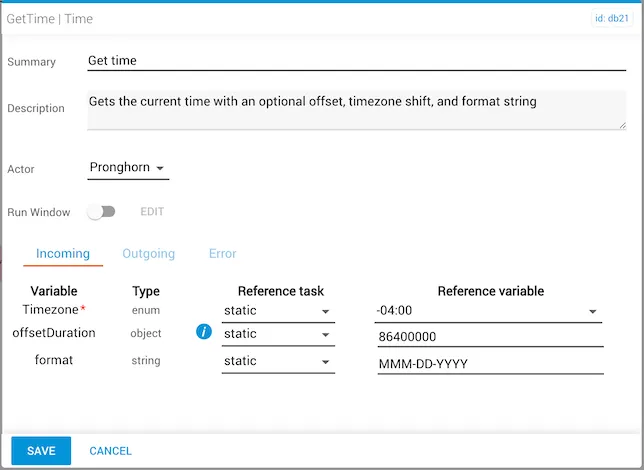
In this example:
Timezoneis UTC−04:00(North American Eastern Time).offsetDurationis86400000milliseconds (one day).formatisMMM-DD-YYYY(month-day-full year).- The outgoing
timevalue is presented inMMM-DD-YYYYformat.
Example 3
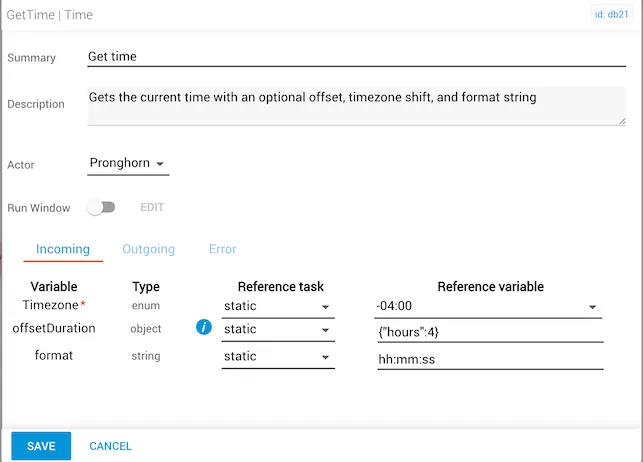
In this example:
Timezoneis UTC−04:00(North American Eastern Time).offsetDurationadds four hours.formatishh:mm:ss(hours:minutes:seconds).- The outgoing
timevalue is presented inhh:mm:ssformat.