

For AI agents: a documentation index is available at the root level at /llms.txt and /llms-full.txt. Append /llms.txt to any URL for a page-level index, or .md for the markdown version of any page.
Open sourceSupportFAQsDocs Home
DocumentationAPI referenceRelease notes
  • Platform On-Prem
    • Overview
    • Navigate
    • Search resources
  • Apps
      • Overview
      • Navigate
        • Configure and manage tasks
        • Null vs. undefined values
        • Parallel branches
          • Overview
          • addDuration
          • arrayIncludes
          • arrayLastIndexOf
          • arrayPop
          • arrayToString
          • assign
          • calculateTimeDiff
          • charAt
          • charCodeAt
          • childjob
          • codePointAt
          • concat
          • concatArray
          • convertEpochToObject
          • convertTimeFormat
          • convertTimeToEpoch
          • convertTimezone
          • copyWithin
          • csvStringToJSON
          • deepmerge
          • delay
          • endsWith
          • ErrorHandling
          • evaluation
          • eventListenerJob
          • excelToJson
          • extractField
          • fill
          • FlattenJSONFormInput
          • getTime
          • includes
          • arrayIndexOf
          • indexOf
          • isArray
          • join
          • keys
          • lastIndexOf
          • length
          • length (string)
          • localeCompare
          • makeData
          • map
          • match
          • merge
          • modify
          • newVariable
          • normalize
          • objectHasOwnProperty
          • objectToString
          • padEnd
          • padStart
          • parse
          • parseInt
          • pop
          • push
          • pushToArray
          • query
          • repeat
          • restCall
          • reverse
          • runCode
          • search
          • setObjectKey
          • shift
          • slice (array)
          • slice (string)
          • sort
          • split
          • startsWith
          • stringValueOf
          • stub
          • substring
          • toLocaleLowerCase
          • toLocaleString
          • toLocaleUpperCase
          • toLowerCase
          • numberToString
          • toString (array)
          • toString (number)
          • toString (object)
          • toUpperCase
          • transformation
          • trim
          • trimEnd
          • trimStart
          • unshift
          • updateJobDescription
          • values
          • viewData
    • FlowAI
    • Itential Automation Gateway
  • Resources
    • Itential Academy
    • Version lifecycle
    • Itential MCP
    • Accessibility conformance
    • Get support
    • FAQs
LogoLogo
Open sourceSupportFAQsDocs Home
On this page
  • Potential use case
  • Properties
  • Example
AppsStudioTasksTask reference

copyWithin

Was this page helpful?
Previous

csvStringToJSON

Next
Built with

The copyWithin task copies a portion of an array within the same array. A specified part of an array is copied to a new location in the same array without modifying its size (length).

Potential use case

This task overwrites the original array by copying array elements to another position in the same array. Suppose you have a list of emails and you want to search for any duplicates in the list. You can specify where to start searching in the list (for example, 0 for the beginning) and where to end the search. You can also specify where in the email list the results will be copied to.

Properties

IncomingTypeDescription
arrArrayRequired. The array to copy.
targetNumberRequired. The index position (destination) to copy the sequence to. The target is a zero-based index.
startNumberThe index position to start copying elements from.
endNumberThe index position where to stop copying elements.
OutgoingTypeDescription
copiedArrayArrayThe modified array.

Example

In this example:

  • The arr value is ["a","b","c","d"]. It has four elements.
  • The target index is 2. This means the destination begins at the 2 location in the index. Indexing starts at 0 and counts up from there.
  • The start variable of the search is 0, which is the first location in the array being searched.
  • The end variable is 2, indicating the search stops after the first two characters in the index and does not copy anything after that.
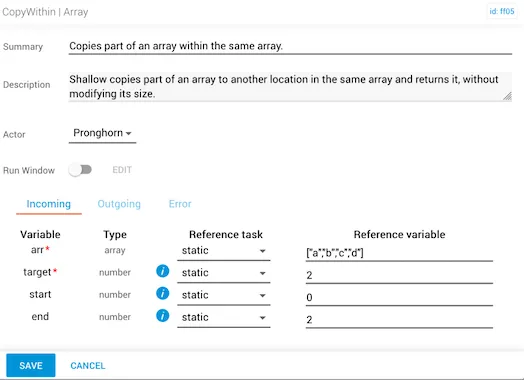
copyWithin task configured with arr a b c d, target 2, start 0, end 2

The result of this task copies the first two characters ("a" at index 0, "b" at index 1) and places that copy at index positions 2 and 3. The copiedArray that returns will be ["a","b","a","b"].
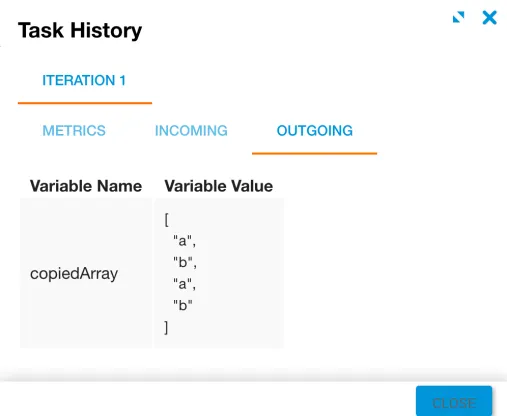
copyWithin task output showing a b a b