For AI agents: a documentation index is available at the root level at /llms.txt and /llms-full.txt. Append /llms.txt to any URL for a page-level index, or .md for the markdown version of any page.
Open sourceSupportFAQsDocs Home
DocumentationAPI referenceRelease notes
  • Platform On-Prem
    • Overview
    • Navigate
    • Search resources
  • Apps
      • Overview
      • Navigate
        • Configure and manage tasks
        • Null vs. undefined values
        • Parallel branches
          • Overview
          • addDuration
          • arrayIncludes
          • arrayLastIndexOf
          • arrayPop
          • arrayToString
          • assign
          • calculateTimeDiff
          • charAt
          • charCodeAt
          • childjob
          • codePointAt
          • concat
          • concatArray
          • convertEpochToObject
          • convertTimeFormat
          • convertTimeToEpoch
          • convertTimezone
          • copyWithin
          • csvStringToJSON
          • deepmerge
          • delay
          • endsWith
          • ErrorHandling
          • evaluation
          • eventListenerJob
          • excelToJson
          • extractField
          • fill
          • FlattenJSONFormInput
          • getTime
          • includes
          • arrayIndexOf
          • indexOf
          • isArray
          • join
          • keys
          • lastIndexOf
          • length
          • length (string)
          • localeCompare
          • makeData
          • map
          • match
          • merge
          • modify
          • newVariable
          • normalize
          • objectHasOwnProperty
          • objectToString
          • padEnd
          • padStart
          • parse
          • parseInt
          • pop
          • push
          • pushToArray
          • query
          • repeat
          • restCall
          • reverse
          • runCode
          • search
          • setObjectKey
          • shift
          • slice (array)
          • slice (string)
          • sort
          • split
          • startsWith
          • stringValueOf
          • stub
          • substring
          • toLocaleLowerCase
          • toLocaleString
          • toLocaleUpperCase
          • toLowerCase
          • numberToString
          • toString (array)
          • toString (number)
          • toString (object)
          • toUpperCase
          • transformation
          • trim
          • trimEnd
          • trimStart
          • unshift
          • updateJobDescription
          • values
          • viewData
    • FlowAI
    • Itential Automation Gateway
  • Resources
    • Itential Academy
    • Version lifecycle
    • Itential MCP
    • Accessibility conformance
    • Get support
    • FAQs
LogoLogo
Open sourceSupportFAQsDocs Home
On this page
  • Potential use case
  • Properties
  • Examples
  • Related reading
AppsStudioTasksTask reference

toLocaleString

Was this page helpful?
Previous

toLocaleUpperCase

Next
Built with

The toLocaleString task converts the elements of a given array to a locale-specific string. Elements are typically separated by a locale-specific delimiter. The result is similar to the toString method, except it is locale-aware.

Potential use case

Use this task when you need to format data in a language-specific way — for example, displaying currency values in the correct format and symbol for a target locale, such as "USD" for US dollars, "EUR" for euros, or "INR" for Indian rupees.

Properties

InputTypeDescription
arrArrayRequired. The array to convert.
localesArrayRequired. A BCP 47 language tag string, or an array of such tags. If not provided or undefined, the default locale is used.
optionsObjectRequired. An object with configuration properties. For number objects, use Number.prototype.toLocaleString(). For date objects, use Date.prototype.toLocaleString().
OutputTypeDescription
elementStringStringA string representing the elements of the array in the specified locale format.

Examples

All incoming variables for toLocaleString are required.
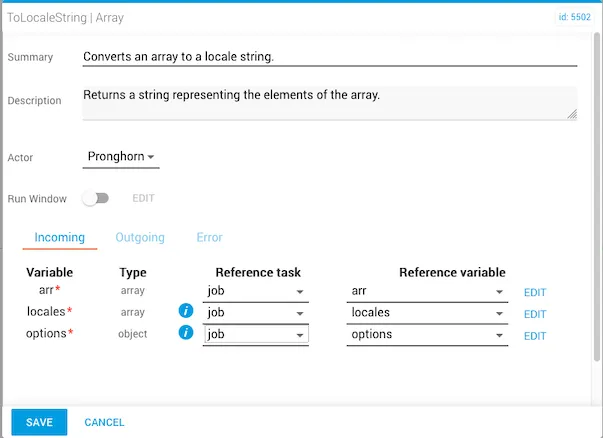
toLocaleString task with arr, locales, and options all set to required

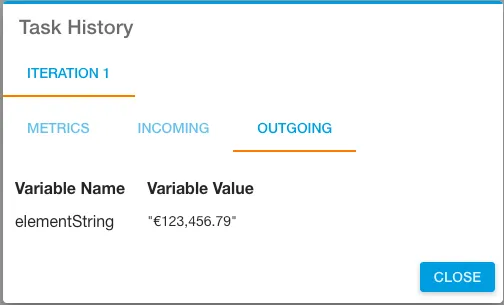
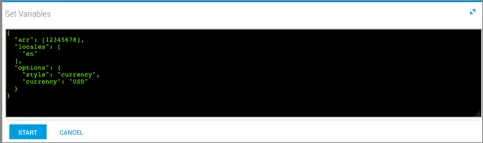
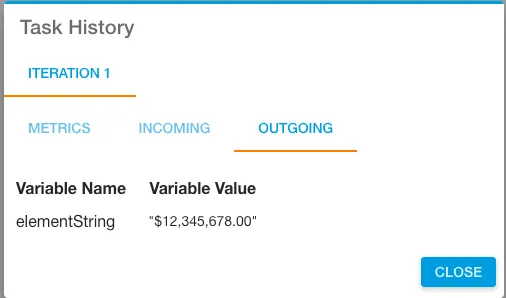
The following examples convert numbers into locale-specific currency representations. The elementString output is shown in Task History, accessed from Jobs in Operations Manager.

Euro examples
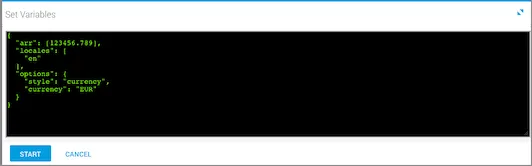
toLocaleString incoming variables configured for Euro format
toLocaleString output showing Euro-formatted currency string

USD examples

toLocaleString incoming variables configured for USD format
toLocaleString output showing USD-formatted currency string

Related reading

For more information on using the locales parameter, see the Intl reference on MDN.