

For AI agents: a documentation index is available at the root level at /llms.txt and /llms-full.txt. Append /llms.txt to any URL for a page-level index, or .md for the markdown version of any page.
Open sourceSupportFAQsDocs Home
DocumentationAPI referenceRelease notes
  • Platform On-Prem
    • Overview
    • Navigate
    • Search resources
  • Apps
      • Overview
      • Navigate
        • Configure and manage tasks
        • Null vs. undefined values
        • Parallel branches
          • Overview
          • addDuration
          • arrayIncludes
          • arrayLastIndexOf
          • arrayPop
          • arrayToString
          • assign
          • calculateTimeDiff
          • charAt
          • charCodeAt
          • childjob
          • codePointAt
          • concat
          • concatArray
          • convertEpochToObject
          • convertTimeFormat
          • convertTimeToEpoch
          • convertTimezone
          • copyWithin
          • csvStringToJSON
          • deepmerge
          • delay
          • endsWith
          • ErrorHandling
          • evaluation
          • eventListenerJob
          • excelToJson
          • extractField
          • fill
          • FlattenJSONFormInput
          • getTime
          • includes
          • arrayIndexOf
          • indexOf
          • isArray
          • join
          • keys
          • lastIndexOf
          • length
          • length (string)
          • localeCompare
          • makeData
          • map
          • match
          • merge
          • modify
          • newVariable
          • normalize
          • objectHasOwnProperty
          • objectToString
          • padEnd
          • padStart
          • parse
          • parseInt
          • pop
          • push
          • pushToArray
          • query
          • repeat
          • restCall
          • reverse
          • runCode
          • search
          • setObjectKey
          • shift
          • slice (array)
          • slice (string)
          • sort
          • split
          • startsWith
          • stringValueOf
          • stub
          • substring
          • toLocaleLowerCase
          • toLocaleString
          • toLocaleUpperCase
          • toLowerCase
          • numberToString
          • toString (array)
          • toString (number)
          • toString (object)
          • toUpperCase
          • transformation
          • trim
          • trimEnd
          • trimStart
          • unshift
          • updateJobDescription
          • values
          • viewData
    • FlowAI
    • Itential Automation Gateway
  • Resources
    • Itential Academy
    • Version lifecycle
    • Itential MCP
    • Accessibility conformance
    • Get support
    • FAQs
LogoLogo
Open sourceSupportFAQsDocs Home
On this page
  • Potential use case
  • Properties
  • Example
AppsStudioTasksTask reference

codePointAt

Was this page helpful?
Previous

concat

Next
Built with

The codePointAt task retrieves the Unicode value for a character at a specific position in a string. The result is a non-negative integer representing the code point value of the character at the given position.

Potential use case

This task helps with multilingual text and localization. If you have a dataset containing unique language characters, use codePointAt to return the code point value for each character and handle them according to the Unicode standard.

Properties

IncomingTypeDescription
strStringRequired. The string to get the Unicode value from.
posNumberThe position of the character in str to return the code point value for. The first character is at position 0, the second at 1, and so on.
OutgoingTypeDescription
codePointValueNumberThe Unicode code point value of the character at the given pos. Returns undefined if there is no character at that position.

Example

The incoming str is "Hello World" and the pos is 1, which corresponds to the letter "e".

The first character position is 0, the second is 1, and so on.
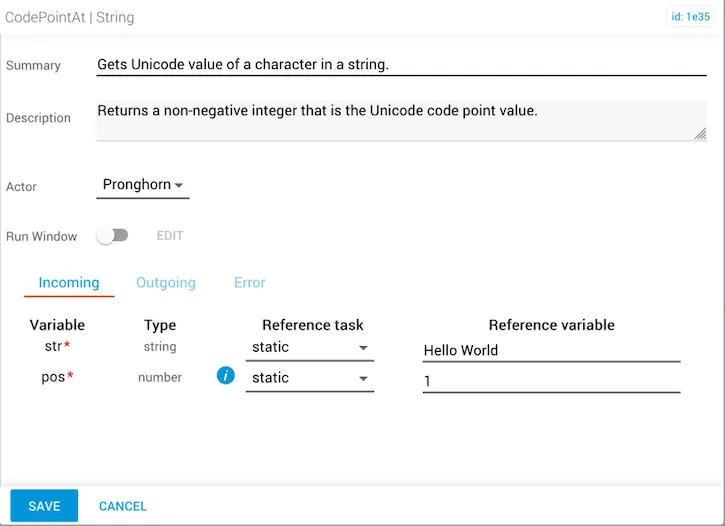
codePointAt task with str set to Hello World and pos set to 1

The codePointValue returned is 101, which is the Unicode value for the lowercase letter "e".
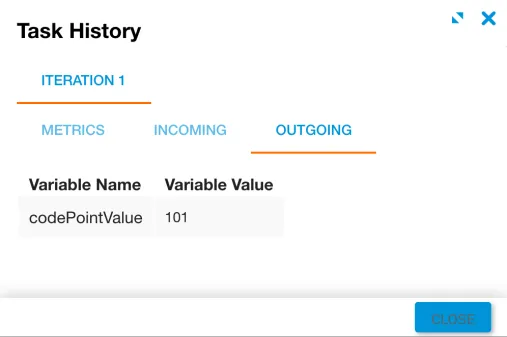
Outgoing result showing codePointValue 101 for the letter e