For AI agents: a documentation index is available at the root level at /llms.txt and /llms-full.txt. Append /llms.txt to any URL for a page-level index, or .md for the markdown version of any page.
Open sourceSupportFAQsDocs Home
DocumentationAPI referenceRelease notes
  • Platform On-Prem
    • Overview
    • Navigate
    • Search resources
      • Adapter API routes
      • Adapter degraded status
      • Broker principal config setting
      • Enumerations in applications
      • Event system
      • Events
      • Log class
      • Naming conventions
      • Public and trusted methods
      • Run as another user
      • Service brokers
      • Service config property encryption
      • Serving UI directories
      • Table control
  • Apps
    • FlowAI
    • Itential Automation Gateway
  • Resources
    • Itential Academy
    • Version lifecycle
    • Itential MCP
    • Accessibility conformance
    • Get support
    • FAQs
LogoLogo
Open sourceSupportFAQsDocs Home
On this page
  • Use the broker principal setting
Platform On-PremDeveloper guide

Broker principal config setting

Was this page helpful?
Previous

Enumerations in applications

Next
Built with

The Itential Platform supports building principal objects via broker calls to a local AAA adapter. The brokerPrincipal configuration setting can be found within the authenticationProps of an active profile. It allows an AAA adapter to define a buildPrincipal function — that is, to create principal objects — instead of the Session Manager module.

Sample profile schema for brokerPrincipal

1"brokerPrincipal": {
2 "$id": "#/properties/authenticationProps/properties/brokerPrincipal",
3 "type": "boolean",
4 "description": "When brokerPrincipal is set to true, the AAA adapter will be responsible for creating a principal.",
5 "title": "Broker Principal",
6 "default": false,
7 "examples": [false]
8}

Use the broker principal setting

To use this feature when developing a custom auth adapter:

1

Add the buildPrincipal function to your Local AAA adapter

Add the following code at the end of the file before the export statement, and change the console log level to debug.

$const buildAnonymousPrincipal = function () {
> return {
> id: 9999,
> provenance: 'Pronghorn',
> username: 'anonymous',
> firstname: 'anonymous',
> groups: [],
> roles: [],
> allowedMethods: [],
> allowedViews: [],
> routes: [],
> };
>}
$
$/**
$ * Make sure a principal is stashed in redis
$ * @param {string} accountId
$ */
$local_aaa.prototype.buildPrincipal = async function (accountId, callback) {
> const promised = new Promise((resolve, reject) => {
> console.log('START!')
> setTimeout(() => {
> console.log('I did a thing to build principal');
> resolve();
> }, 3000);
> });
>
> await promised;
> callback(buildAnonymousPrincipal());
>}
2

Restart Itential Platform

Restart Itential Platform with the code changes.

3

Log in as admin

Log in to Itential Platform as admin.

4

Navigate to the broker principal setting

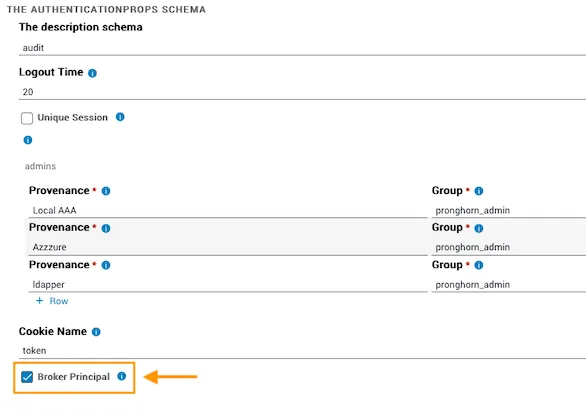
Go to Admin Essentials → Profiles → select the active profile → Configure → authenticationProps Schema.

Verify there is a checkbox for Broker Principal (unchecked).

Broker Principal checkbox in authenticationProps
5

Enable broker principal

Check the Broker Principal box and save the profile.

6

Restart and verify

Restart Itential Platform, then log in as admin. Upon login, you should have no permissions, as you are using the equivalent of an anonymous principal. This confirms the local AAA adapter buildPrincipal function is being called.