

For AI agents: a documentation index is available at the root level at /llms.txt and /llms-full.txt. Append /llms.txt to any URL for a page-level index, or .md for the markdown version of any page.
Open sourceSupportFAQsDocs Home
DocumentationAPI referenceRelease notes
  • Platform On-Prem
    • Overview
    • Navigate
    • Search resources
  • Apps
      • Overview
      • Navigate
        • Configure and manage tasks
        • Null vs. undefined values
        • Parallel branches
          • Overview
          • addDuration
          • arrayIncludes
          • arrayLastIndexOf
          • arrayPop
          • arrayToString
          • assign
          • calculateTimeDiff
          • charAt
          • charCodeAt
          • childjob
          • codePointAt
          • concat
          • concatArray
          • convertEpochToObject
          • convertTimeFormat
          • convertTimeToEpoch
          • convertTimezone
          • copyWithin
          • csvStringToJSON
          • deepmerge
          • delay
          • endsWith
          • ErrorHandling
          • evaluation
          • eventListenerJob
          • excelToJson
          • extractField
          • fill
          • FlattenJSONFormInput
          • getTime
          • includes
          • arrayIndexOf
          • indexOf
          • isArray
          • join
          • keys
          • lastIndexOf
          • length
          • length (string)
          • localeCompare
          • makeData
          • map
          • match
          • merge
          • modify
          • newVariable
          • normalize
          • objectHasOwnProperty
          • objectToString
          • padEnd
          • padStart
          • parse
          • parseInt
          • pop
          • push
          • pushToArray
          • query
          • repeat
          • restCall
          • reverse
          • runCode
          • search
          • setObjectKey
          • shift
          • slice (array)
          • slice (string)
          • sort
          • split
          • startsWith
          • stringValueOf
          • stub
          • substring
          • toLocaleLowerCase
          • toLocaleString
          • toLocaleUpperCase
          • toLowerCase
          • numberToString
          • toString (array)
          • toString (number)
          • toString (object)
          • toUpperCase
          • transformation
          • trim
          • trimEnd
          • trimStart
          • unshift
          • updateJobDescription
          • values
          • viewData
    • FlowAI
    • Itential Automation Gateway
  • Resources
    • Itential Academy
    • Version lifecycle
    • Itential MCP
    • Accessibility conformance
    • Get support
    • FAQs
LogoLogo
Open sourceSupportFAQsDocs Home
On this page
  • Potential use cases
  • Properties
  • Example
AppsStudioTasksTask reference

normalize

Was this page helpful?
Previous

objectHasOwnProperty

Next
Built with

The normalize task normalizes a string, returning it in a specified Unicode normalization form:

ValueDefinition
NFCCanonical Decomposition, followed by Canonical Composition
NFDCanonical Decomposition
NFKCCompatibility Decomposition, followed by Canonical Composition
NFKDCompatible Decomposition

For more information, see the Unicode Normalization Forms standard.

In simple terms, normalization ensures that two strings that may use different binary representations for their characters have the same binary value after normalization.

Potential use cases

Unicode sometimes has multiple representations of the same character. For example, the letter “é” can be represented using either U+00E9 (a single code point) or U+0065 and U+0301 together (two code points). This can cause unexpected errors such as password mismatches that prevent user authentication, or the inability to search and sort email addresses in a database.

Use normalize whenever you need to convert characters with diacritical marks, change letter case, decompose ligatures, or convert half-width characters to full-width characters. To ensure data is stored and accessed consistently, normalize input whenever you accept it from users.

Properties

IncomingTypeDescription
strStringRequired. The string to normalize.
formStringOptional. The Unicode normalization form to use: NFC, NFD, NFKC, or NFKD.
OutgoingTypeDescription
normalizedStringStringA string containing the Unicode normalization form of the given string.

Example

The incoming str variable is "Chloé O'Leary" and the form value is NFC. Note the acute accent in the first name and the apostrophe in the last name.
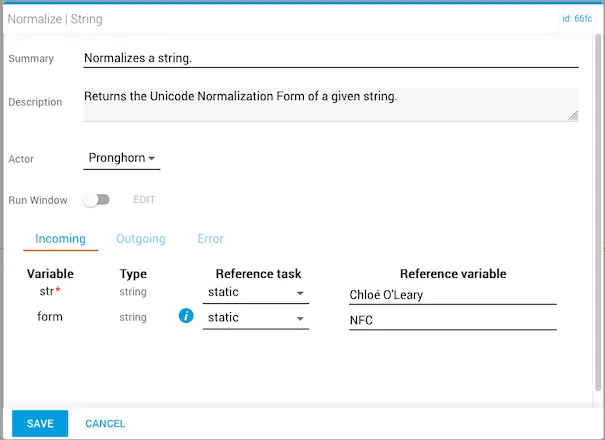
normalize task — input

The task returns a normalizedString as output.
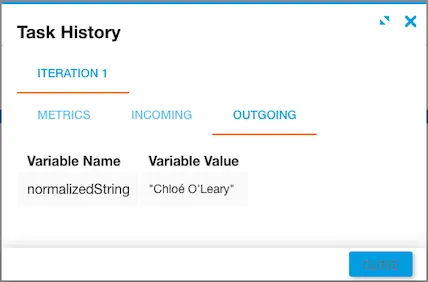
normalize task — output