For AI agents: a documentation index is available at the root level at /llms.txt and /llms-full.txt. Append /llms.txt to any URL for a page-level index, or .md for the markdown version of any page.
Open sourceSupportFAQsDocs Home
DocumentationAPI referenceRelease notes
  • Platform On-Prem
    • Overview
    • Navigate
    • Search resources
  • Apps
      • Overview
      • Navigate
        • Configure and manage tasks
        • Null vs. undefined values
        • Parallel branches
          • Overview
          • addDuration
          • arrayIncludes
          • arrayLastIndexOf
          • arrayPop
          • arrayToString
          • assign
          • calculateTimeDiff
          • charAt
          • charCodeAt
          • childjob
          • codePointAt
          • concat
          • concatArray
          • convertEpochToObject
          • convertTimeFormat
          • convertTimeToEpoch
          • convertTimezone
          • copyWithin
          • csvStringToJSON
          • deepmerge
          • delay
          • endsWith
          • ErrorHandling
          • evaluation
          • eventListenerJob
          • excelToJson
          • extractField
          • fill
          • FlattenJSONFormInput
          • getTime
          • includes
          • arrayIndexOf
          • indexOf
          • isArray
          • join
          • keys
          • lastIndexOf
          • length
          • length (string)
          • localeCompare
          • makeData
          • map
          • match
          • merge
          • modify
          • newVariable
          • normalize
          • objectHasOwnProperty
          • objectToString
          • padEnd
          • padStart
          • parse
          • parseInt
          • pop
          • push
          • pushToArray
          • query
          • repeat
          • restCall
          • reverse
          • runCode
          • search
          • setObjectKey
          • shift
          • slice (array)
          • slice (string)
          • sort
          • split
          • startsWith
          • stringValueOf
          • stub
          • substring
          • toLocaleLowerCase
          • toLocaleString
          • toLocaleUpperCase
          • toLowerCase
          • numberToString
          • toString (array)
          • toString (number)
          • toString (object)
          • toUpperCase
          • transformation
          • trim
          • trimEnd
          • trimStart
          • unshift
          • updateJobDescription
          • values
          • viewData
    • FlowAI
    • Itential Automation Gateway
  • Resources
    • Itential Academy
    • Version lifecycle
    • Itential MCP
    • Accessibility conformance
    • Get support
    • FAQs
LogoLogo
Open sourceSupportFAQsDocs Home
On this page
  • Potential use case
  • Properties
  • Example
AppsStudioTasksTask reference

padStart

Was this page helpful?
Previous

parse

Next
Built with

The padStart task pads a current string with a specified string (repeated, if needed) so that the resulting string reaches a given length. The padding is applied at the start of the current string.

Potential use case

Suppose you have a dataset of a known length and you would like to repeat that dataset at the beginning of the current dataset. You could use the padStart task to specify the numeric length and variables needed to pad the start of the original dataset.

Properties

IncomingTypeDescription
strStringRequired. The string to pad.
targetLengthNumberThe length of the resulting string after it has been padded. If the value is less than the original str length, then the original string is returned.
padStringStringRequired. The specified string to pad to the start of the original string.
OutgoingTypeDescription
paddedStringStringA string that has been padded at the beginning with a specified string to the desired length.

Example

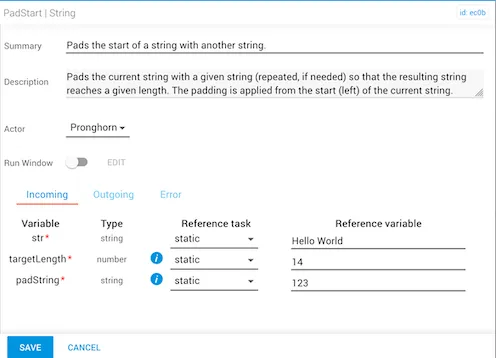
In this example:

  • The str variable is “Hello World” and the current length of the string is 11 characters, including the space.
  • The new targetLength has been set to 14, and the padString variable of “123” is applied at the start of the current string so that it reaches the desired targetLength of 14 characters.
padStart task configured with str Hello World, targetLength 14, and padString 123

The expected result is “123Hello World”. Notice that the beginning of the word string for “Hello World” has been padded with “123” in order to fulfill the specified targetLength.
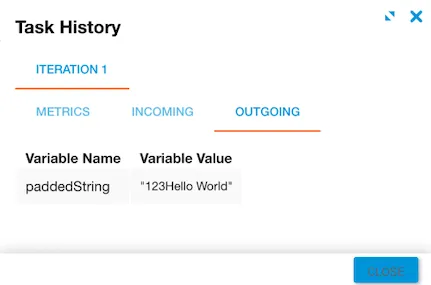
padStart task output showing 123Hello World