

Admin Essentials overview
Admin Essentials is Itential Platform’s centralized administration hub. It serves as your primary control center where you can manage all essential administrative functions from one accessible interface. You get complete visibility and control over your automation infrastructure, whether you’re managing workflow tasks, user permissions, monitoring system health, or configuring integrations.
Why use Admin Essentials?
Admin Essentials centralizes administrative tasks and provides real-time insights into system performance. Instead of navigating multiple interfaces or managing components separately, you can accomplish all your administrative work from one location.
Key problems it solves
Reduces onboarding complexity: Simplify user management with centralized role-based access control, making it easier to bring new team members into your automation environment.
Speeds up troubleshooting: Configure logging levels to quickly identify and resolve issues across applications, adapters, and integrations.
Streamlines configuration management: View environment variables and manage platform configurations and service settings from a single interface.
Key features and capabilities
Admin Essentials provides these essential administrative capabilities:
- Role-based access control (RBAC): Define authorization levels for user groups such as developers, operators, and administrators, ensuring appropriate access to platform resources.
- System monitoring and health status: View real-time health status of applications, adapters, and integrations, with comprehensive monitoring of system performance.
- Adapter and application management: Configure settings for adapters and integrations, including authentication, requests, and health checks. Manage adapter and application services with the ability to restart services, set log levels, and modify configurations.
- Pre-built management: Import and export pre-builts and configure repository configuration to point to a GitLab repository hosting pre-builts in version control.
- Server usage statistics: Monitor platform resource utilization and performance metrics to optimize your environment.
How Admin Essentials works with other Itential products
Itential Platform: Admin Essentials provides comprehensive management and monitoring capabilities for the core platform, including system health, configurations, and task execution visibility.
Adapter and integration management: Admin Essentials manages adapters and integration configurations, including any credentials required for external system connections.
Studio and Workflow Builder: Admin Essentials supports administrators in ensuring workflows and operations execute correctly, with troubleshooting capabilities for workflow-related issues.
What you’ll learn
From this collection of guides, you’ll learn to effectively administer Itential Platform through Admin Essentials, including how to:
- Download Itential Platform Blueprints for your environment
- Set authorization levels for roles and groups
- Create integrations from integration models
- Configure platform settings and manage user access
- Monitor system health and troubleshoot issues
- Manage applications, adapters, and integrations
Prerequisites
Before using Admin Essentials, ensure you have:
- Administrative access to Itential Platform
- Understanding of your organization’s user roles and access requirements
- Familiarity with the applications and integrations in your environment
Profiles (if migrating from an earlier Platform version)
Prior to Platform 6, the Profiles page in Admin Essentials contained “Applications”, “Adapters”, “Configure”, and “Indexing” tabs. Now that Itential Platform can run without a profile, the “Applications”, “Adapters”, and “Indexing” tabs were moved to a new Status page.
The Profiles page in Admin Essentials now only contains the contents to edit “Profile Services” and “Profile Properties.” Any configuration done inside of a Profile will only affect that Profile; there is no way to modify a Config File or Environment Variables in Admin Essentials. Multiple profiles can exist for an instance of Itential Platform, but only one can be active at a time.
Select (or deselect) the checkbox next to the Profile Services name to enable or disable the service.
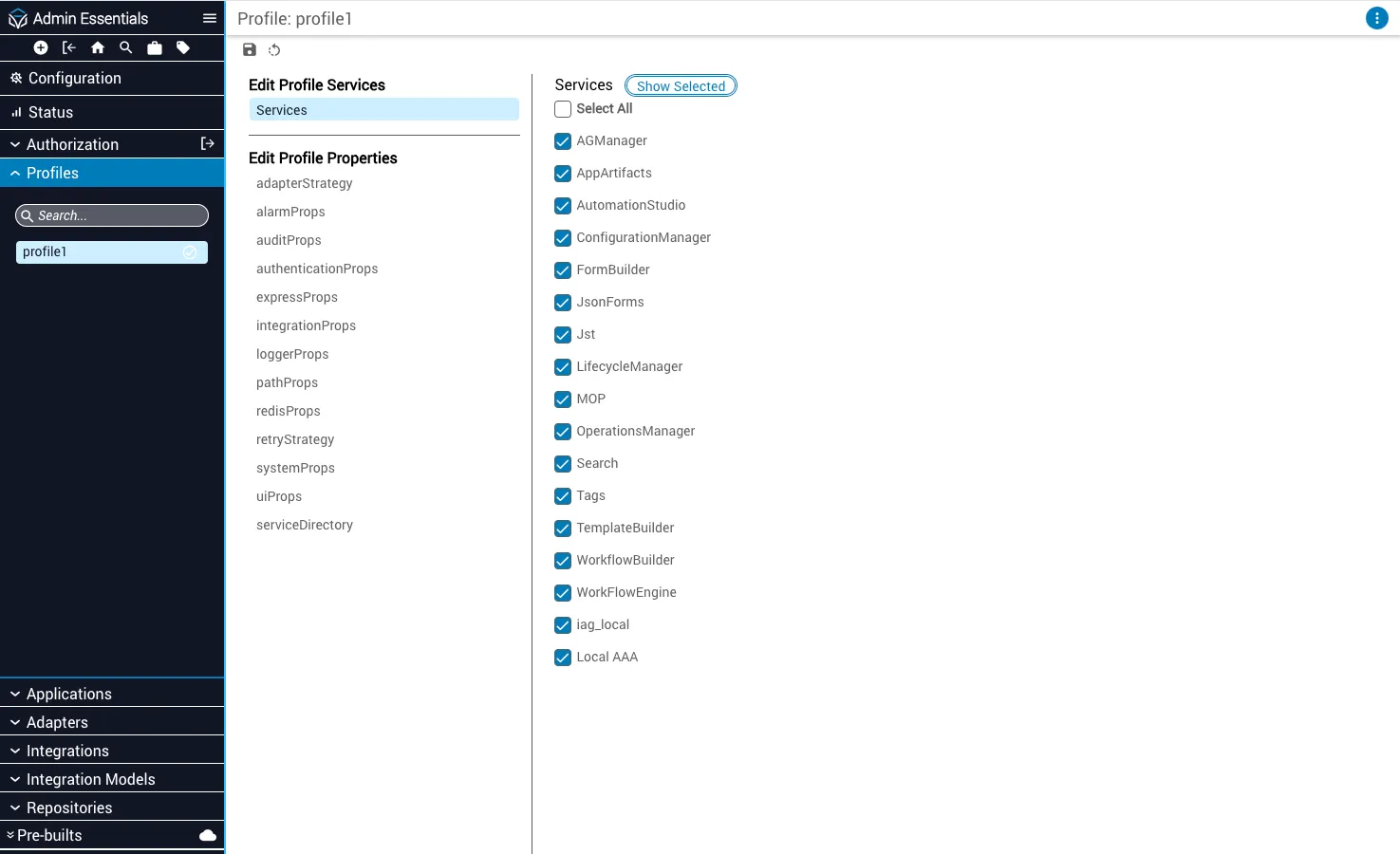
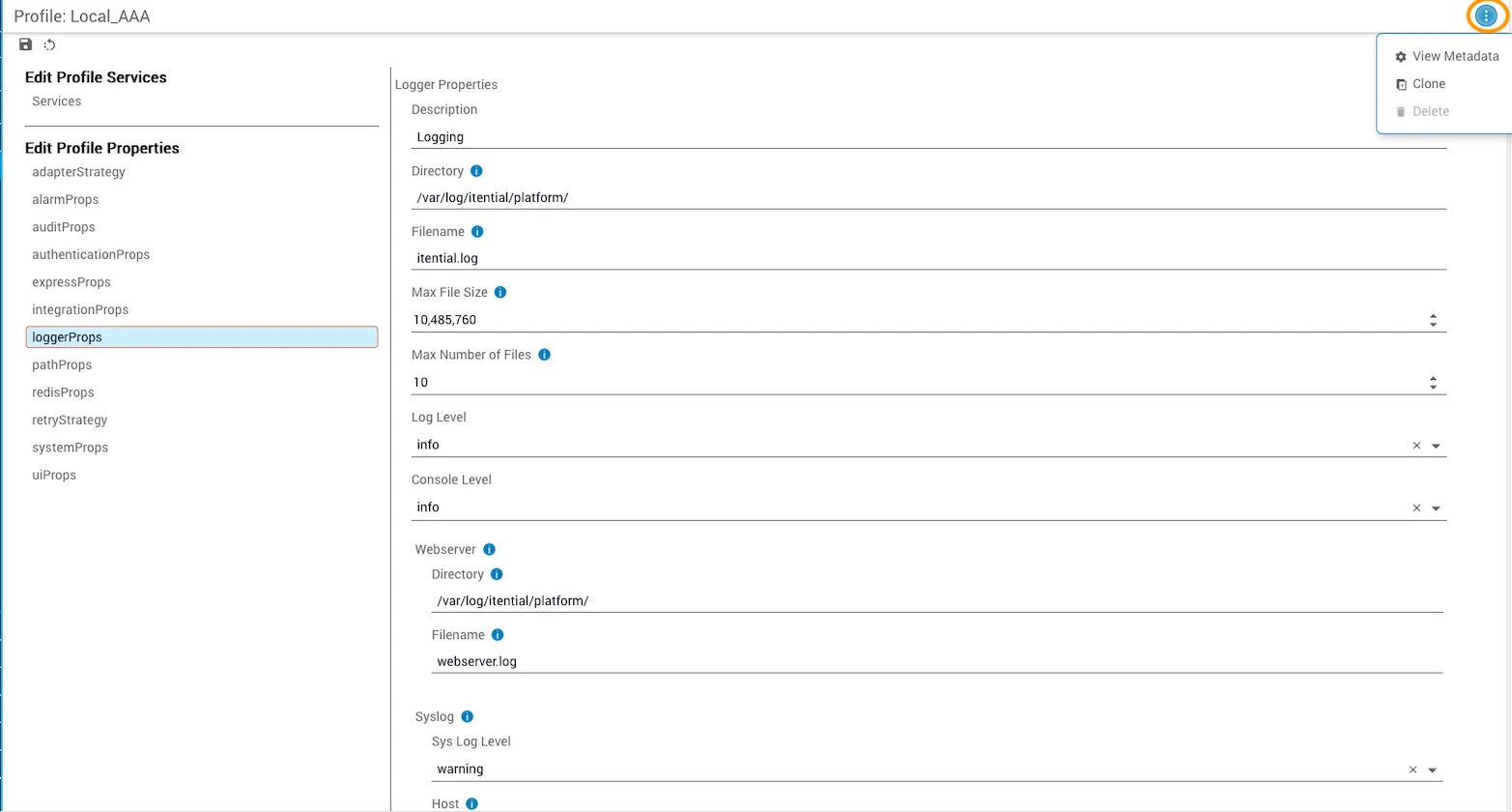
When a profile property is selected for editing, the properties are displayed as a form. Further details on the specifications stored and managed within Edit Profile Properties are available in the Profile Properties Configuration guide.
You can click the Menu button (stacked dots) in the upper-right corner to view profile metadata, clone a profile, or delete a profile if it is not the active profile.
Next steps
Start with the Navigate Admin Essentials guide to familiarize yourself with the interface and core concepts, then explore specific administrative tasks based on your role and responsibilities.