For AI agents: a documentation index is available at the root level at /llms.txt and /llms-full.txt. Append /llms.txt to any URL for a page-level index, or .md for the markdown version of any page.
Open sourceSupportFAQsDocs Home
DocumentationAPI referenceRelease notes
  • Platform On-Prem
    • Overview
    • Navigate
    • Search resources
  • Apps
      • Overview
      • Navigate
        • Configure and manage tasks
        • Null vs. undefined values
        • Parallel branches
          • Overview
          • addDuration
          • arrayIncludes
          • arrayLastIndexOf
          • arrayPop
          • arrayToString
          • assign
          • calculateTimeDiff
          • charAt
          • charCodeAt
          • childjob
          • codePointAt
          • concat
          • concatArray
          • convertEpochToObject
          • convertTimeFormat
          • convertTimeToEpoch
          • convertTimezone
          • copyWithin
          • csvStringToJSON
          • deepmerge
          • delay
          • endsWith
          • ErrorHandling
          • evaluation
          • eventListenerJob
          • excelToJson
          • extractField
          • fill
          • FlattenJSONFormInput
          • getTime
          • includes
          • arrayIndexOf
          • indexOf
          • isArray
          • join
          • keys
          • lastIndexOf
          • length
          • length (string)
          • localeCompare
          • makeData
          • map
          • match
          • merge
          • modify
          • newVariable
          • normalize
          • objectHasOwnProperty
          • objectToString
          • padEnd
          • padStart
          • parse
          • parseInt
          • pop
          • push
          • pushToArray
          • query
          • repeat
          • restCall
          • reverse
          • runCode
          • search
          • setObjectKey
          • shift
          • slice (array)
          • slice (string)
          • sort
          • split
          • startsWith
          • stringValueOf
          • stub
          • substring
          • toLocaleLowerCase
          • toLocaleString
          • toLocaleUpperCase
          • toLowerCase
          • numberToString
          • toString (array)
          • toString (number)
          • toString (object)
          • toUpperCase
          • transformation
          • trim
          • trimEnd
          • trimStart
          • unshift
          • updateJobDescription
          • values
          • viewData
    • FlowAI
    • Itential Automation Gateway
  • Resources
    • Itential Academy
    • Version lifecycle
    • Itential MCP
    • Accessibility conformance
    • Get support
    • FAQs
LogoLogo
Open sourceSupportFAQsDocs Home
On this page
  • Potential use case
  • Properties
  • Examples
  • Example 1
  • Example 2
  • Example 3
AppsStudioTasksTask reference

includes

Was this page helpful?
Previous

arrayIndexOf

Next
Built with

The includes task searches an input variable for a predefined value and returns true if the value is found, or false if it is not.

The includes task is case sensitive.

Potential use case

Use this task if you need to scan an email list for the word “unsubscribe” and execute a process to remove that email address from a database.

Properties

IncomingTypeDescription
strStringRequired. The string to search.
searchStringStringRequired. The string to search for within str. Case sensitive.
positionNumberOptional. The character position within str at which to begin the search. The count begins at 0 (default). Useful when searchString is known to appear more than once in str and you only need to verify the existence of a specific instance.
OutgoingTypeDescription
resultBooleanReturns true if searchString is found anywhere within str from the given position; returns false if not.

Examples

Example 1

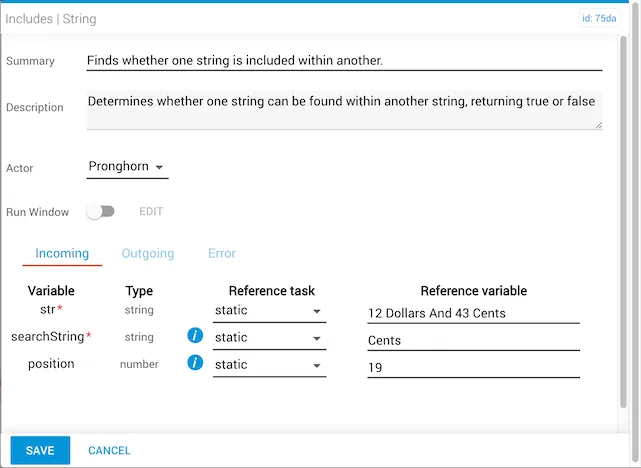
In this example:

  • The str variable is statically set to 12 Dollars And 43 Cents.
  • The searchString is Cents.
  • The position is statically set to 19.
  • The result is false — starting at position 19, the str value reads "ents", so no complete match of Cents is found from that position onward.
includes (string) example 1 — search from position 19

Example 2

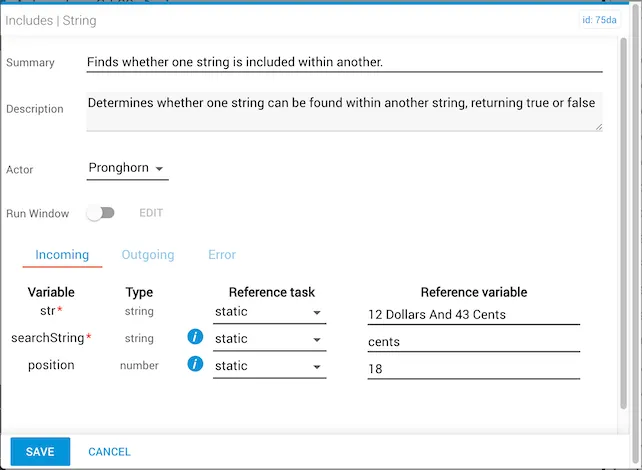
In this example:

  • The str variable is statically set to 12 Dollars And 43 Cents.
  • The searchString is cents (lowercase).
  • The position is statically set to 18.
  • The result is false — the task is case sensitive, so "cents" does not match "Cents".
includes (string) example 2 — case sensitivity

Example 3

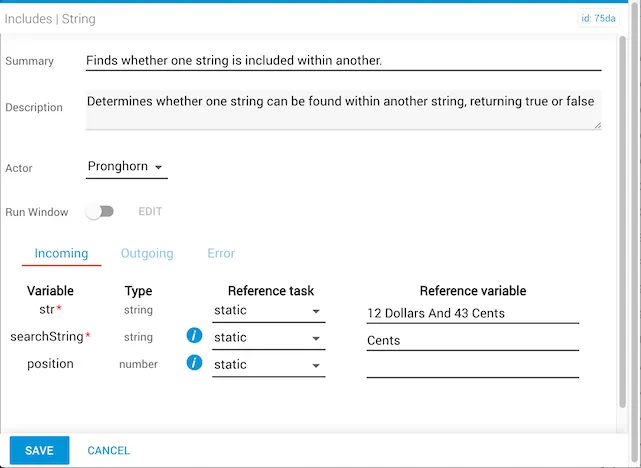
In this example:

  • The str variable is statically set to 12 Dollars And 43 Cents.
  • The searchString is Cents.
  • The position is left blank, defaulting to 0.
  • The result is true — "Cents" does appear within the str variable.
includes (string) example 3 — search from position 0