For AI agents: a documentation index is available at the root level at /llms.txt and /llms-full.txt. Append /llms.txt to any URL for a page-level index, or .md for the markdown version of any page.
Open sourceSupportFAQsDocs Home
DocumentationAPI referenceRelease notes
  • Platform On-Prem
    • Overview
    • Navigate
    • Search resources
  • Apps
      • Overview
      • Navigate
        • Configure and manage tasks
        • Null vs. undefined values
        • Parallel branches
          • Overview
          • addDuration
          • arrayIncludes
          • arrayLastIndexOf
          • arrayPop
          • arrayToString
          • assign
          • calculateTimeDiff
          • charAt
          • charCodeAt
          • childjob
          • codePointAt
          • concat
          • concatArray
          • convertEpochToObject
          • convertTimeFormat
          • convertTimeToEpoch
          • convertTimezone
          • copyWithin
          • csvStringToJSON
          • deepmerge
          • delay
          • endsWith
          • ErrorHandling
          • evaluation
          • eventListenerJob
          • excelToJson
          • extractField
          • fill
          • FlattenJSONFormInput
          • getTime
          • includes
          • arrayIndexOf
          • indexOf
          • isArray
          • join
          • keys
          • lastIndexOf
          • length
          • length (string)
          • localeCompare
          • makeData
          • map
          • match
          • merge
          • modify
          • newVariable
          • normalize
          • objectHasOwnProperty
          • objectToString
          • padEnd
          • padStart
          • parse
          • parseInt
          • pop
          • push
          • pushToArray
          • query
          • repeat
          • restCall
          • reverse
          • runCode
          • search
          • setObjectKey
          • shift
          • slice (array)
          • slice (string)
          • sort
          • split
          • startsWith
          • stringValueOf
          • stub
          • substring
          • toLocaleLowerCase
          • toLocaleString
          • toLocaleUpperCase
          • toLowerCase
          • numberToString
          • toString (array)
          • toString (number)
          • toString (object)
          • toUpperCase
          • transformation
          • trim
          • trimEnd
          • trimStart
          • unshift
          • updateJobDescription
          • values
          • viewData
    • FlowAI
    • Itential Automation Gateway
  • Resources
    • Itential Academy
    • Version lifecycle
    • Itential MCP
    • Accessibility conformance
    • Get support
    • FAQs
LogoLogo
Open sourceSupportFAQsDocs Home
On this page
  • Potential use case
  • Properties
  • Input variables
  • Output variables
  • Example 1
  • Example 2
  • Manual reference variable entry (inputTime)
AppsStudioTasksTask reference

convertTimeFormat

Was this page helpful?
Previous

convertTimeToEpoch

Next
Built with

The convertTimeFormat task converts a time value into a new format.

Potential use case

Use this task if a workflow requires you to take a specific record timestamp and convert it to a different time or date format, such as the quarter of the year, or to provide only the day of the year from a given date.

Properties

Input variables

IncomingTypeDescriptionExample
inputTimeObjectRequired. The timestamp to be converted, presented as a moment.js formatted string. The timestamp must be provided as a value of the time key; see the provided example.{ "time": "2023-04-28T01:21:14.052000-1100" }
newFormatStringStringRequired. The format of the converted timestamp.gg

Output variables

OutgoingTypeDescription
convertedTimeObjectThe converted time value, presented in the format specified by the newFormatString parameter.

Example 1

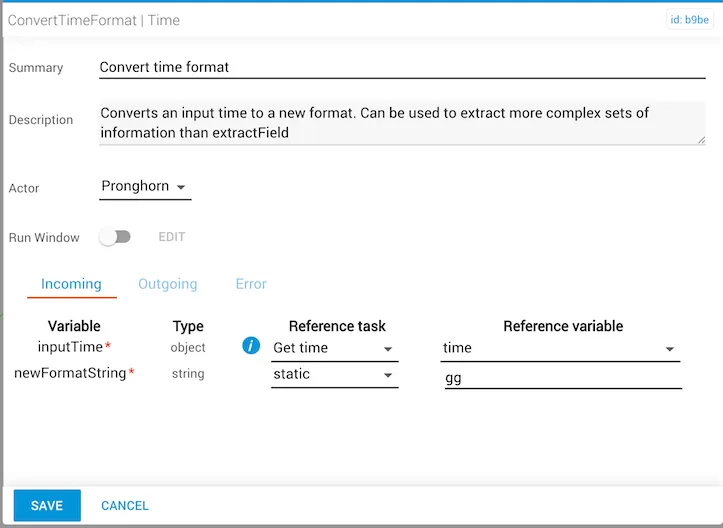
In this example:

  • The inputTime property is provided by the output of getTime, a reference task located elsewhere in the workflow. The reference variable provided by the getTime task is time.
  • The newFormatString property is set to gg, which is the moment.js locale two-digit format for Week Year (1–52).
  • The convertedTime will be the week number of the year in which the inputTime value exists.
convertTimeFormat task configured with newFormatString gg for week year

Example 2

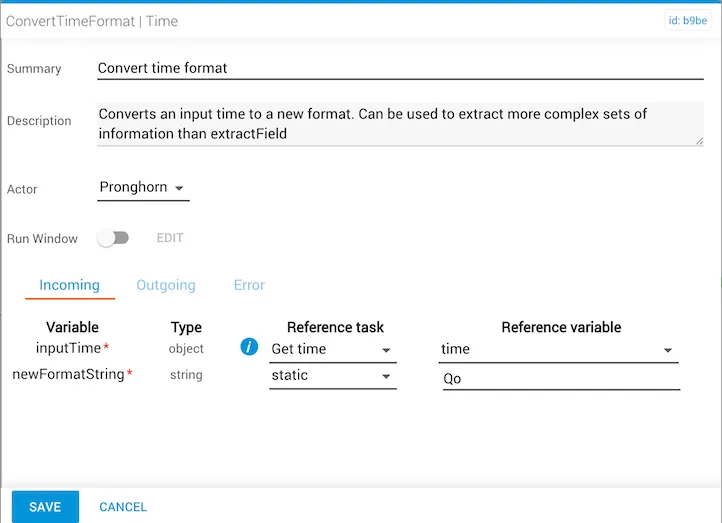
In this example:

  • The inputTime property is provided by the output of getTime, a reference task located elsewhere in the workflow. The reference variable provided by the getTime task is time.
  • The newFormatString property is set to Qo, which is the moment.js format for Quarter. This format includes a trailing numeral abbreviation such as “1st”, “2nd”, “3rd”, or “4th”.
  • The convertedTime will be the quarter number for the calendar year in which the inputTime value exists. If the inputTime value is February 12, the resulting convertedTime value will be “2nd” Quarter.
convertTimeFormat task configured with newFormatString Qo for quarter

Manual reference variable entry (inputTime)

To enter the inputTime object manually, use the format below for Year-Month-Date-Time (yyyy-MM-dd 'T' HH:mm:ss.SSSZ):

1{"time": "2021-02-26T15:00:00.000Z"}

This format displays as:

2021-02-25 03:00.00