

transformation

The transformation task runs JSON Schema Transformations (JSTs) during job execution, allowing JSON data to be consumed by endpoints with different formatting requirements.

For more information about JSTs, see the JST Designer documentation.

Task variables

All transformation task variables are accessed via the Data tab of the task details window. The available variables depend on which JST the task is configured to run:

  • Input variables are sourced from the incoming schema properties of the selected JST.
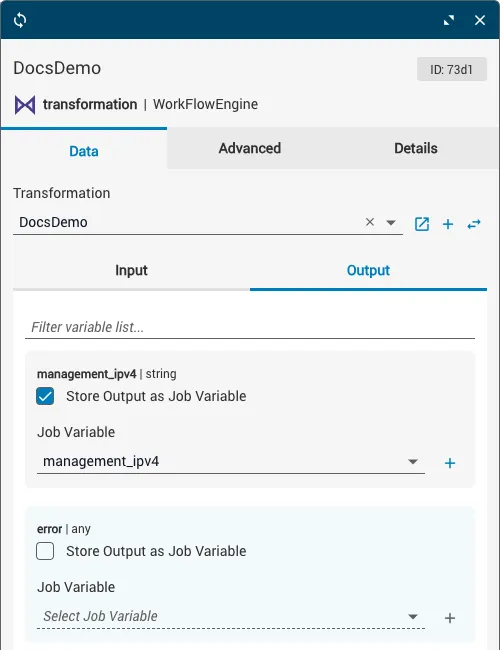
  • Output variables (except error) are sourced from the outgoing schema properties of the selected JST.

The data type of each variable matches the data type specified by the corresponding schema property.
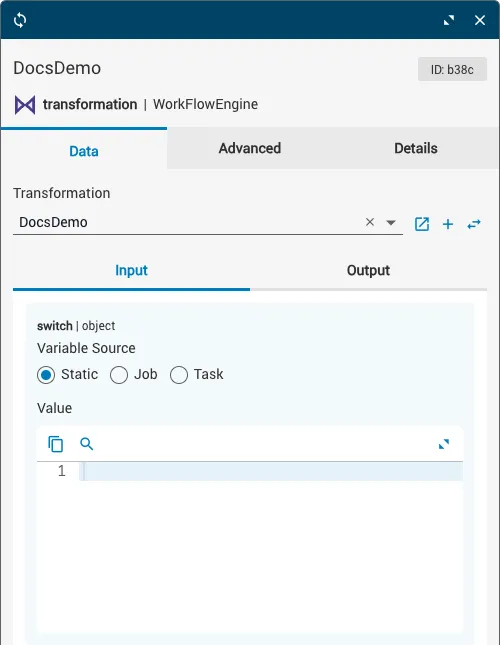
Transformation task showing the Data tab with input and output variable fields

Configure task variables

1

Select the JST

Click the Transformation dropdown at the top of the Data tab. Select the JST you want to run from the menu. The input and output variables populate based on the JST’s incoming and outgoing schema properties.
2

Define input variables

Click the Input subtab to view all input variables. Define each variable using one of these sources: Static (manually type or paste the data), Job (data from a job variable), or Task (data from a previous task’s output).

3

Define output variables

From the Output subtab, check the Store Output as Job Variable checkbox for any output you want to save, and specify which job variable to store it in.

Output subtab showing the Store Output as Job Variable checkboxes

Task options

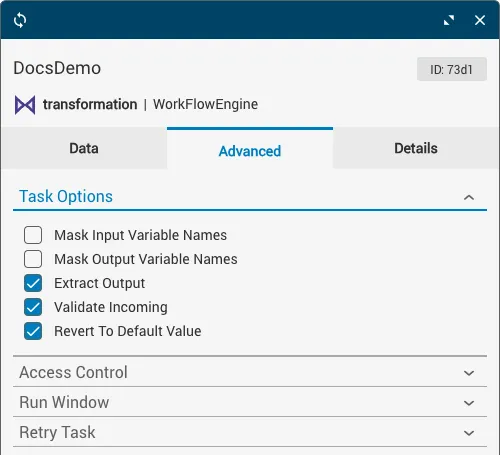
Task behavior can be further customized by enabling or disabling options in the Task Options dropdown on the Advanced tab.
OptionDescription
Mask Input Variable NamesHide input variable names at runtime.
Mask Output Variable NamesHide output variable names at runtime.
Extract OutputIf only a single outgoing schema property exists, removes it from its wrapper object.
Validate IncomingConfirms that input is compatible with the incoming schema.
Revert to Default ValueEnables the use of the default keyword in schemas. See the JSON Schema documentation for more information.

Configure task options

1

Go to the Advanced tab

Select the Advanced tab on the task details window.

2

Expand Task Options

Expand the Task Options dropdown.

3

Enable or disable options

Click the checkbox of the relevant option.

Task Options dropdown on the Advanced tab showing available checkboxes