

forEach
The forEach task executes a loop inside a job. It iterates over a passed array, and for each element, it executes a series of tasks. The forEach task is helpful when using tasks that operate on one thing, such as a device, but then you need to repeat those steps over a set of devices. Building a loop in the workflow is more efficient than writing new tasks.
The forEach task is unique as it supports transitions that follow the loop value. When a transition is created to follow the loop, it is distinguished with a blue arrow. The series of tasks at the end of the blue arrow dictates what will be executed for every iteration of the forEach task. A forEach task also supports transitions bound to the success and error finish states. When forEach completes its iterations (barring any errors), it returns with a success finish state and the job then follows the transitions bound to that finish state.
Properties
Examples
Replace retired device group
Use the forEach workflow operation task for a job that replaces a retired device group used on every device with a new group.
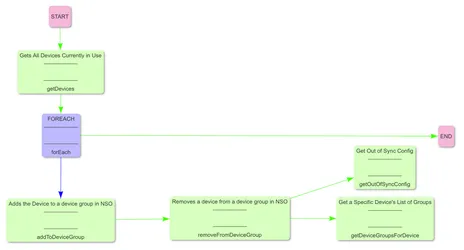
When the job begins, the first automatic task returns a list of all devices. The device list is passed to a forEach task which executes four tasks for every device passed. The four tasks in the example above remove each device from the retired device group, add each device to the new device group, and then concurrently get any configuration on the device not in sync with its modeled configuration while getting all groups for the device. After the last device is processed, the forEach task returns with a success finish state, and the job completes.
Handle errors inside forEach loops
Use the following to handle errors inside forEach loops.
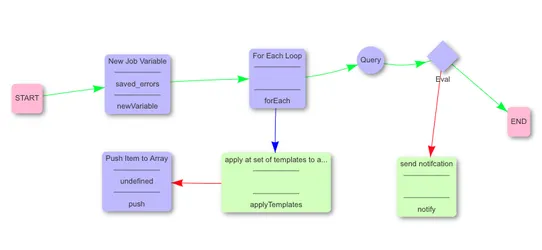
Create a newVariable task
Create a newVariable task and name the variable saved_errors as an empty array.
Tasks within forEach branches
Tasks within a forEach branch should not connect to the END task. The forEach branch is akin to a tree branch. It is best to think of END tasks as “inside” of the forEach loop — they should not interact with any other task or branch of the workflow, only within the loop. The workflow builder will allow you to connect a task, but doing so will yield unintuitive results.