

Use service accounts
Service accounts let third-party services and applications call Itential Cloud APIs without using user credentials. They use the OAuth2 Client Credentials grant type for API access.
Before you begin
To manage service accounts, you need the service-accounts:read and service-accounts:write roles. To grant a user the ability to manage service accounts, enable these roles in the groups those users belong to. See Manage users and groups for instructions.
About service accounts
Service accounts provide API access to a specific product in your Itential Cloud account. If you have multiple products or environments, create a separate service account for each. This isolates application access and prevents unintended API access across products.
Create a service account
Open Service Accounts
Go to Administration → Service Accounts from the sidebar, then click + New Service Account.
Configure the account
Give the service account a unique name and optional description, then select the product to protect. Click Create.
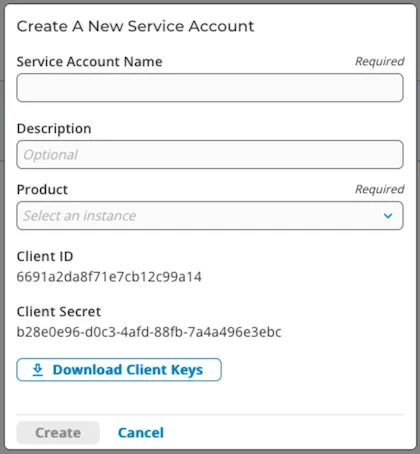
Store your client keys securely. If you lose them, you must regenerate new keys — the previous keys cannot be recovered. Share client keys only through secure, encrypted channels.
Regenerate client keys
If you lose your client keys, regenerate new credentials. This invalidates the previous client_id and client_secret.
Assign roles to a service account
Associate groups with a service account
Enable or disable a service account
Use the toggle switch in the Enabled column next to the service account name in the Service Accounts table. Applications cannot access APIs using credentials from a disabled service account.
Delete a service account
The service account is removed and its credentials are automatically invalidated.