Navigate pre-builts UI

The Itential Open Source Pre-Builts repository is no longer actively maintained. Those pre-builts have been certified up to Platform 2023.2, but can still be imported to Platform 6. We recommend transitioning to Projects for the best experience.

The primary user interfaces in the Prebuilts application are described below. Each interface allows you to view details about the pre-built along with the ability to uninstall a pre-built item or download data.

Details view
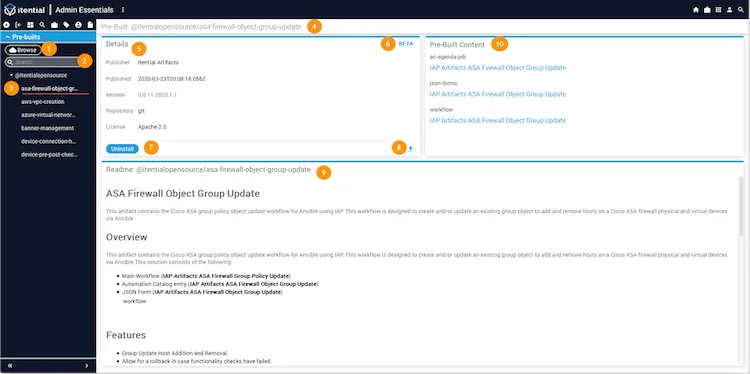
Pre-builts Details view
LabelUI ElementEdit View function
1BrowseClick to browse all available prebuilts from the Itential Open Source Repository.
2Search barUse to search the list of installed prebuilts.
3Installed pre-builtsA collection list of all installed pre-builts on the current Itential Platform environment.
4NameThe name of the prebuilt.
5DetailsPre-built metadata regarding the publisher, publish date, version info, repository location, and license info.
6Beta releaseA prebuilt will show the Beta flag if the version is less than 1.0.0.
7UninstallClick to uninstall the prebuilt.
8DownloadClick to download a pre-built data file from the database of the current Itential Platform environment.
9ReadMeDisplays the readme file for the prebuilt.
10Pre-Built ContentClick the links to access components for the prebuilt in Automation Catalog, JSON Forms, and Studio.

Browse view

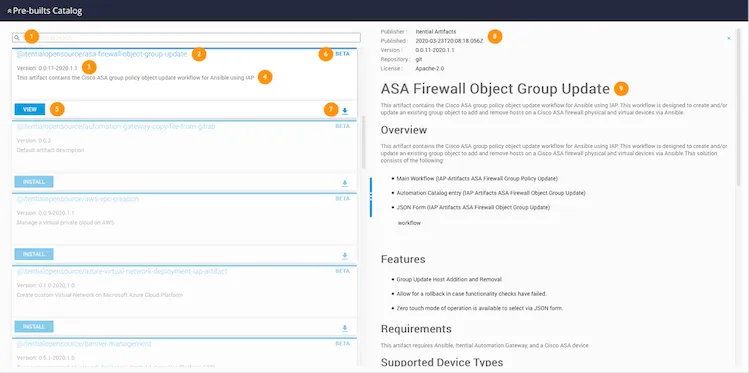
Browse Prebuilts catalog
LabelUI ElementList view function
1SearchUsed to search the prebuilt repository.
2NameThe name of the prebuilt.
3Version InfoThe latest version of the prebuilt that is compatible with the current running Itential Platform version.
4DescriptionA summary description of the prebuilt.
5ViewClick to view details about the prebuilt.
6Beta releaseA prebuilt will show the Beta flag if the version is less than 1.0.0.
7DownloadClick to download a prebuilt data file from the repository.
8MetadataPrebuilt metadata regarding the publisher, publish date, version, repository type, and license type.
9ReadMeThe readme file for the prebuilt.

Note: If the Beta release of a prebuilt is not compatible with the current environment, a red indicator displays next to the Beta flag.
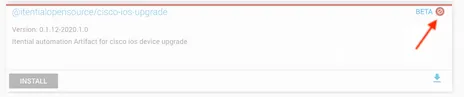
Noncompatible Beta flag