Work with parallel branches
After a task finishes, the workflow follows any transitions whose binding values match the task’s finish state. This can create concurrent execution paths, which is a pattern known as parallel branching. For example, if a task has two outgoing success transitions, the workflow follows both when that task succeeds.
Control of a workflow becomes more complicated when parallel branching is introduced. Avoid parallel branching whenever possible.
Before you begin
Before proceeding, note the following:
- This page uses foundational concepts introduced in Creating and Running Workflows.
- Some example workflows contain tasks and transitions highlighted in solid gray. This denotes a task or transition that will not be used upon workflow execution. This is for documentation purposes only — it is not visible in normal canvas operation.
How parallel branching works
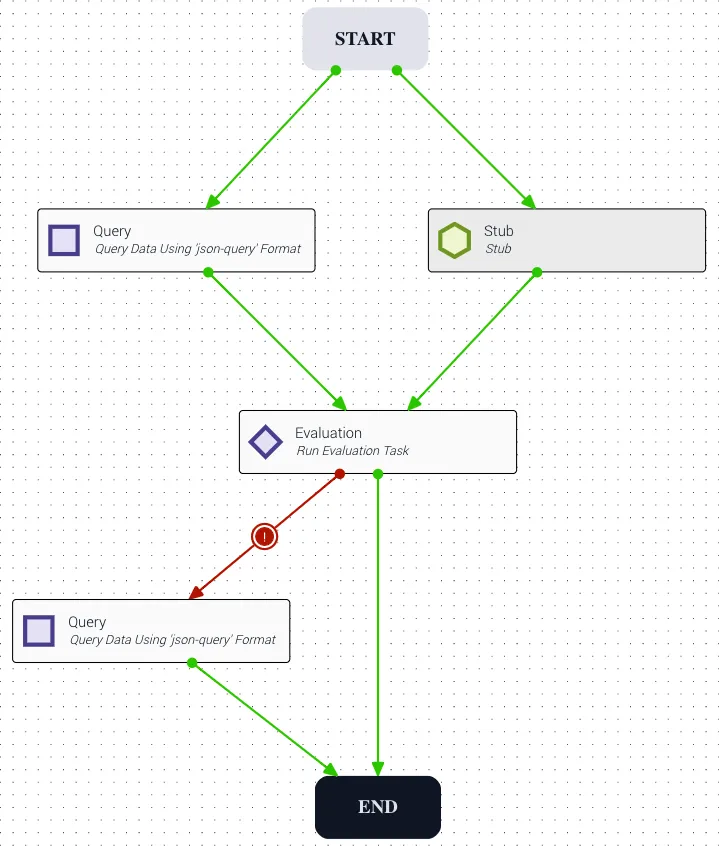
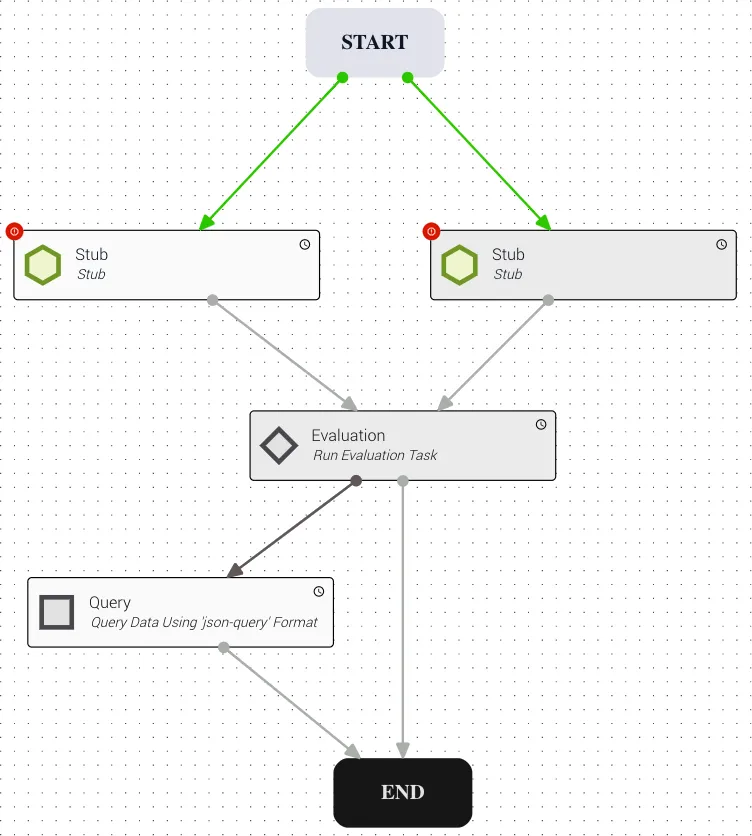
The following example shows two tasks that both provide input to an Evaluation (Eval) task. Because the two upstream tasks run concurrently, it’s impossible to predict which finishes first. This is an inherent challenge of parallel branching.
A path is a series of tasks that begins with the Start task and ends with the End task. When parallel branching is used, a single task can belong to many paths.
Possible outcomes for multiple inputs to a task
When there are multiple incoming transitions to a task, there are three possible outcomes: all inputs are received, one input is received, or no inputs are received.
All inputs received
A task does not wait for a specific transition binding value before executing. Rather, a task executes when all of its preceding tasks have executed and chosen a path. Even if the chosen path differs from the one drawn on the canvas, the workflow can proceed as long as the previous task has executed or declared itself as never going to execute (see Tasks that never run below). If all incoming transitions run, the subsequent task runs.
One input received
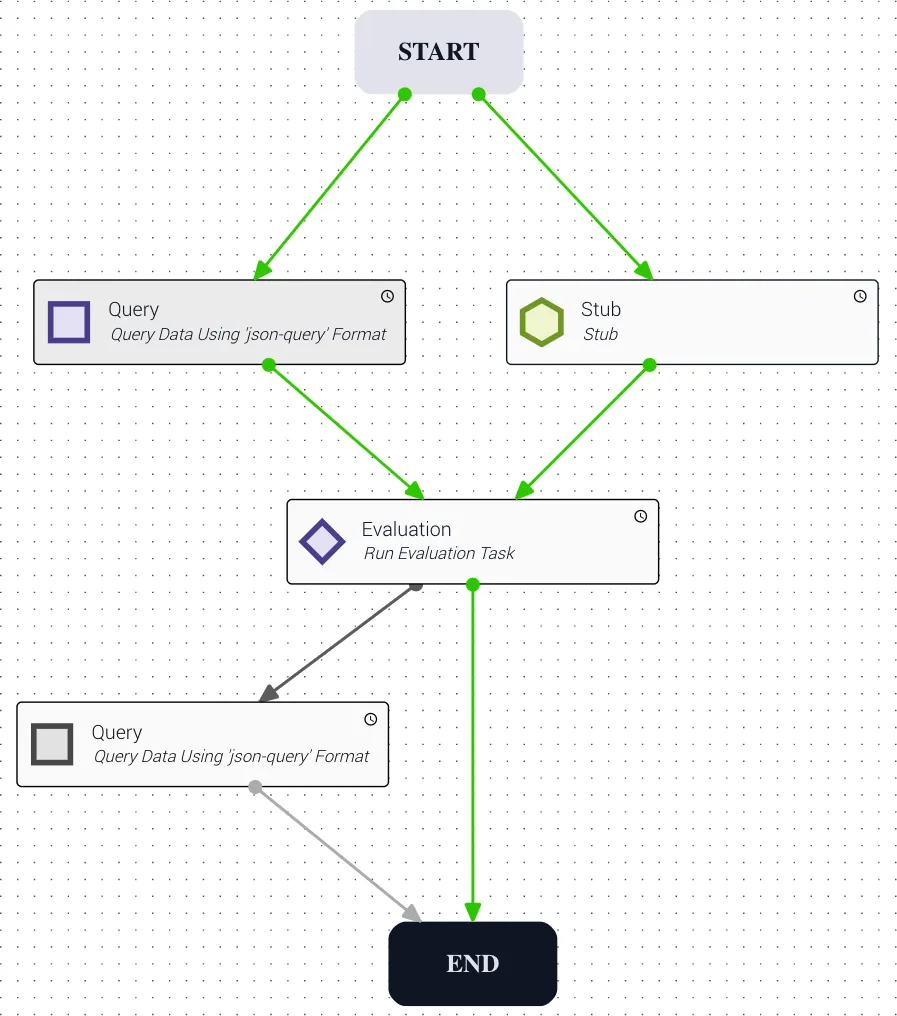
When at least one incoming transition occurs, and even if all other transitions are no longer possible, the subsequent task still runs. Any task references that do not exist evaluate as null. In the example below, this causes the Evaluation task to take the failure (red) transition path instead of the success (green) path.
Recognize the potential for confusion this causes when designing workflows. When the transition in the right path between Stub and Eval shows success (green), a designer might assume the only way the workflow advances is if that condition occurs. That is not the correct interpretation of how a workflow runs.
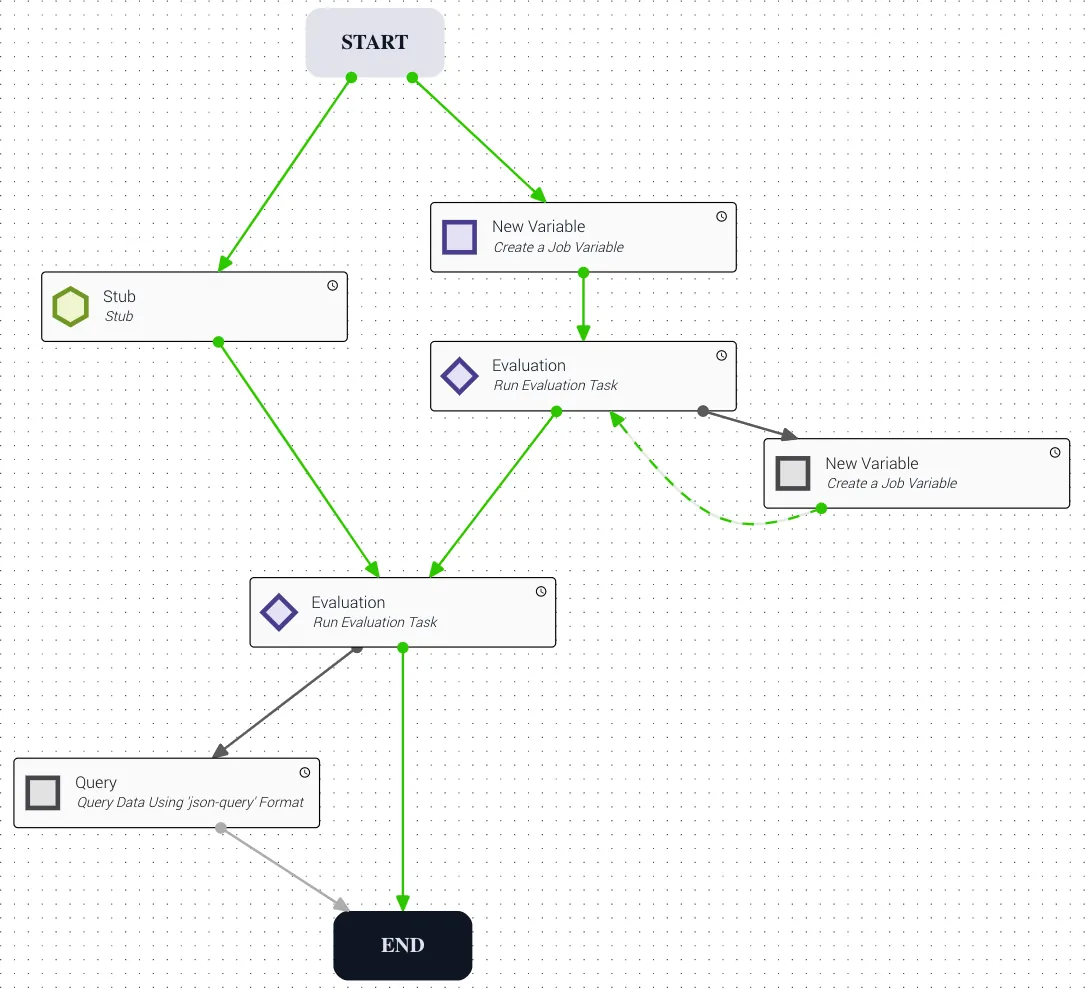
As shown below, the Stub task chose a path at runtime (shown in gray) — the task completed, but since the result was not green (success), it has done as much as it can. The left (green) path was chosen and the Evaluation task is now free to execute. Any references to the right parallel path’s Stub variables evaluate as null.
No input received
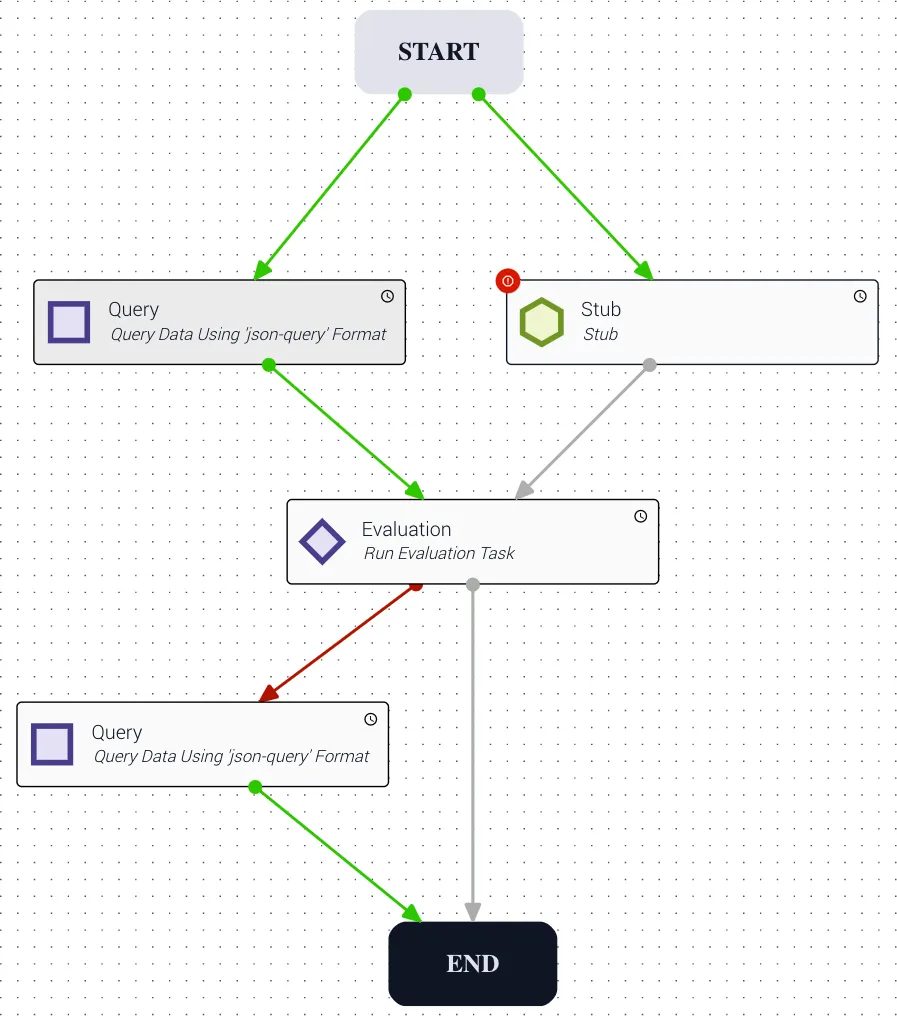
When neither incoming task succeeds, the subsequent task never runs. If this is the only task that leads to the End task, the job will fail.
Tasks that never run
If a task never runs, it still notifies subsequent tasks to determine whether they should run, based on parallel branching logic. For example, if a Stub task errors, it notifies all connected tasks that rely on a success transition that those transitions will never be taken. The next task (e.g., the first Query on the right parallel path) then notifies its subsequent task that it will never run, and so on. This notification chain continues until the End task or a task with multiple inputs is reached. Careful attention to all parallel paths is necessary to prevent a job from never completing.
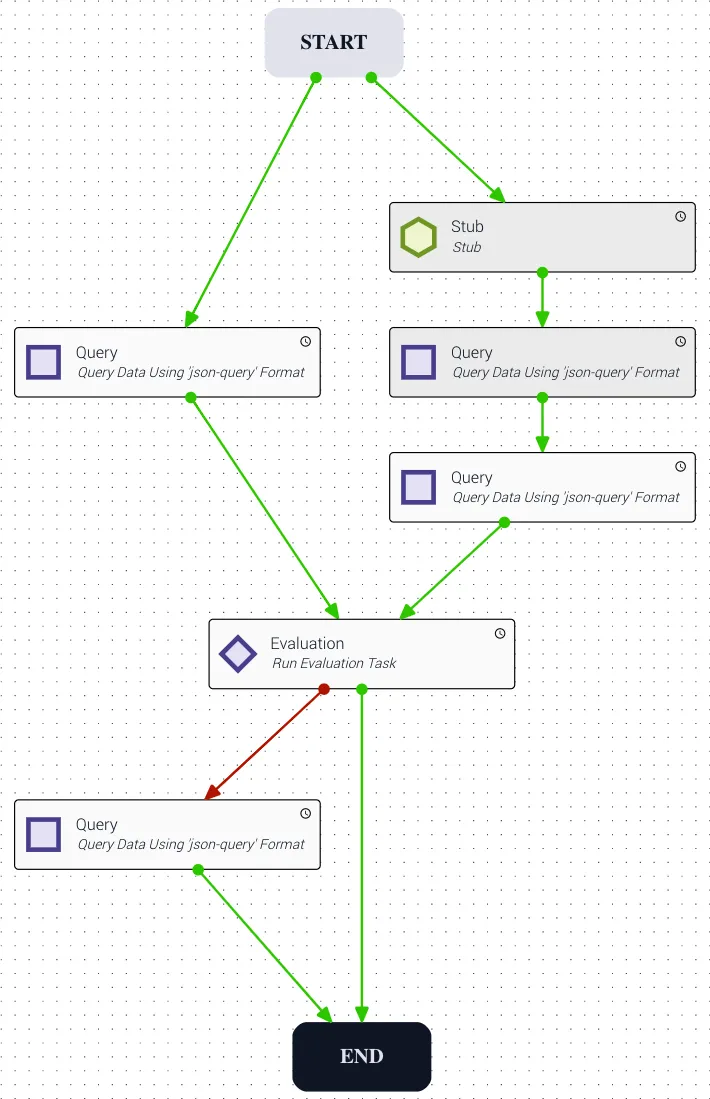
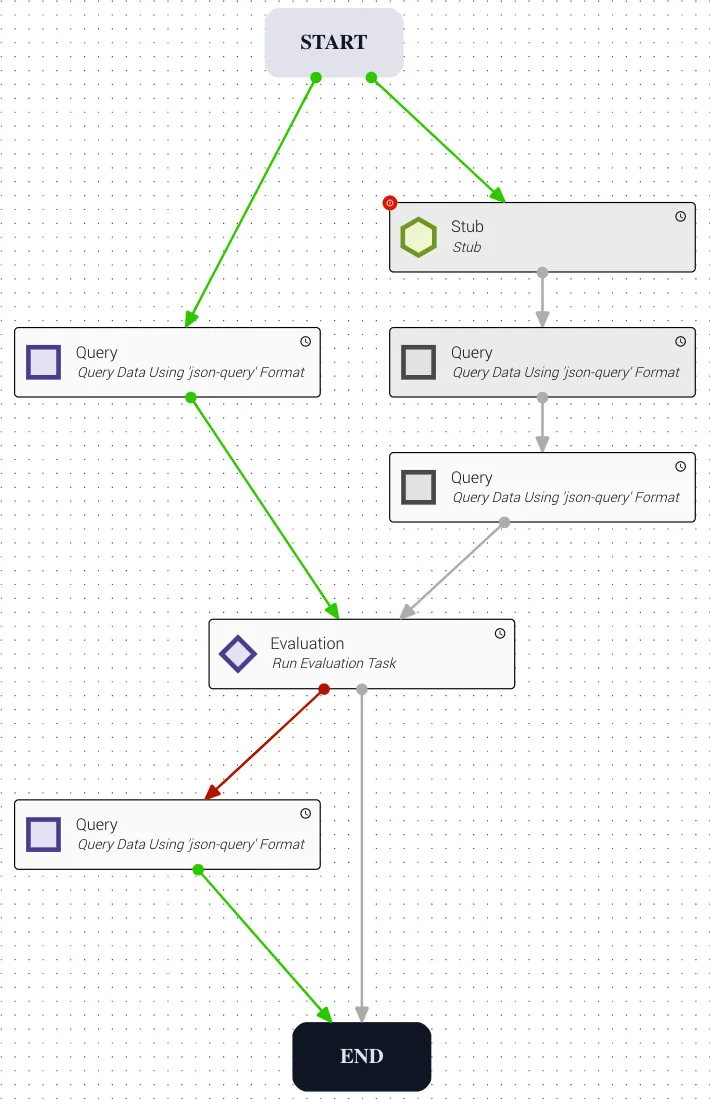
If one of two incoming tasks to a subsequent task never runs but the other succeeds, the subsequent task still runs — even if it may not have all the necessary data. In the example below, if the Stub task fails, it notifies Query on the right path that its transition will never run, and Query in turn notifies the second Query that its transition will never run. The Evaluation task is notified that the right path will never run and can look to its other inputs. Once the left path runs, the Evaluation task sets references for the unexecuted right-path Query tasks to null and performs the evaluation.
Revert transitions in parallel branching
Determining execution order becomes more complex when a workflow contains both a revert transition and parallel branching. When designing such a workflow, you must separate how the workflow looks visually from how it actually flows through its paths. When a revert transition occurs, all tasks on the path from the revert’s destination task to the End task are reset and executed again — even if they had already executed due to traversal of a different parallel path.
Using a revert within a parallel branch can cause all subsequent workflow tasks to run multiple times (1 + the number of reverts). This is expected behavior — plan your workflows accordingly.
Example 1
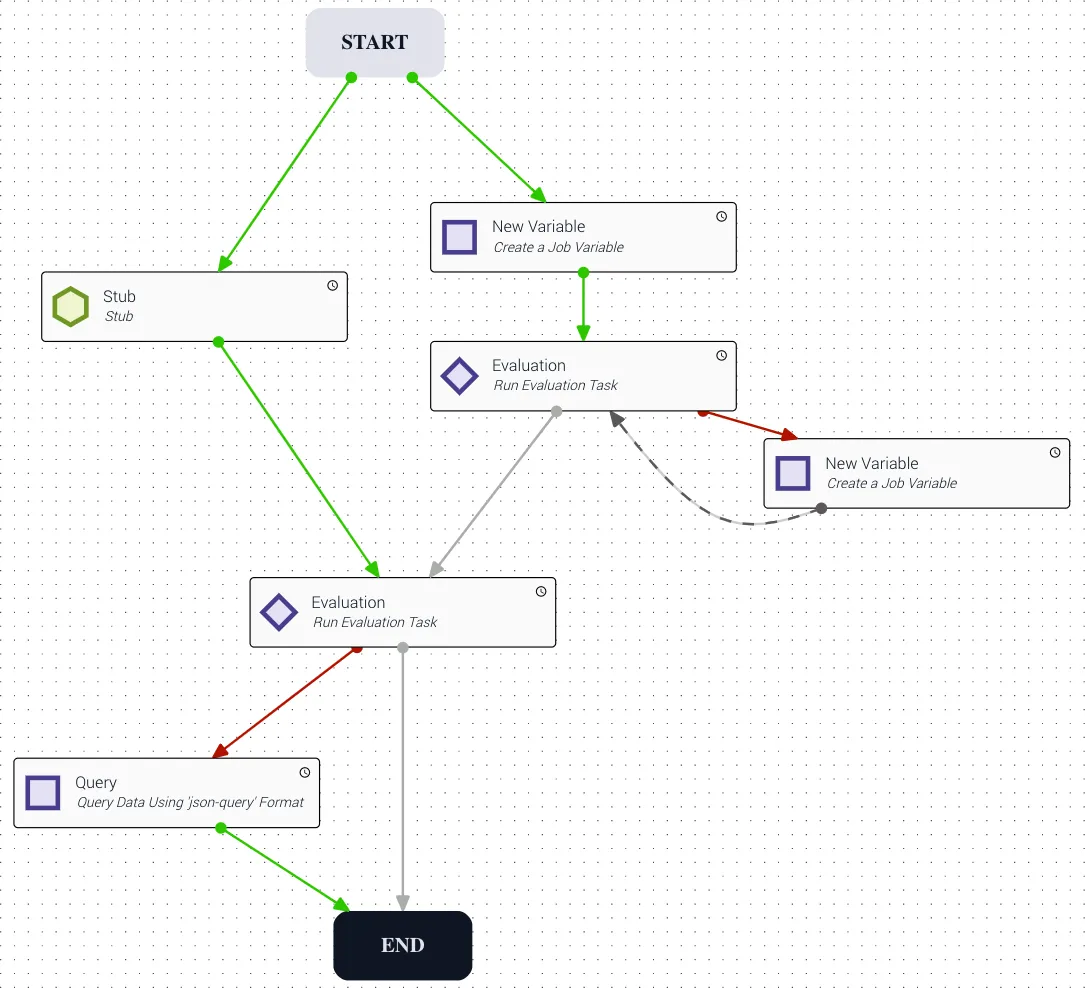
In the workflow below, a task has two paths that lead to a shared Evaluation task. The right path contains its own Evaluation task, which fails the first time. A job variable is then set to a value intended to cause the second run to succeed, but the transition from that variable is a revert back to the Evaluation task — so only after the revert does the second execution yield a success.
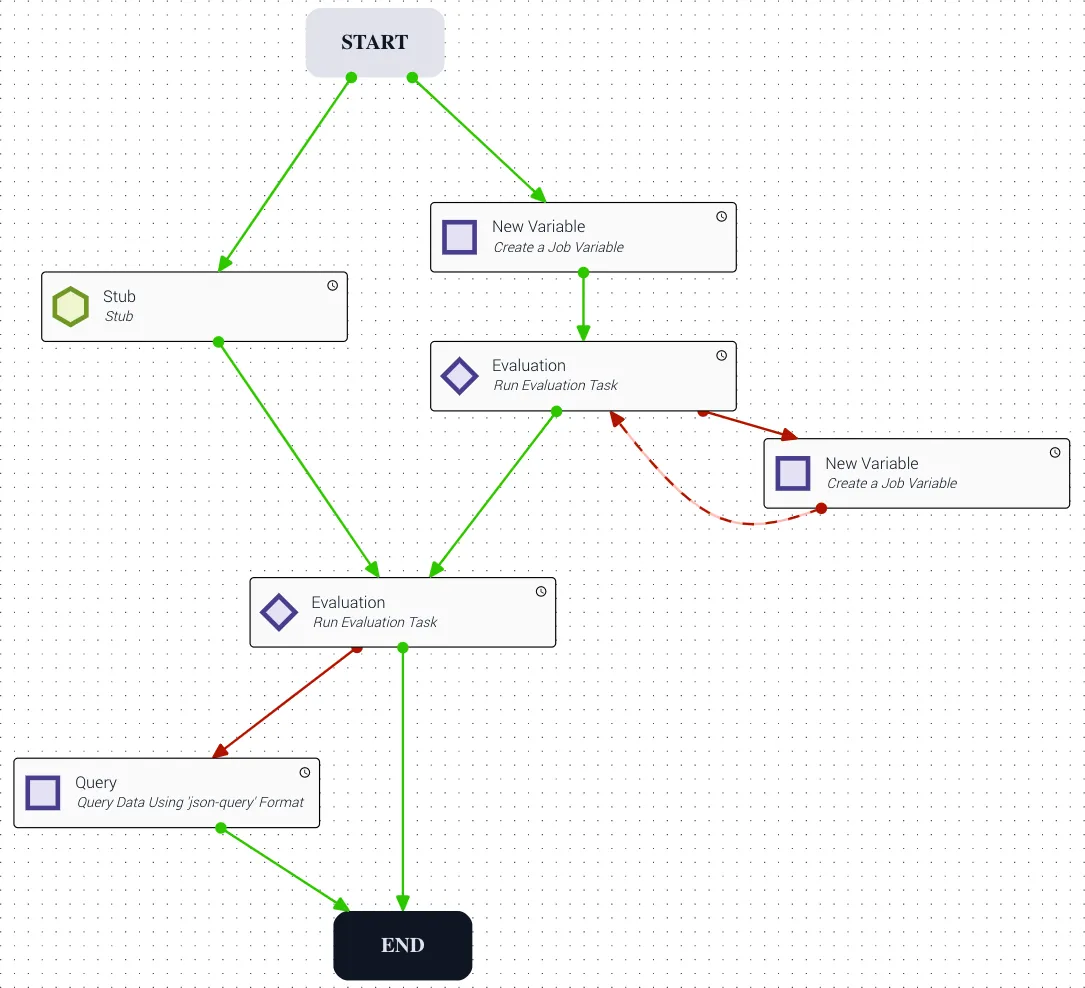
Due to the first execution of the right-path Evaluation task failing, the workflow goes to a task with a revert transition. The first Evaluation task notifies the shared Evaluation task that the path between them will never run.
Example 2
While the revert scenario is unfolding on the right, the left path executes and reaches the shared Evaluation task (where both paths converge) and runs for the first time. Because both preceding tasks have chosen a path, the shared Evaluation task runs — but in this case it fails because it does not have the correct data from the right path. A failure path to the Query task is then executed.
Example 3
When the right path reaches the revert transition, it resets all tasks subsequent to the first Evaluation task along its path and starts executing again. This causes the shared Evaluation task to run a second time. To avoid scenarios like this, find an alternative to using revert within parallel branching — such as converting the workflow to run sequentially or using a child job to handle the revert logic.
Revert transitions in parallel branching with child jobs
When a revert transition is used in a workflow that contains parallel paths, the revert may also revert over a running child job task. This does not stop the previously running child job — it instead launches a second child job.
Using a revert within a parallel branch can cause multiple instances of the same child job to run simultaneously. Avoid this when possible.
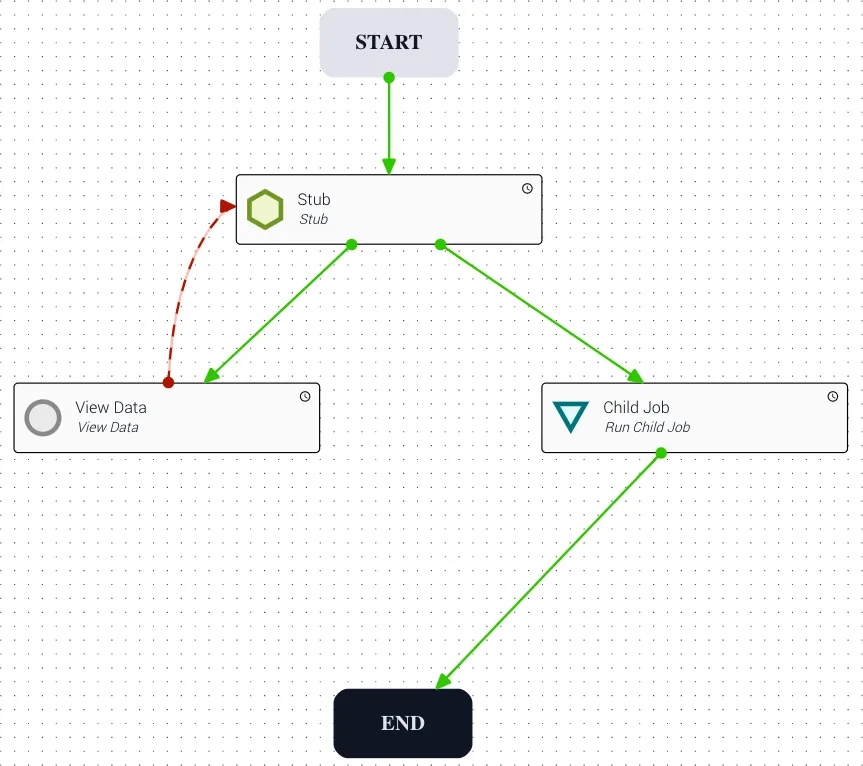
In the workflow below, the Stub task has parallel branches to both a ViewData manual task and a childJob task. If the manual task is worked before the child job finishes, the job reverts to the Stub task, which succeeds and then executes the childJob task again. This does not cancel or replace the initial child job — it starts a brand new child job while the first continues running to completion. If the previous child jobs are no longer needed, cancel them manually.
This same behavior applies when manually reverting over a paused child job.