

High-availability architecture
A Highly Available Architecture (HA2) is an Itential architecture where all components are redundant and can gracefully tolerate at least one catastrophic failure. This architecture is the recommended architecture for production and testing environments.
Architecture overview
The Itential Platform application performs many reads and writes against the database and is sensitive to high latencies. All components must be installed in the same data center and have authentication enabled.
The minimum HA2 architecture is composed of nine VMs:
- Two Itential Platform servers
- Three MongoDB servers
- Three Redis servers
- One Gateway server (optional)
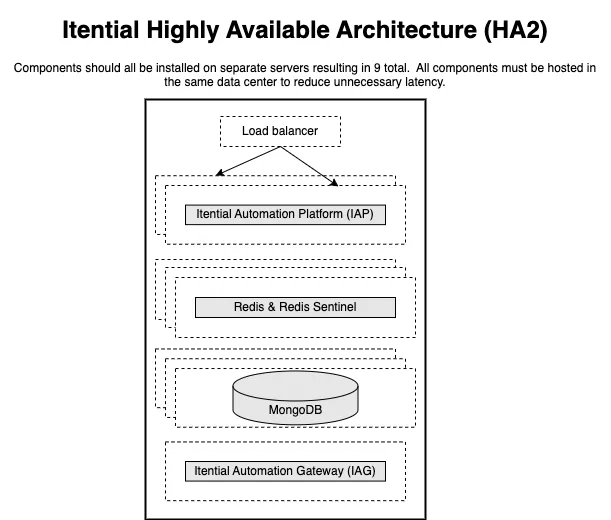
Components
Itential Platform instances communicate with one another through Redis and share data via MongoDB. Adding a new Itential Platform node and pointing it to the correct MongoDB and Redis is sufficient to achieve high availability. As Itential Platforms are added and configured, they are enabled to perform work.
Itential Platforms must have the following configurations:
- MongoDB connection strings must contain a reference to all members of the replica set
- Redis configurations must specify the list of all known Redis Sentinels and their Sentinel username and password (connections to HA Redis occur through Sentinels, not directly to Redis)
Highly available MongoDB
MongoDB clusters operate in a primary/secondary model where data written to the primary replicates to the secondary. If a primary MongoDB node fails, the replica set detects this failure and forces an election for a new primary. During this time the replica set may not accept reads and writes until the new primary is selected, usually after a few seconds. Once finished and a new primary is identified, the Itential Platform application resumes normal operation. Operators do not need to take action during this election.
Itential’s MongoDB cluster must have the following requirements:
- All replica set members must be defined in the Itential Platform config
- Authentication between the replica members must be done with either a shared key or X.509 certificate
- The database must have an admin user able to perform any operation
- The database must have an “itential” user that is granted the least amount of privileges required by the Itential Platform application (Itential Platform must be configured to use this user account)
For more information, see MongoDB Replication documentation.
Highly available Redis
Redis clusters operate in a primary/secondary model where data written to the primary replicates to the secondary. If a primary Redis node fails, the replica set detects this failure via Redis Sentinels and forces an election for a new primary. During this time the replica set may not accept reads and writes until the new primary is selected, usually after a few seconds. Once finished and a new primary is identified, the Itential Platform application resumes normal operation. Operators do not need to take action during this election.
Itential’s Redis cluster must have the following requirements:
- All Redis nodes must be defined in the Itential Platform profile configuration
- Authentication between the replica members is done with users defined in the Redis config file
- Redis must have an admin user able to perform any operation
- Redis must have an “itential” user that is granted the least amount of privileges required by the application (Itential Platform must be configured to use this user account)
- Redis must have a replication user that is granted the least amount of privileges required by the replication process
- Redis Sentinel must be included to monitor the Redis cluster and must be colocated with Redis
- Redis Sentinel must have an admin user able to perform any Sentinel task
- Redis nodes must maintain a low latency connection between nodes to avoid replication failures
For more information, see Redis Replication documentation.
Required user accounts
The validated designs are opinionated installations of Itential and its dependencies. The following user accounts are required by the dependencies.
MongoDB
Redis
Network requirements
In an environment where components are installed on more than one host, the following network traffic flows need to be allowed. All ports and networking specs are TCP protocol unless otherwise noted. Not all ports will need to be open for every supported architecture. Secure ports are only required when explicitly configured.
Hardware requirements
Processor
Processor specification requirements:
- Second generation or better Intel Xeon Platinum 8000 series processors
- Third generation or better AMD EPYC 7000 series processors
Memory
Memory specification requirement:
- DDR5 DRAM 3200 MHz or higher
Storage
Storage performance requirements in IOPS (16 kiB):
- 20000+ IOPS
- Non-spinning media (SSD, NVMe)
Network
Network speed requirement:
- 10 Gbps or higher
In some instances, adding additional dedicated interfaces that are focused on routing specific traffic to specific external systems can be explored. This routing of traffic would be configured at the OS-level (custom interfaces and routes) and requires the system administrator to manage it. An example would be separating NSO traffic from Redis/MongoDB destined traffic.
Hypervisor/host OS settings
These settings are strongly recommended for high load applications of Itential Platform:
- CPU affinity settings or similar functionality to prevent CPU starvation
- Full memory reservation
- One physical CPU per VM is preferred
- Huge pages for memory support enabled (except MongoDB)
- Memory compression disabled
- Minimal CPU allocation settings for scheduler according to CPU clock
Example: Assuming an Itential Platform VM on a server capable of 2.5GHz nominal speed:
Follow hypervisor recommendations when performing CPU reservations. In most cases the total of all CPU reservations for all VMs on a host cannot be more than 90% of the host capacity as 10% is reserved by the host itself.
MongoDB discourages the utilization of Transparent Huge Pages.
Server specifications
For production environments, all Itential Platform components should be installed on their own individual servers to properly support High Availability (HA). Disk references to pronghorn (seen in older deployments) should be changed to itential.
Itential Platform server
MongoDB server
Redis server
Gateway server
Troubleshoot
Troubleshoot common issues related to high availability architecture.
Identify failed task servers
If task execution fails in an HA Itential Platform environment, you can determine the specific Itential Platform server that attempted to execute the task by referencing the Server ID of the failed task.
Server ID configuration
Each Itential Platform server in an HA environment has a unique Server ID property that is defined in one of two ways:
- Manually via the
serverNameproperty of theproperties.jsonfile located in the Itential Platform installation directory - Automatically by combining the MAC address and Itential Platform port values and hashing them
When a server attempts to execute a task, its Server ID property is added to the Task Details panel of that task. Verify there are no connection issues affecting the server identified by the Server ID property of a failed task.