

Configure Redis Sentinel shared tokens
Large-scale web applications require load balancers to distribute user traffic across multiple servers. For high availability to work correctly, users must be able to move from one Itential Platform server to another without being prompted to log in again. To support this, Itential Platform stores all login tokens in a shared Redis location accessible to all servers in the cluster.
Itential Platform uses Redis Sentinel in a master-replica configuration to keep tokens available to all platform servers. This setup also provides automatic failover if a single Redis server goes offline.
This is a living document that is continually revised. It may not precisely match the Itential Deployer guide. Check for updates and contact Itential Product Support with any questions.
Recommended configuration
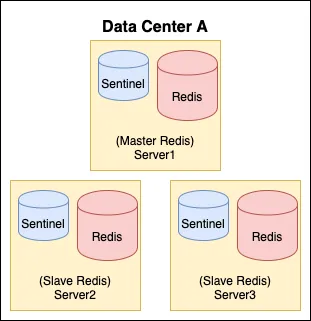
Itential recommends three Redis instances and three Sentinel instances for shared token storage: one Redis Sentinel pair per server, with three servers per data center. This provides the best combination of failover capability and supportability. In multi-data-center deployments, it’s important to deploy the Sentinels to three different data centers to avoid losing a majority of Sentinels in a data center outage and causing the Redis replica set to go into read-only mode.
Master server config
/etc/redis.conf
Replica server config
/etc/redis.conf
Sentinel config
/etc/redis-sentinel.conf
Itential Platform-specific settings
To minimize failover time when Sentinel detects a Redis instance is offline, apply the following settings. These values are based on internal testing and reduce user-facing delay during failover events.
/etc/redis-sentinel.conf
Security recommendations
Encryption
Itential Platform-to-Redis communication does not support SSL encryption by default due to a limitation in Redis. For details on Redis’s work to address this, see Redis encryption.
Because of this limitation, Itential strongly recommends that shared token Redis servers block all network access except from Itential Platform servers. Platform tokens should be treated as sensitive and confidential.
Redis 6 and later support TLS, but you must enable it with compile-time flags.
In disaster recovery or multi-data-center configurations, use separate Redis Sentinel setups in each data center, each connected only to the Itential Platform servers in that data center. Sharing tokens between data centers is not recommended due to the lack of encryption and the associated performance impact.
Passwords
Enable passwords on all Redis servers to limit access to token data. Once configured, Redis requires the password before granting access to any stored tokens.
Related resources
- Redis installation
- High availability with Redis Sentinel
- Redis replication
- Configure Redis and monitor health
- For installation guidance, see Install Platform.