

Depending on the inventory variables present for a device within the IAG Ansible inventory, an Itential role will take one of three different execution paths in the 2023.1 release version and higher. The role execution paths are categorized as follows:
The Fully integrated execution path includes a set of Ansible roles provided by IAG that are utilized for device types found in an internal “integrated device” table. The roles use well known Ansible modules supported by the Ansible community to retrieve operational state data from devices as well as retrieve and set the device configuration. A list of fully integrated devices can be found on this Platform compatibility page. You do not need to make any modifications in order to get the functionality provided by the Fully integrated roles.
Executing a role against a fully integrated device enables you to utilize the full suite of Itential Automation Gateway and Itential Platform features, such as Configuration Manager, Golden Configuration, and Command Templates.
The device must be explicitly in the IAG list of integrated devices, and you can successfully connect to the device using Ansible connection parameters.
The ansible_network_os variable must match a valid Ansible OS type, and it must be in the list of integrated devices, such as ios for Cisco IOS.
IAG provides a set of Ansible role templates that use the Netmiko library to connect and communicate with devices. The templates can be customized by users in order to communicate with devices that do not fall under the fully integrated category. This is only an option for devices which have prebuilt support from the Netmiko library. The list of devices supported by Netmiko is very large, however it has its own caveats and levels of support from that library. See Netmiko platforms for additional information regarding the device_type variable and options.
Executing a role that has been properly customized to use the Netmiko library enables you to utilize the majority of Itential Automation Gateway and Itential Platform features, such as Configuration Manager, Golden Configuration, and Command Templates.
You will most likely have to make a variety of changes to the files within the template in order to get Netmiko to successfully connect to the device and operate against the device exactly as expected. The templates are provided as a reasonable starting point and with the expectation that if Netmiko has a device_type for your device, you can easily enable connectivity and test the available functionality, such as sending commands and updating the configuration.
The device is not in the IAG list of integrated devices, and you can successfully connect to the device using Netmiko connection parameters.
The templates for the Ansible roles that use the Netmiko library can be found in the IAG release package at the following directory path:
automation_gateway/integrations/extensible_device_roles/ansible_netmiko
The roles should be copied to a new directory on the IAG server before they are modified in order to avoid being overwritten upon the next upgrade of IAG.
The names of the roles (i.e., itential_netmiko_cli, itential_netmiko_get_config, etc.) should not be modified. The main Itential roles (i.e., itential_cli, itential_get_config, etc.) are written to search for those explicit names at execution time.
The templates contain the minimum directory structure required for an Ansible role. You can modify the files in the template, including adding other directories, as needed to support your devices.
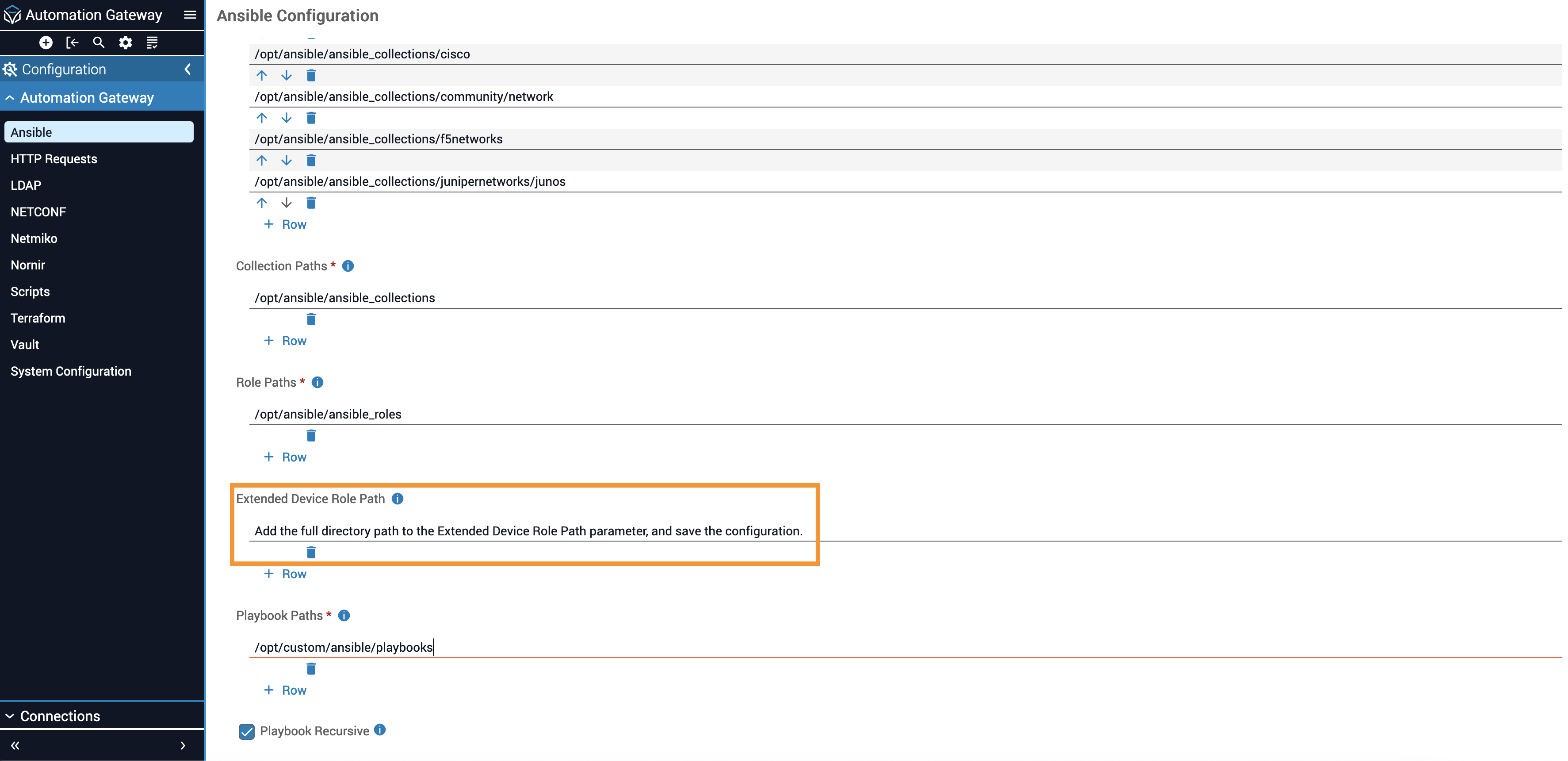
In order for the itential_netmiko_* roles to be found at execution time, the directory path where they were saved needs to be configured using the Automation Gateway UI. After logging into IAG, go to the Configuration → Ansible tab, add the full directory path to the Extended Device Role Path parameter, and save the configuration.
The main Itential roles (i.e., itential_cli, itential_get_config, etc.) are used as an entry point to execute the Ansible roles using the Netmiko library (i.e., itential_netmiko_cli, itential_netmiko_get_config, etc.). The Itential roles decide which code path to execute based on the presence and contents of different Ansible inventory variables. Below is the criteria that will cause the Netmiko customized template roles to be executed along with some example devices with variables that will match the criteria.
ansible_network_os variable must not match the name of a fully integrated device and should generally be omitted to avoid confusion and ensure the correct execution path is followed.ansible_connection must be set to local.provider.device_type or netmiko_device_type must be a valid Netmiko device_type.The following example host shows an explicit set of Netmiko-related variables nested under the provider object so that it is clear that this host is meant to be used only with the Netmiko roles.
The following example host shows an implicit set of Netmiko-related variables declared outside of the provider object. This method allows you to use mostly Ansible variables, which are converted into the provider object within the role template, along with the addition of netmiko_device_type so that it is correctly routed to the Netmiko roles.
IAG provides a set of Ansible role templates that can be customized by users to use their Ansible modules of choice to connect and communicate with devices. The templates are available for use with devices that do not fall under the fully integrated list and cannot be configured to work with the Netmiko library.
Executing a role that has been properly customized enables you to utilize the majority of Itential Automation Gateway and Itential Platform features, such as Configuration Manager, Golden Configuration, and Command Templates.
You will have to make a variety of changes to the files within the template in order to successfully connect to the device and operate against the device exactly as expected. The templates are provided as a reasonable starting point and are an example implementation of adding support for a Cisco IOS device.
ansible_network_os variable must not be in the list of integrated device types and should instead be a custom value that matches the custom role you created (see the templates for additional information).The Ansible customized template roles can be found in the IAG release package at the following directory path:
automation_gateway/integrations/extensible_device_roles/ansible_custom
The roles should be copied to a new directory on the IAG server before they are modified in order to avoid being overwritten upon the next upgrade of IAG.
The names of the roles (i.e., iag_cli, iag_get_config, etc.) should not be modified. The main Itential roles (i.e., itential_cli, itential_get_config, etc.) are written to search for those explicit names at execution time.
The templates contain the minimum directory structure required for an Ansible role. You can modify the files in the template, including adding other directories, as needed to support your devices.
In order for the iag_* roles to be found at execution time, the directory path where they were saved needs to be configured using the IAG UI. After logging into the UI, go to the Configuration → Ansible tab, add the full directory path to the Extended Device Role Path parameter, and save the configuration.
The main Itential roles (i.e., itential_cli, itential_get_config, etc.) are used as an entry point to execute the Ansible customized roles (i.e., iag_cli, iag_get_config, etc.). The Itential roles decide which code path to execute based on the presence and contents of different Ansible inventory variables. Below is the criteria that will cause the Ansible customized template roles to be executed along with an example device with variables that will match the criteria.
The ansible_network_os variable must not match the name of a fully integrated device, and the variables netmiko_device_type and provider.device_type must not be present.
The following example host shows a set of Ansible custom variables.