Use hidden keyword extension

In some cases, the parameters defined in user decorations for Ansible modules, roles, playbooks, Nornir modules, Terraform plans, and scripts may have values that are displayed in the console log. If the values should not be displayed in the log due to privacy concerns, you can add the JSON extension keyword $hidden to the schema to hide the value.


1

Select your module, playbook, or script

Select the desired module, playbook, or script from the left navigation.

3

Add the $hidden keyword extension

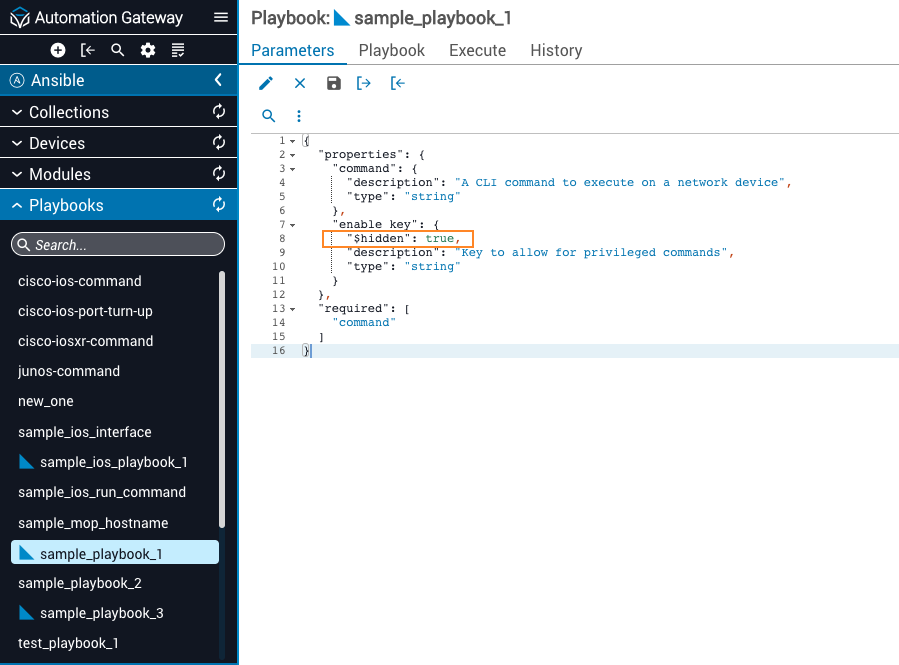
Use the edit icon to add the $hidden keyword extension directly into the parameter of the schema that should be omitted from the console log.

4

Enable the keyword extension

Set the keyword extension to true for the values to be hidden.

5

Save the schema parameter

Click the Save icon to update the change in the schema parameter.

Parameters tab
6

Execute with the hidden value

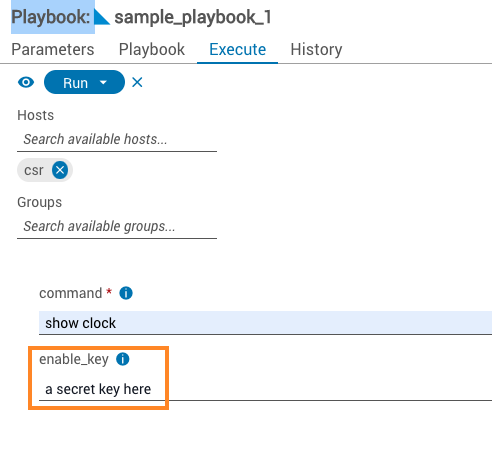
Click the Execute tab and enter the information for the enable_key that will be hidden.

Execute tab

When checking the console log, the $hidden keyword extension will have removed the value and replaced it with a fixed set of asterisks.