For AI agents: a documentation index is available at the root level at /llms.txt and /llms-full.txt. Append /llms.txt to any URL for a page-level index, or .md for the markdown version of any page.
Open sourceSupportFAQsDocs Home
DocumentationRelease notes
  • Itential Automation Gateway
    • Overview
    • Related terminology
    • Navigate UI
      • Built-in Ansible roles
      • Roles, modules, and playbooks
      • Add new role
      • Add a new playbook
      • Ansible collections
      • Ansible F5 device provider object
      • Role execution parameters
      • Execution paths
    • Automatic discovery in IAG
    • Use hidden keyword extension
    • Edit the description field
    • Edit JSON schema
    • Manage decorations
    • View audit logs
LogoLogo
Open sourceSupportFAQsDocs Home
On this page
  • Default location to add roles
  • Refresh a new role
Itential Automation GatewayAnsible

Add new role

Was this page helpful?
Previous

Add a new playbook

Next
Built with

New roles must be added to Ansible first before they can be synchronized and viewed by Automation Gateway.

Default location to add roles

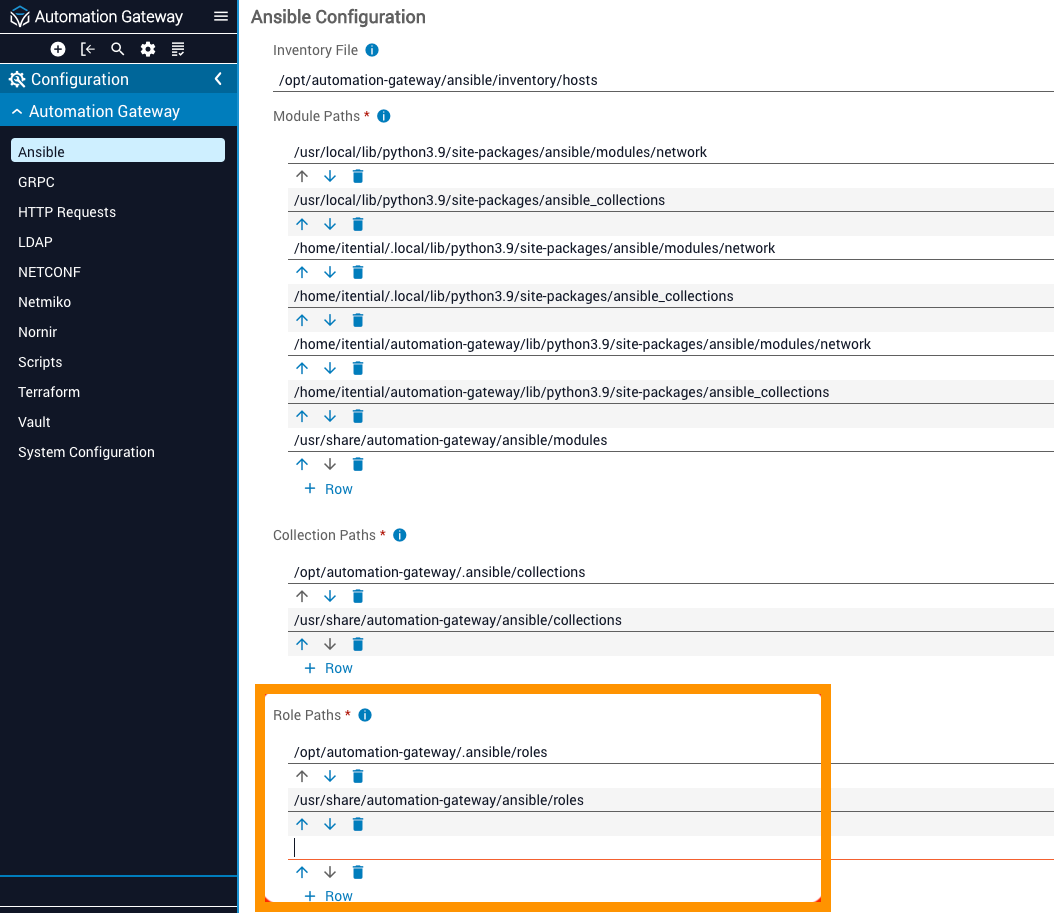
The default location for custom content to add a role is /usr/share/automation-gateway/ansible/roles, or you can customize your own folder path and add it to the Configuration/Ansible/Role Paths array. Once you add a role to a folder that is in the “Role Paths” array and refresh the roles in Automation Gateway, it should appear.

Ansible role paths configuration in Automation Gateway

Refresh a new role

1

Navigate to API documentation

Navigate to API Documentation within the Automation Gateway UI.

2

Find the refresh endpoint

Find and expand POST /roles/refresh.

3

Try it out

Click Try it out!

4

Execute the refresh

Click Execute to refresh the cache and re-sync the roles with Ansible.

5

Verify the response

Verify the response. Response Code 200 indicates the refresh was successful.

6

View the new roles

Go back to the Roles section of Automation Gateway to view and use the new roles.

POST /roles/refresh endpoint in the API documentation
Response from POST /roles/refresh showing a successful refresh