

Default adapter protocol changing to https
Itential is updating the default protocol for Adapters from HTTP to HTTPS to enhance security across our platform. This change ensures secure connections are the standard, and HTTP connections require explicit opt-in.
This change applies only to adapters. It does not impact integrations.
Adapters published on or after Monday, December 1, 2025 will default to HTTPS when the protocol property is not explicitly defined in the service instance configuration.
Impact to your environment
Your Adapter instances may stop working after upgrading if both of the following conditions are true:
- The Adapter’s service instance configuration in Admin Essentials is missing the protocol property
- You upgrade to an Adapter version published after Monday, December 1, 2025
In this case, your Adapter will default to HTTPS and may fail to connect if your service requires HTTP.
Adapters not affected by this change
The following Adapters are not impacted by this change. No action is required prior to upgrading them:
- adapter-db_mongo
- adapter-db_mssql
- adapter-db_mysql
- adapter-db_oracle
- adapter-db_postgresql
- adapter-db_sybase
- adapter-email
- adapter-git
- adapter-kafkav2
- adapter-mockdevice
- adapter-winston_syslog
What should I do?
Complete the following steps to configure your Adapter to use a specific connection protocol. These steps should be performed before upgrading an Adapter to a new version:
- Navigate to Admin Essentials
- Select your Adapter’s service instance and navigate to the Configuration tab
- Verify that the protocol property is defined
- If missing, add the protocol property with the appropriate value (e.g., “http” or “https”). This is the best practice for Adapter service configuration.
- Optionally, you do not need to add the protocol property, however the default behavior will be to connect via HTTPS for any Adapter released on or after December 1, 2025.
Example configuration
You can define the protocol property in two ways:
Option 1: Using the protocol dropdown in the Adapter Details view
Select either “http” or “https” from the protocol dropdown menu in the Adapter Details view.
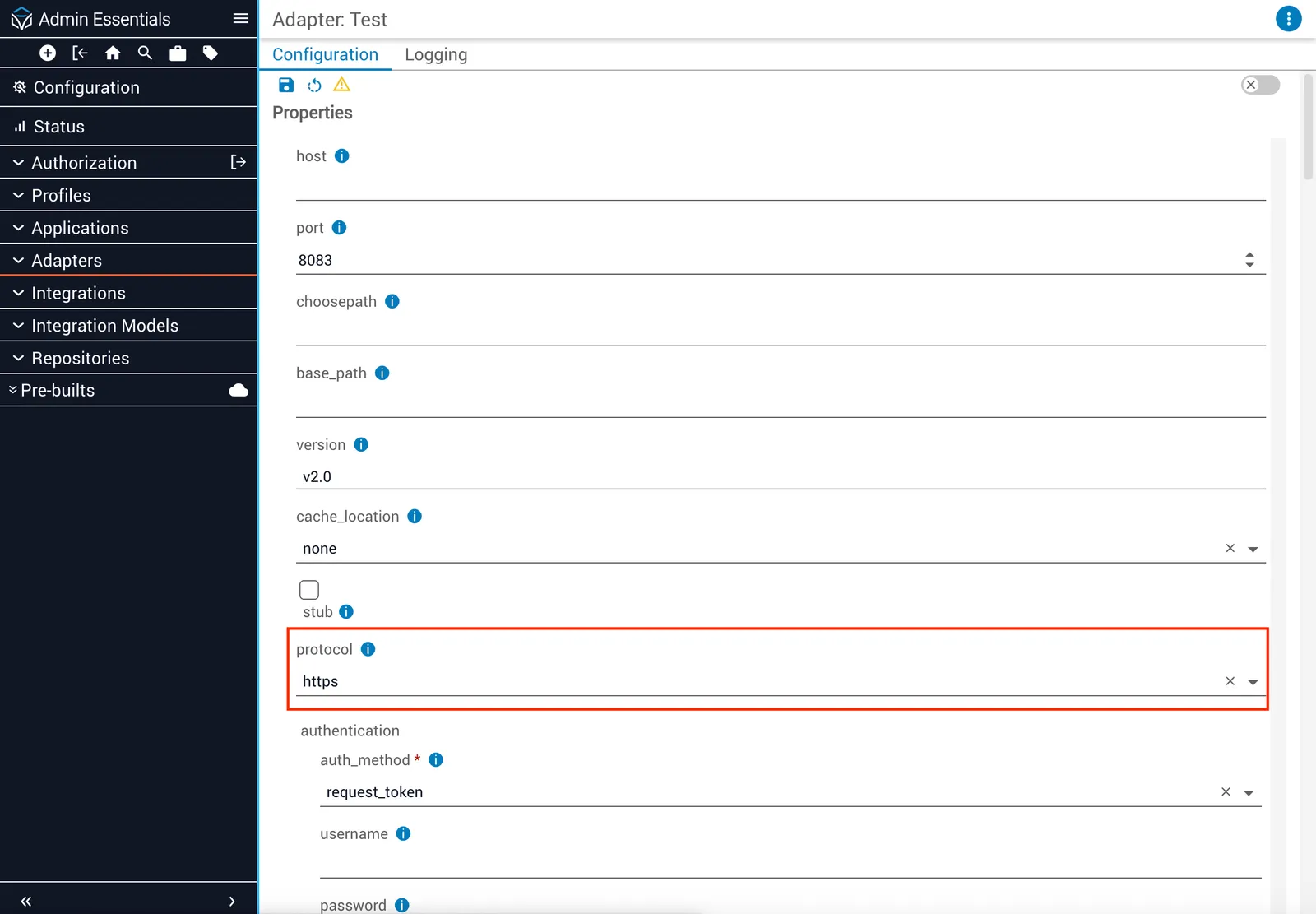
Option 2: Using JSON in the Advanced view
Add the protocol property directly to your Adapter service configuration from the Advanced view.
For more information on the Details and Advanced views, see Adapters.
Ongoing impact
Once you update your Adapter configuration as described above, no further action will be required. Future Adapter version upgrades will not require changes to the service configuration to set the default protocol.
Questions?
If you have questions about this change or need assistance reviewing your configuration, contact our support team.