Blue-green deployments
Blue-green deployments
A blue-green deployment has two separate, but identical, environments where both “old” and “new” versions of an application run simultaneously in production. Blue is the old version, and Green is the new one. Users are migrated to the new application version (Green) after it has been deployed to production.
Using a blue-green deployment increases application availability and reduces deployment risk by simplifying the rollback process if a deployment fails. Deployments and upgrades can be staged in advance during normal business hours so end users are not interrupted. After users are moved to the new application version (Green), the old version (Blue) can act as a failover if code must be rolled back to the previous version due to bugs or critical errors. Changes made on Blue never affect Green, including code running adapters and applications, database documents such as workflows, and configurations.
Blue-green architecture in Itential Platform
Itential structures its blue-green deployment architecture with two Itential Platform stacks defined as “Separate” and “Identical”.
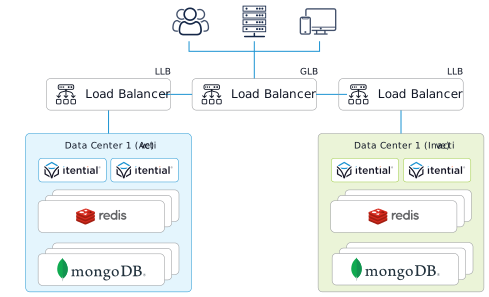
Separate Itential Platform
Itential Platform that is “Separate” is defined as having a separate:
- Logical database in MongoDB
- Database in Redis
A “Separate” Itential Platform does not interfere with the “Identical” Itential Platform environment during the execution of automations.
Identical Itential Platform
Itential Platform is “Identical” to another Itential Platform if it has the same set of native resource models (defined below) in the MongoDB logical database. The database data required to make an “Identical” Itential Platform is:
- An
iap_profilesdocument for both Green Itential Platform and Blue Itential Platform - A
service_configsdocument for both Green Itential Platform and Blue Itential Platform - An identical set of native resource model documents
- An identical set of custom resource model documents owned by custom applications/adapters
Native resource models
Each Itential Platform in a blue-green deployment has a set of native resource models that configure Itential Platform to work with automations and resource components to provide a consistent development and automated management experience. These include the following collections, but may also include custom collections from custom applications/adapters.
Collections:
blue-green deployment process
Create a blue-green environment using the process outlined below. This requires Itential Platform release version 2023.1 and higher.
Create Green Itential Platform
Create a “Separate”, but “Identical” Itential Platform using the desired new version of Itential Platform. The new Itential Platform will be referred to as “Green” and the existing (old) Itential Platform will be referred to as “Blue”.
Green Itential Platform must have:
startJobsdeactivated- Task Worker deactivated
- An
iap_profilesdocument - A
service_configsdocument
Copy native resource models
Copy over all native resource models, including any running schema migrations.

