

Choose a deployment architecture
Itential Gateway supports multiple deployment models to meet different scalability, resilience, and infrastructure requirements. This topic describes each model and helps you choose the right one for your environment.
Key concepts
Node types
Gateway servers (controller nodes)
Gateway servers (also called controller nodes or core servers) manage automation resources, handle incoming requests from gateway clients, and maintain connections to Gateway Manager. These nodes serve as the control plane for your Gateway deployment and are responsible for orchestrating service execution across the cluster. In all-in-one deployments, gateway servers also execute services directly on the same node.
Runner nodes
Runner nodes (also called runners) are specialized execution-only nodes that run automation services such as scripts, playbooks, and plans on behalf of the gateway server, which handles coordination and management. In all-in-one deployments, the gateway server performs both roles on its own. As your workloads increase, you can add runner nodes to distribute execution and process more tasks in parallel. Each runner node you add increases the cluster’s overall capacity. To add one, place the Gateway 5 binary on a server and point it at the cluster. For detailed procedures, see Configure distributed execution clusters.
Active and standby nodes
In high availability configurations, only one gateway server can be active at a time. The active node maintains the connection to Gateway Manager and handles all incoming requests. Standby nodes remain in a hot standby state, ready to take over immediately if the active node fails. For more information, see Configure high availability clusters.
Physical cluster
A physical gateway cluster consists of one or more gateway servers and runner nodes that share the same automation resources (services, repositories, configuration) and appear as a single, unified execution environment to Itential Platform. When Itential Platform connects to Gateway 5 through Gateway Manager, it connects to the cluster, not individual servers. You can deploy a single cluster or multiple independent clusters to separate environments by geography or network segment. Nodes in a cluster that runs more than one runner communicate through a shared database (etcd or Amazon DynamoDB) for resource sharing and coordination.
Virtual cluster
A virtual cluster is a Gateway Manager construct that sits above physical clusters in the data model. It groups two or more physical clusters under a single name and provides either automatic failover (active/standby) or job distribution across all members (load balancing). Platform features target a virtual cluster by name exactly as they would a physical cluster — Gateway Manager handles routing transparently. Virtual clusters are configured in Gateway Manager, not at the individual gateway level. For more information, see Virtual clusters overview.
Deployment models
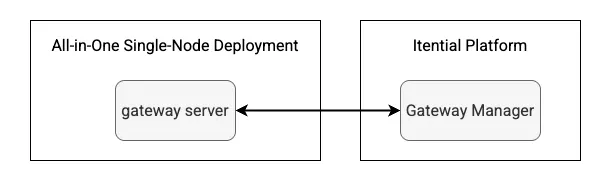
1. All-in-one single-node
The most basic Gateway deployment consists of a single gateway server that handles both management and execution on the same node. Services run directly on the gateway server without separate runner nodes.
2. All-in-one active/standby high availability
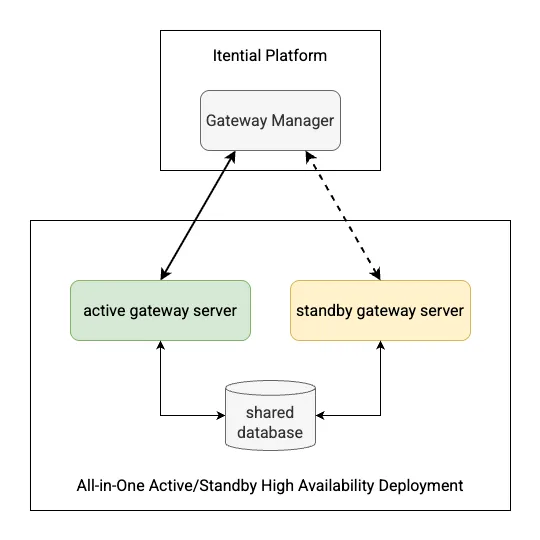
This deployment model provides basic high availability with one active gateway server and one or more standby gateway servers. All nodes operate in all-in-one mode, handling both management and execution without separate runner nodes.
Key characteristics:
- Only one node is active at any time
- The active node maintains the connection to Gateway Manager
- Standby nodes monitor the active node through the shared database (etcd or Amazon DynamoDB)
- Automatic failover occurs when the active node becomes unavailable
- All nodes appear as a single gateway cluster in Gateway Manager
Use cases:
- Environments requiring basic high availability
- Deployments where execution load is moderate and can be handled on gateway servers
- Organizations wanting high availability without the complexity of distributed execution
3. Distributed service execution with single cluster
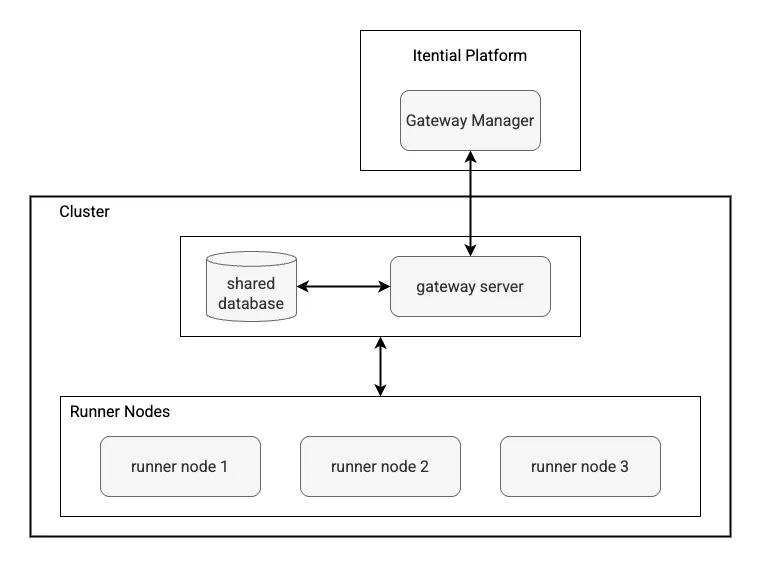
This architecture separates management from execution by introducing dedicated runner nodes. One or more gateway servers handle management and coordination, while multiple runner nodes handle service execution.
Key characteristics:
- Gateway servers manage resources and coordinate execution
- Runner nodes focus exclusively on service execution
- All nodes share resources through a shared database
- Gateway clients and Gateway Manager send requests to gateway servers, which delegate execution to runners
Use cases:
- High-volume automation environments
- Scenarios requiring dedicated execution capacity
- Deployments where execution nodes need specific configurations or access
4. High availability with distributed execution
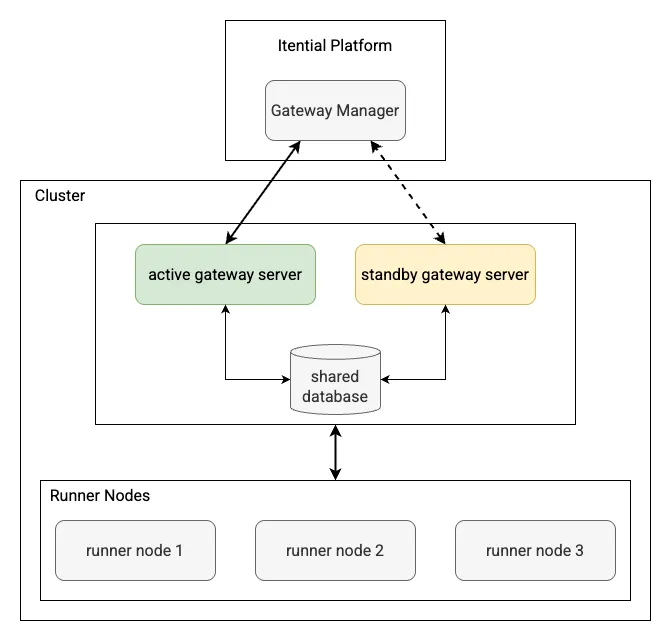
This model combines high availability gateway servers with distributed runner nodes, providing both resilience and scalability within a single cluster.
Key characteristics:
- Multiple gateway servers in active/standby configuration
- Dedicated runner nodes for service execution
- All gateway servers can send execution requests to any runner node
- Shared database enables coordination across all node types
Use cases:
- Mission-critical environments requiring both high availability and high throughput
- Large-scale deployments with diverse execution requirements
- Enterprise environments with strict uptime requirements
5. Multiple physical clusters
For complex environments, you can deploy multiple independent physical clusters, each with its own cluster ID and potentially its own shared database.
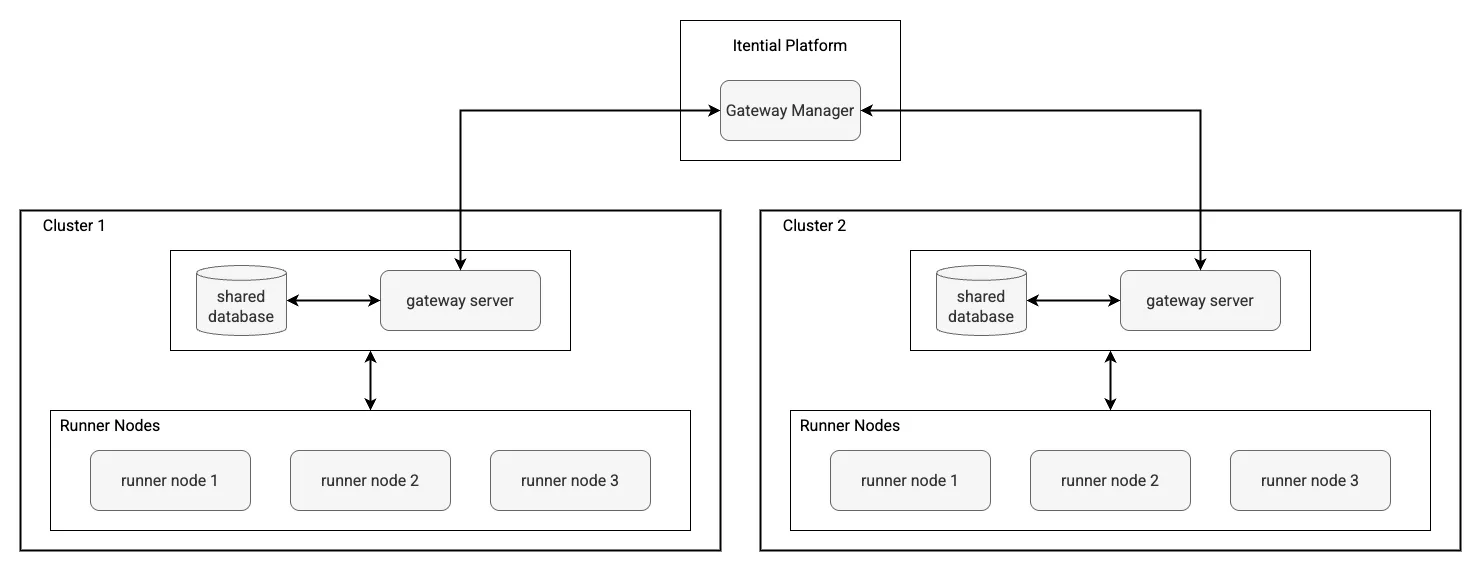
Key characteristics:
- Each cluster operates independently with a unique cluster ID
- Clusters can have their own databases or share a common one
- Resources are namespaced per cluster even when sharing a database
- Enables geographic distribution and network segmentation
Use cases:
- Geographically distributed infrastructure
- Network-segmented environments with firewall restrictions
- Organizations requiring logical separation of automation domains
- Scenarios where runner nodes need proximity to target infrastructure
When you deploy multiple clusters, you designate one as the Platform default cluster in Admin Essentials. Gateway-dependent features use the default cluster unless a feature-specific cluster is configured. For more information, see Gateway configuration.
To add resilience or load distribution across multiple clusters, use a virtual cluster in Gateway Manager. See Model 6 below.
6. Standalone gateways with virtual cluster
This model composes two or more standalone gateway servers into a single logical cluster using a Gateway Manager virtual cluster, without a shared etcd or Amazon DynamoDB database between them.
Each member gateway runs as an independent all-in-one server with local storage. Gateway Manager distributes jobs across members or routes failover according to the virtual cluster type you choose:
- Active/standby — one member serves traffic; others stand by in ordered failover sequence. If the active member becomes unreachable, Gateway Manager routes new jobs to the next available backup.
- Load balancing — all members serve traffic simultaneously. Gateway Manager distributes each job to the member with the fewest active jobs (least outstanding requests).
Key characteristics:
- Members are independent standalone gateways — no shared database required between them
- Each member uses local storage
- Virtual cluster configuration lives entirely in Gateway Manager
- Platform features select the virtual cluster by name; no per-feature changes are required
- Members can be deployed across regions without cross-region database dependencies
When to use each virtual cluster type:
Use cases:
- Scale-out across many gateway servers without the overhead of a shared database tier
- Multi-region deployments where cross-region etcd latency is a constraint
- Resilience across data center or cluster-level boundaries
- Teams that want to manage each gateway independently while presenting a single cluster name to Platform
A load-balanced virtual cluster requires at least two member clusters to enable. For setup procedures, see Create a virtual cluster.
Planning considerations
Availability and resilience
There are two distinct levels of resilience to plan for, and they use different mechanisms:
- Node-level resilience (within a single cluster) — use active/standby gateway servers (models 2 and 4). If the active gateway server fails, a standby takes over automatically.
- Cluster-level resilience (across independent clusters) — use an active/standby virtual cluster in Gateway Manager (model 6). If an entire cluster becomes unreachable, Gateway Manager routes new jobs to the next cluster in the failover chain.
These are independent levers. You can combine them: a virtual cluster whose members are themselves high-availability clusters (models 2 or 4) provides both node-level and cluster-level resilience.
Scale requirements
- Low to moderate volume — all-in-one single-node or active/standby (models 1–2)
- High volume within a single cluster — distributed execution with dedicated runner nodes (models 3–4)
- Scale out across many gateways — load-balanced virtual cluster over standalone gateways (model 6); no shared database required between members
Infrastructure constraints
- Network segmentation — multiple clusters are typically required; use a virtual cluster to present them as one to Platform
- Geographic distribution — standalone gateways under a virtual cluster are preferred over a single etcd-clustered deployment spanning regions; etcd degrades over cross-region latency
- Resource isolation — distributed execution (models 3–4) provides better resource management within a cluster
- Firewall restrictions — runner nodes can be positioned closer to target infrastructure
Operational complexity
- Simplest — all-in-one single-node (model 1)
- Moderate — all-in-one active/standby or standalone with virtual cluster (models 2, 6)
- Complex — distributed execution architectures (models 3–4)
- Most complex — multiple physical clusters without virtual clusters (model 5)
Architecture decision framework
When selecting a deployment model, consider these factors in order of priority:
- Availability requirements — determine whether node-level resilience, cluster-level resilience, or both are required
- Scale expectations — assess current and projected automation volume, and whether that volume is best handled by adding runners to one cluster or distributing across multiple clusters
- Infrastructure constraints — evaluate network segmentation, geographic distribution, and cross-region latency requirements
- Operational capabilities — consider your team’s ability to manage complex deployments
- Growth planning — ensure the chosen model can accommodate future expansion
The Gateway architecture is designed to allow evolution from simpler to more complex models as your requirements grow.