

Configure the NSO adapter
The NSO adapter connects to NSO using the web UI port and NETCONF port. Each time the NSO adapter establishes a connection, it reads the service models advertised by NSO. To securely configure the NSO adapter, configure the HTTP hostname with the same hostname as the common name in the NSO server certificate.
- NSO needs to be installed on a server that Itential Platform can access.
- NSO does not need to be installed on the same server as Itential Platform.
- Refer to the NSO Version Support policy.
Adapter properties
Sample configuration
The following sample configuration is provided for reference. Configure these properties: http.host, http.port, ssl.enabled, ssl.caFile, ssl.ciphers, netconf.host, netconf.port, credentials.user, credentials.passwd.
By default, the configuration uses machineLogin for all transactions. To have NSO handle individual user authorization, configure NSO with an external authentication script capable of returning external group memberships for a given user ID. Configure NSO for external authentication and set authenticationStrategy.method to tokenLogin instead of machineLogin.
Itential Tools package compatibility with NSO
Two packages support various Cisco NSO versions in integration with Itential Platform: itential-tools and itential-tools-nso6.4.
If you have access to the itential_tools repository in Nexus, you can access both packages and install either based on your NSO version.
itential-tools
itential-tools is compatible with NSO versions: 5.6.x, 5.7.x (LTS), 5.8.x, 6.0.x, 6.1.x (LTS), 6.2.x, 6.3.x.
itential-tools-nso6.4
itential-tools-nso6.4 is specifically built to support NSO 6.4 and above.
If you are using NSO 6.4 and above along with the itential-tools-nso6.4 package, you must use one of the following minimum versions of adapter-nso:
- Platform 6.0.3 or later
- 2023.2.14 or later
- 2023.1.34 or later
Itential Tools in the Nexus repository
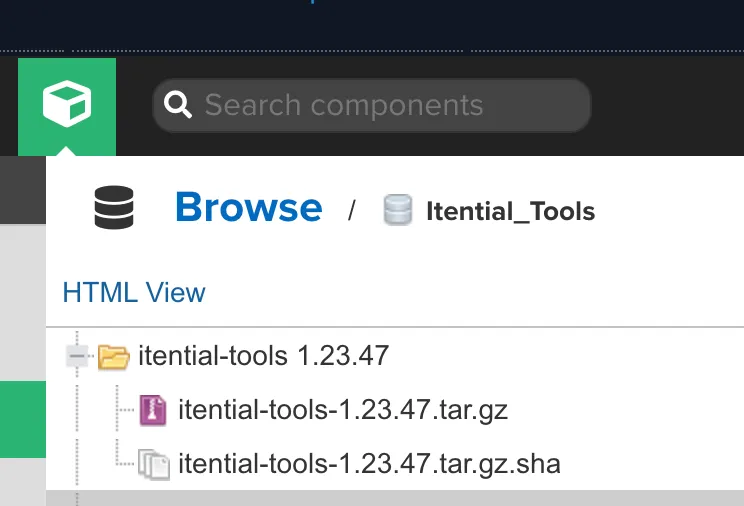
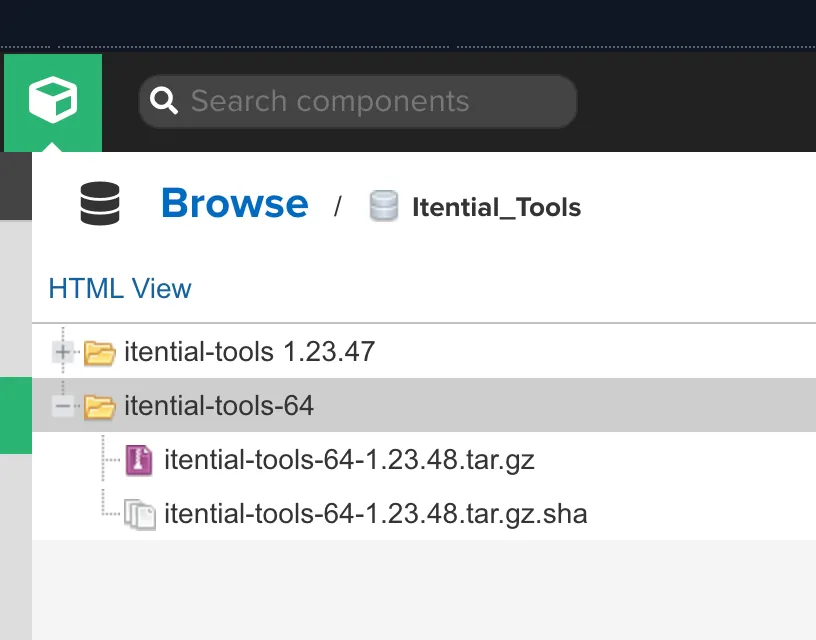
The Nexus repository manager has two folder types: itential_tools and itential_tools-64. Each folder contains the assets and components that Itential Platform needs to interact with NSO.
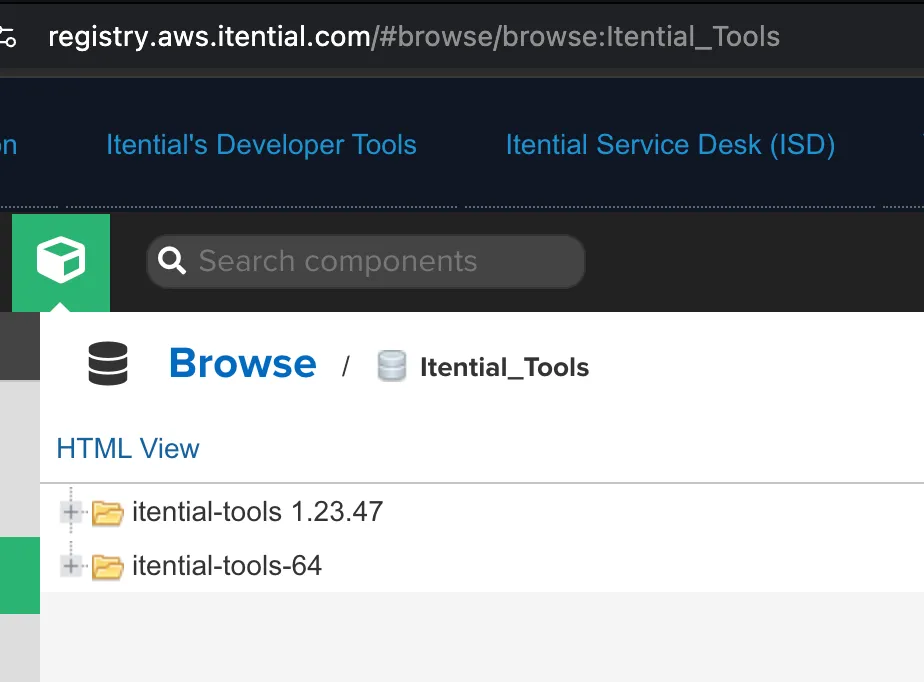
itential-tools 1.23.x
The itential-tools 1.23.x folder contains assets that support Cisco NSO versions: 5.6.x, 5.7.x (LTS), 5.8.x, 6.0.x, 6.1.x (LTS), 6.2.x, 6.3.x.
itential-tools-64
The itential-tools-64 folder supports Cisco NSO 6.4.x and above, and contains itential-tools-64-1.23.48, which is the first package release of itential-tools-64.
Download instructions
NSO external authentication installation
To get started with external authentication, install the ph-auth script and then configure the ncs.conf file. The NSO external authentication script requires Python and the requests module.
Network connectivity is required between NSO and Itential Platform (typically port 3000) for use with the external authentication script.
NSO external authentication configuration
Configure ncs.conf to use external authentication. Enable both external-authentication and either location-authentication or PAM. Itential Platform initially connects using a global service account with admin privileges.
For transactions bound to a specific user account, Itential Platform makes calls on behalf of that user (for example, bobjones instead of admin).
Restart NSO:
Configure default authgroup mappings
If you use the tokenLogin feature, verify that all users map to the correct southbound credentials. Run this command for each authentication group and set the appropriate device credentials as remote-name and remote-password.
Sample NSO NACM rules
To use Itential Platform with an NSO NETCONF Access Control Model (NACM), refer to the sample NACM rules provided with this package.
The NACM rules assume the following groups model:
These groups are shared across Itential Platform and NSO. Using the sample external authentication script, Itential Platform provides the groups defined in Itential Platform—discovered from the configured AAA system—to NSO for use in NACM rule-lists.
The groups returned by the NSO AAA provider must match the NACM rule-list group assignments.
The following rule-lists are provided in the sample rules:
Adjust the groups associated with these rule-lists to ensure they map to the correct user accounts.
Install NACM rules in NSO
Configure device allowlists
The sample NACM rules include a rule-list for allowlisting devices to the users group. Configure the sample rule-list or create your own to associate devices with groups of users. To add devices to the users allowlist:
In a NACM-enabled system, any new device added to the system needs to have its groups defined at the time of device turn-up. This applies to both manual configuration of the devices in NSO and any device turn-up workflows turning up new devices on the network.
Configure service allowlists
The sample NACM rules include a rule-list for allowlisting service instances to the users group. Configure the sample rule-list or create your own to associate services with groups of users.
To add all service instances for a model to the users allowlist:
To add a single instance to the users allowlist:
In a NACM-enabled system, any new service instance added to the system needs to have its groups defined. Service instances may be restricted to an individual group or made accessible to multiple groups with the appropriate NACM rules.
NSO NETCONF events in workflows
You can configure workflows in Itential Platform to wait for Cisco NSO northbound NETCONF event notifications before proceeding.
Cisco NSO emits notifications over NETCONF for various system events. You can configure the NSO adapter to listen to NSO NETCONF event streams and the Itential Platform Event System to consume and process these events in a workflow.
Configure NSO NETCONF event streams
Event streams are configured in NSO within the ncs.conf file. NSO allows the following event streams to be configured: ncs-alarms, ncs-events, device-notifications, service-state-changes, NETCONF.
This example shows how to configure an ncs-alarms event stream inside the NSO ncs.conf file:
Every stream that is configured must be defined within ncs.conf regardless of whether it supports replay. NSO logs notifications and a NETCONF client can ask for logged notifications if replay support is enabled.
Configure the NSO adapter to listen to NETCONF streams
Configure the NSO adapter to specify which NSO NETCONF event streams to subscribe to. The event streams are defined in adapter properties using the netconfSubscriptions key. After updating adapter properties, restart the NSO adapter to begin listening to the configured streams. The netconfSubscriptions values must correspond to the NETCONF streams defined in ncs.conf.
Example configuration:
Workflow configuration
Use the Workflow Engine eventListener task to listen for events from applications and adapters deployed in the platform.
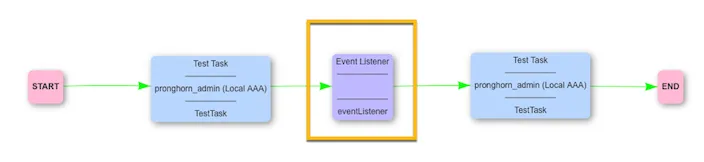
Refer to the eventListenerJob task reference for more information.
When a job is created, it processes all available tasks. When it reaches the eventListener task, it waits in a running state until it receives an event. You configure the specific event within the task.
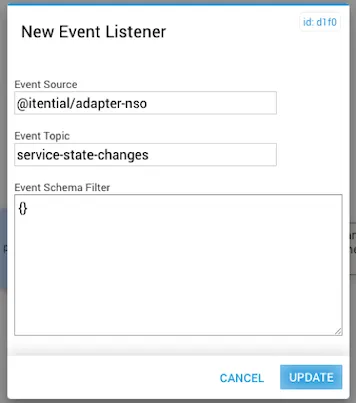
Defined event listener inputs
Event schema filter examples
The following example processes the eventListener task only when this payload is received:
The JSON schema for the Event Schema Filter is:
If there is no need to filter on the payload and you want the task to execute when it receives a specific Event Topic, set an empty JSON object {} in the Event Schema Filter field.
Itential Tools Rules Engine
The Itential Tools Rules Engine lets you define scripts that run before NSO command sets are executed. These scripts add or change values in the NSO command sets before execution.
The rules engine has two parts: a rule engine and a script engine. The script engine reads the script files for the incoming command, then reads the defined rules and passes them to the rule engine for processing.
The following files are required:
Development tools and libraries
System design
The Itential Tools Rules Engine has three functional areas: Script Engine, Rule Engine, and Script Validation Engine.
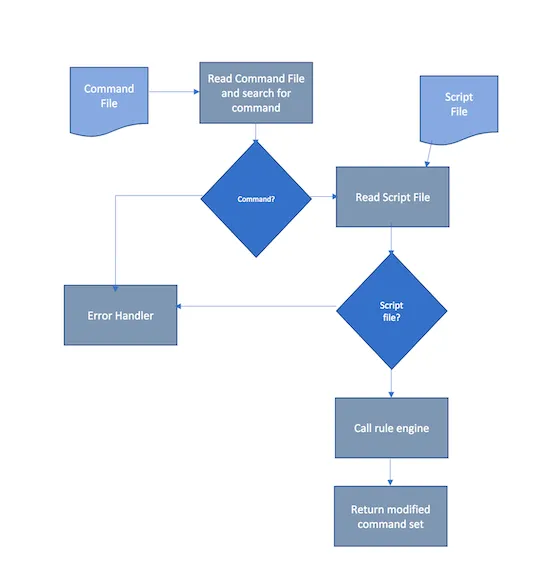
Script Engine
The Script Engine is the main driver for script processing. It receives the command file containing the request to modify the NSO command set. It performs the following steps:
- Read the command file.
- Locate the command to get the script file to execute.
- Read the script file to execute. This file contains the rules to run against the NSO command set.
- Call the rule engine to process the rules.
- Modify the NSO command set.
- Return the modified command set to the calling system.
Any errors are handled and returned to the calling system.
Rule Engine
The Rule Engine processes each rule. It takes the rule and NSO command set as input and returns the modified NSO command set as output. It performs the following steps:
- Receive parameters.
- Determine which rule to process.
- Process the rule and modify the NSO command set.
- Return the modified NSO command set.
- Pass any errors back to the Script Engine’s error handler.
Script Validation Engine
The Script Validation Engine validates the script format and verifies that all commands have the correct number of parameters for their command type.
If validation fails, a custom Java exception is thrown with an error message and code, and passed back to the calling system.
Validation commands
$DLC_REPLACE — four parameters:
- 1st — Any String
- 2nd — Any String
- 3rd — Int value
- 4th — Int value
$DLC_INSERT — five parameters:
- 1st — Any String
- 2nd — Any String
- 3rd — Before or After value
- 4th — Int value
- 5th — Int value
Rule command format and usage
Arguments
Supported options within the “new string” argument
$STRING
Syntax: $STRING['my string'|'2nd string'|'3rd string']
$STRING— A single value or an array of strings separated by a pipe (|) symbol that will be printed out. An array will cause a loop.
$LOOP
Syntax: $LOOP[{start}-{end}|$STRING['{string to print out}']$LOOP_VAR]
{start}:[int]— The starting number of the loop.{end}:[int]— The ending number of the loop.{string to print out}:[string]— Any string to print out.$LOOP_VAR:[int]— The integer value of the current loop iteration. Multiple references to$LOOP_VARare allowed.
Example:
Implementation design
The Rule Engine implementation includes the following features:
- Integration into the
itential-toolsJava application. - A mechanism to refresh the list of available commands without restarting
itential-tools. - An option to bypass the refresh feature.
- The ability for users to update commands and scripts.
Rule Engine integration
To integrate the Rule Engine into the itential-tools application, include the Java JAR file generated by the Rule Engine application in the private-jar or shared-jar directory.
Import the com.itential.datalore_utils.ScriptEngine package into the calling class:
Integration features
Configure NSO for SSL
NSO SSL configuration
Itential Platform NSO SSL configuration
Update the NSO adapter configuration
Update your desired NSO adapter under Settings > Services > Adapters with the following configuration:
While updating the cipher in SSL properties, you can use the preferred cipher in your SSL handshake with the following command from Itential Platform server:
In the example below, the preferred cipher is ECDHE-RSA-AES128-GCM-SHA256:
NSO LSA setup
The following principles apply to the NSO adapter in an NSO LSA architecture:
- Itential does not support multiple NSO instances having devices of the same name. Only one NSO instance manages a given device, and no other devices use that exact same name.
- Itential does not support multiple NSO instances having service models of the same name/path. Only one NSO instance manages a given service model, and no other service models use that exact same name/path.
For the following LSA architecture:
- An “upper” NSO service that has service models defined.
- One or more “lower” NSO services that connect to devices.
Set up Itential Platform as follows:
- Create an
adapter-nsoinstance and point it to the upper node. - Create an additional
adapter-nsoinstance for every lower node and point it to a lower node.
With this setup, you can use service models (for example, with tasks such as saveInstances) and perform device management (for example, with Configuration Manager).
NSO can also use an Itential Platform broker to support this setup. When you use an app task like saveInstances, provide the device name to the task. The Itential Platform broker queries all adapter-nso instances to find which one has that service model and uses that instance. The same principle applies to any tasks that interact directly with devices. For example, the golden config feature in Configuration Manager uses a broker to determine which adapter-nso instances manage each device.